


There are two popular searching algorithms to find a target value in an Array 'Linear Search' and 'Binary Search'. In this article, we will learn about the Binary Search Algorithm in detail using Python Programming.
Output:
Binary Search Algorithm.
Binary search is an efficient algorithm for finding an item from a sorted list of items. It works by repeatedly dividing the search interval in half. The only drawback of this search algorithm is that we need a sorted array to perform our search operation to find the target element in the given list.
Below are the algorithm steps to follow:
Step 1: Set two pointers, low and high, to the start and end of the array, respectively.
Step 2: Loop until the base case is reached:
- Calculate the middle index as (low + high) // 2.
- If the element at the middle index is equal to the target, return the index.
- If the element is greater than the target, update high to mid - 1 and repeat the search in the left half.
- If the element is smaller than the target, update low to mid + 1 and repeat the search in the right half.
Step 3: If low is greater than high, the target is not present. Return -1.
Example of Binary Search:
Let's go through an example to understand the workings of the Binary Search Algorithm.
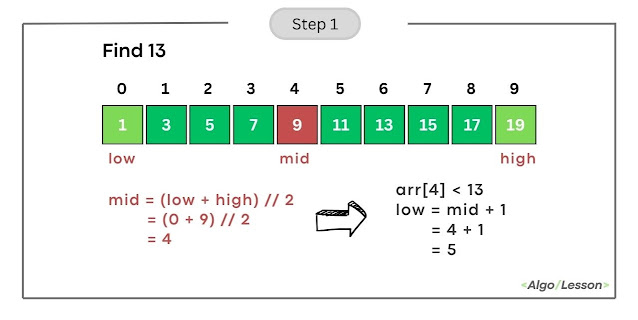
We have a sorted array [1, 3, 5, 7, 9, 11, 13, 15, 17, 19], and we want to find the index of element 13.
Initialize Pointers: Set low to 0 and high to 9 (the indices of the array's first and last elements).
Iteration 1:
- Calculate mid as (low + high) // 2 = (0 + 9) // 2 = 4.
- Compare arr[mid] (element at index 4) with the target (13).
- Since arr[4] is less than 13, update low to mid + 1, making low = 5.

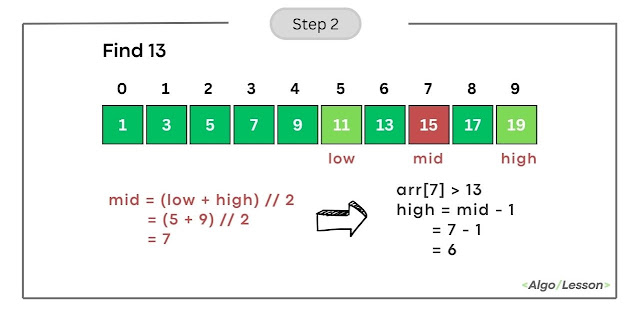
Iteration 2:
- Calculate mid as (low + high) // 2 = (5 + 9) // 2 = 7.
- Compare arr[mid] (element at index 7) with the target (13).
- Since arr[7] is greater than 13, update high to mid-1, making high = 6.

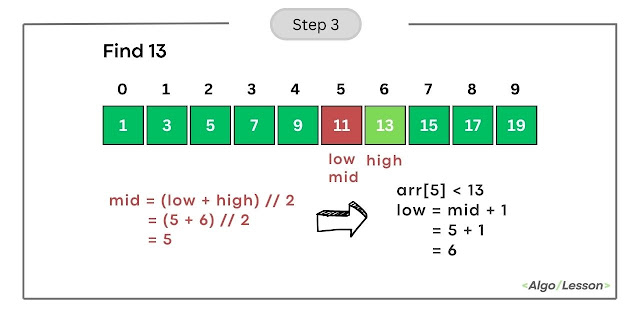
Iteration 3:
- Calculate mid as (low + high) // 2 = (5+ 6) // 2 = 5.
- Compare arr[mid] (element at index 5) with the target (13).
- Since arr[5] is less than 13, update low to mid + 1, making low = 6.
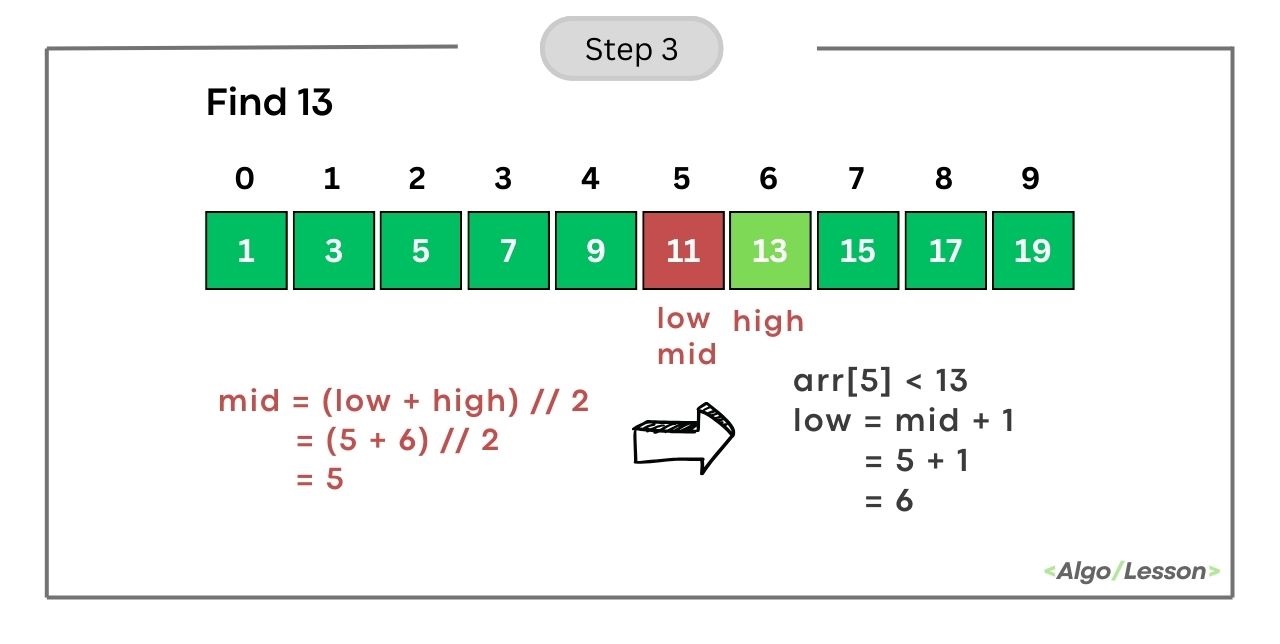
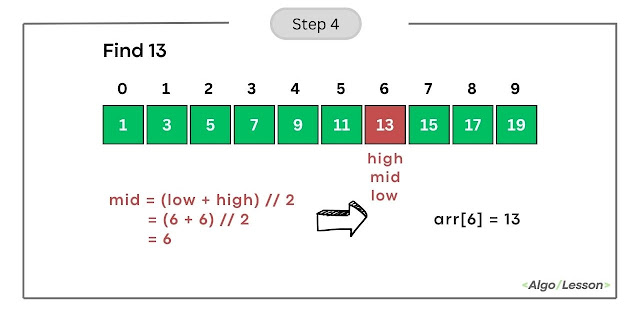
Iteration 4:
- Calculate mid as (low + high) // 2 = (6 + 6) // 2 = 6.
- Compare arr[mid] (element at index 6) with the target (13).
- Since arr[6] is equal to 13, we found the target. Return the index 6.

The target element 13 is present at index 9 in the array.
Python Program for Binary Search Using Iteration.
# Python code for Iterative Binary Search to find
# target element from sorted array
def binary_search(arr, target):
    low, high = 0, len(arr) - 1

    while low <= high:
        mid = (low + high) // 2
        mid_element = arr[mid]

        if mid_element == target:
            return mid
        elif mid_element < target:
            low = mid + 1
        else:
            high = mid - 1

    return -1

# Example
sorted_array = [1, 2, 3, 4, 5, 6, 7, 8, 9]
target_element = 6
result = binary_search(sorted_array, target_element)

if result != -1:
    print(f"Element {target_element} is present at index {result}.")
else:
    print(f"Element {target_element} is not present in the array.")
Element 6 is present at index 5.- Time Complexity: The time complexity of binary search is O(log n), where 'n' is the number of elements in the array.
- Space Complexity: The space complexity is O(1), indicating that the memory used by the algorithm remains constant regardless of the input size.
Python Program for Binary Search Using Recursion.
# Python code for Recursive Binary Search Algorithm
def binary_search_recursive(arr, low, high, target):
    if low <= high:
        mid = (low + high) // 2

        # Check if the target is present at the middle
        if arr[mid] == target:
            return mid
        # If the target is smaller, search in the left half
        elif arr[mid] > target:
            return binary_search_recursive(arr, low, mid - 1, target)
        # If the target is larger, search in the right half
        else:
            return binary_search_recursive(arr, mid + 1, high, target)
    else:
        # Target is not present in the array
        return -1

# Example usage:
arr = [1, 3, 5, 7, 9, 11, 13, 15, 17, 19]
target = 13
result = binary_search_recursive(arr, 0, len(arr) - 1, target)

if result != -1:
    print(f"Element {target} is present at index {result}.")
else:
    print(f"Element {target} is not present in the array.")
Output:
Element 13 is present at index 6.The base case of the above recursive function is when low is greater than high, indicating that the search range is empty. The function will return the index at which the element is present else it will return -1 which means the target element is not present in the given array.
- Time Complexity: The time complexity is O(log n) because, at each step, the search range is divided by 2.
- Space Complexity: The space complexity is O(log n) due to the recursive call stack.


