


Implementing a stack using a linked list involves utilizing the dynamic nature of linked lists to create a Last-in, First Out (LIFO) data structure. A linked list, comprising nodes where each node contains data and a reference to the next node, is ideal for stack implementation due to its efficient insertion and deletion at the beginning or to the top of a stack.
Output:
In this article, we will discuss how to perform push, pop, peek, isEmpty, and size operations of a stack using a linked list.

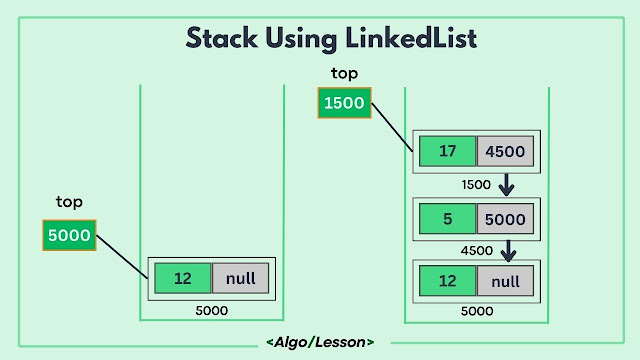
To implement a stack using a linked list we need to create nodes that will contain a value and a reference to the next node and we also need a top pointer to point to the topmost node that will help us in further push and pop operation. Initially, our top pointer pointed to null as the stack is empty.
Stack Operations using Linked List.
Push operation: The push operation involves adding an element to the top of the stack. This process begins by creating a new node and linking it to the current top node. The newly created node becomes the new top of the stack, updating the top pointer to this newly added node. This operation has a constant time complexity of O(1), irrespective of the stack's size.
Pop operation: The pop operation removes the top element from the stack. It starts by checking if the stack is empty. If not, it removes the top node, reassigning the top pointer to the subsequent node in the linked list. This constant-time operation O(1) effectively removes the element from the stack, ensuring adherence to the LIFO principle.
Peek operation: The peek (or top) operation retrieves the top element without removing it. It simply returns the value of the top node, allowing users to view the element at the stack's top without altering the stack's structure.
IsEmpty operation: The isEmpty operation inspects whether the stack is empty by checking if the top pointer is null, promptly determining the stack's status without traversing the entire linked list.
Size operation: The size operation determines the number of elements in the stack. It traverses the entire linked list while incrementing a counter for each node encountered. This operation exhibits a linear time complexity O(n), directly proportional to the number of elements in the stack.
Below is the code implementation of the above stack operations using Linked List.
// C++ code implementation for stack using linked list
#include <iostream>
using namespace std;

// Node class for the linked list
class Node {
public:
    int data;
    Node* next;
    Node(int value) : data(value), next(nullptr) {}
};

// Stack class using linked list
class Stack {
private:
    Node* top;

public:
    Stack() : top(nullptr) {}

    // Push operation
    void push(int value) {
        Node* newNode = new Node(value);
        newNode->next = top;
        top = newNode;
    }

    // Pop operation
    void pop() {
        if (isEmpty()) {
            cout << "Stack is empty. Cannot pop." << endl;
            return;
        }
        Node* temp = top;
        top = top->next;
        delete temp;
    }

    // Check if the stack is empty
    bool isEmpty() {
        return top == nullptr;
    }

    // Display the top element of the stack
    void peek() {
        if (isEmpty()) {
            cout << "Stack is empty." << endl;
            return;
        }
        cout << "Top element: " << top->data << endl;
    }
};

int main() {
    // Example usage of the stack
    Stack stack;

    // Push elements onto the stack
    stack.push(1);
    stack.push(2);
    stack.push(3);

    // Display the top element
    stack.peek();

    // Pop an element
    stack.pop();

    // Display the top element after pop
    stack.peek();

    return 0;
}
// Java code implementation for stack using Linked list
public class Main {
  // Node class for the linked list
  static class Node {
      int data;
      Node next;
      Node(int value) {
          data = value;
          next = null;
      }
  }

  // Stack class using linked list
  static class Stack {
      private Node top;

      // Push operation
      void push(int value) {
          Node newNode = new Node(value);
          newNode.next = top;
          top = newNode;
      }

      // Pop operation
      void pop() {
          if (isEmpty()) {
              System.out.println("Stack is empty. Cannot pop.");
              return;
          }
          top = top.next;
      }

      // Check if the stack is empty
      boolean isEmpty() {
          return top == null;
      }

      // Display the top element of the stack
      void peek() {
          if (isEmpty()) {
              System.out.println("Stack is empty.");
              return;
          }
          System.out.println("Top element: " + top.data);
      }
  }

  public static void main(String[] args) {
      // Example usage of the stack
      Stack stack = new Stack();

      // Push elements onto the stack
      stack.push(1);
      stack.push(2);
      stack.push(3);

      // Display the top element
      stack.peek();

      // Pop an element
      stack.pop();

      // Display the top element after pop
      stack.peek();
  }
}
# Python code implementation of stack using linked list
class Node:
def __init__(self, value):
    self.data = value
    self.next = None

class Stack:
def __init__(self):
    self.top = None

# Push operation
def push(self, value):
    new_node = Node(value)
    new_node.next = self.top
    self.top = new_node

# Pop operation
def pop(self):
    if self.is_empty():
        print("Stack is empty. Cannot pop.")
        return
    self.top = self.top.next

# Check if the stack is empty
def is_empty(self):
    return self.top is None

# Display the top element of the stack
def peek(self):
    if self.is_empty():
        print("Stack is empty.")
        return
    print("Top element:", self.top.data)

# Example usage of the stack
stack = Stack()

# Push elements onto the stack
stack.push(1)
stack.push(2)
stack.push(3)

# Display the top element
stack.peek()

# Pop an element
stack.pop()

# Display the top element after pop
stack.peek()
// C-Sharp  code implementation for stack using linked list
using System;

// Node class for the linked list
public class Node {
    public int Data;
    public Node Next;

    public Node(int value) {
        Data = value;
        Next = null;
    }
}

// Stack class using linked list
public class Stack {
    private Node top;

    // Push operation
    public void Push(int value) {
        Node newNode = new Node(value);
        newNode.Next = top;
        top = newNode;
    }

    // Pop operation
    public void Pop() {
        if (IsEmpty()) {
            Console.WriteLine("Stack is empty. Cannot pop.");
            return;
        }
        top = top.Next;
    }

    // Check if the stack is empty
    public bool IsEmpty() {
        return top == null;
    }

    // Display the top element of the stack
    public void Peek() {
        if (IsEmpty()) {
            Console.WriteLine("Stack is empty.");
            return;
        }
        Console.WriteLine("Top element: " + top.Data);
    }
}

class Program {
    static void Main() {
        // Example usage of the stack
        Stack stack = new Stack();

        // Push elements onto the stack
        stack.Push(1);
        stack.Push(2);
        stack.Push(3);

        // Display the top element
        stack.Peek();

        // Pop an element
        stack.Pop();

        // Display the top element after pop
        stack.Peek();
    }
}
Top element: 3
Top element: 2
Time Complexity: All stack operations like, push, pop, peek, and isEmpty take O(1) constant time as it doesn't rely on traversal. But for counting the number of nodes in the stack take O(n) time as we need to traverse the complete list.
Space Complexity: O(n) where n represents the number of elements in the stack. Each node in the linked list consumes space for value and a reference to the next node.
Related Post: Stack Implementation using Array.
Benefits of Stack Implementation using LinkedList.
- Dynamic Memory Allocation: Linked lists allow dynamic memory allocation, accommodating a varying number of elements without predefining a fixed size, providing flexibility.
- Efficient Insertions and Deletions: Push and pop operations in linked lists execute in constant time, making them efficient for stack implementations.
- Simplicity and Ease of Use: Implementing a stack using a linked list is relatively straightforward and easy to understand, aiding in code readability and maintenance.
- No Memory Wastage: Linked lists utilize memory efficiently by allocating space only as needed for elements, preventing memory wastage.


