Showing posts with label Java. Show all posts

Difference Between == and .equals() in Java.

As a language, Java provides different mechanisms to compare objects and values. Two commonly used methods for comparison are the equals() method and the == operator. While they might seem similar, they serve different purposes and behave differently when used. Let's discuss each of them individually and understand which one should use in which condition.
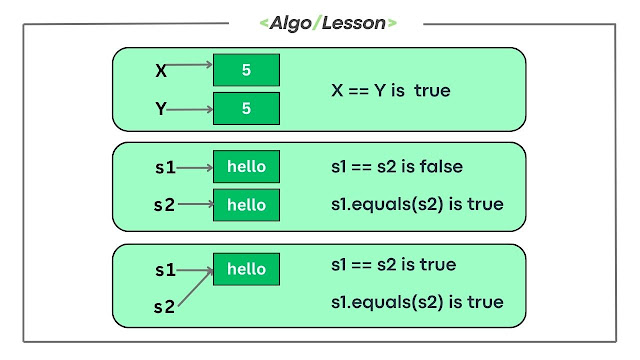
Comparison Operator in Java

== Operator.

In Java, the == operator is used to compare primitive data types and object references. When comparing primitive data types, it checks whether the values are the same. When comparing object references, it checks whether the references point to the same memory location.

Example Java Code:
public class EqualityExample {
    public static void main(String[] args) {
        // Primitive types
        int x = 5;
        int y = 5;
        System.out.println(x == y); // true

        // Object references
        String str1 = new String("Hello");
        String str2 = new String("Hello");
        System.out.println(str1 == str2); // false
    }
}
Output:
true
false

Explanation:

In the example, x == y is true because the values of x and y are both 5. However, str1 == str2 is false because the == operator compares the references, and str1 and str2 point to different memory locations.

equals() Methods.

The equals() method is a method provided by the Object class and is meant to be overridden by classes that need to define a logical equality. By default, the equals() method in the Object class compares object references, similar to the == operator.

Example Java Code:
public class EqualityExample {
    public static void main(String[] args) {
        String str1 = new String("Hello");
        String str2 = new String("Hello");
        System.out.println(str1.equals(str2)); // true
    }
}
Output:
true

Explanation:

In this example, str1.equals(str2) is true because the String class overrides the equals() method to compare the actual content of the strings, not just the references.

It's important to note that many classes in Java, like String, Integer, and others, override the equals() method to provide meaningful content-based comparison. When working with custom classes, you should override equals() to suit the specific equality criteria for instances of your class.

Stack Class in Java Programming.

In Java, the Collection Framework is a unified architecture that provides a set of interfaces, implementations, and algorithms to manipulate and store collections of objects. It provides standard implementations (like ArrayList, LinkedList, HashSet, etc) for these interfaces, catering to diverse data storage and manipulation needs. The java.util.Stack class is a part of this framework, offering a dynamic, resizable implementation of a Last In, First Out (LIFO) stack data structure.

Stack Class in Java.

Stack is a subclass of Vector and follows its structure, but it's designed for stack operations, providing methods specifically for stack functionalities. Despite being part of the Collection Framework, it's an older implementation, and its use is discouraged in favor of more modern alternatives like Deque implementations.

The Stack class supports essential operations like push, pop, peek, empty check, and determining size, mirroring traditional stack functionalities.

List of Basic Stack Operations:

  • push(element): Adds an element to the top of the stack.
  • pop(): Removes and returns the top element from the stack.
  • peek(): Returns the top element without removing it.
  • isEmpty(): Checks if the stack is empty.
  • search(element): Searches for an element in the stack and returns its position.

How To Use Stack Class in Java?

To create and use the stack in Java, you must import Stack Class from java.util package (java.util.stack) at the beginning of your Java file and instantiate a Stack object with the desired data type as shown below.

Example: Stack<Integer> myStack = new Stack<>(); 

Java Example Code:
// Java Stack Class Implementation code
import java.util.Stack;

public class StackOperationsExample {
    public static void main(String[] args) {
        // Creating a stack of integers
        Stack<Integer> myStack = new Stack<>();

        // Pushing elements onto the stack
        myStack.push(10);
        myStack.push(20);
        myStack.push(30);

        // Accessing the top element without removing it (peek)
        int topElement = myStack.peek();
        System.out.println("Top element: " + topElement);

        // Popping the top element
        int poppedElement = myStack.pop();
        System.out.println("Popped element: " + poppedElement);

        // Checking if the stack is empty
        boolean isEmpty = myStack.empty();
        System.out.println("Is stack empty? " + isEmpty);

        // Determining the size of the stack
        int stackSize = myStack.size();
        System.out.println("Size of stack: " + stackSize);

        // Search for an element in the stack
        int searchElement = 20;
        int position = myStack.search(searchElement);
        if (position != -1) {
            System.out.println("Element " + searchElement + " found at position: " + position);
        } else {
            System.out.println("Element " + searchElement + " not found in the stack");
        }
    }
}
Output:
Top element: 30
Popped element: 30
Is stack empty? false
Size of stack: 2Element 20 found at position: 1

In this above code, we have used integer stack to demonstrate the usage of stack operations in Java; similarly, you can create a stack for different data types. 
  • Time Complexity: push(), pop(), peek(), empty(), size() have constant time O(1) complexity. These operations generally perform in constant time regardless of the number of elements in the stack.
  • Space Complexity: The space complexity of the Stack in Java is O(n) where n is the number of elements in the stack.

The Stack class in Java offers a convenient way to implement a stack data structure with basic stack operations. While it follows the traditional stack behavior, it's recommended to use more efficient alternatives provided by the Collection Framework to enhance performance and versatility in modern Java programming.

Difference Between Java and Core Java.

Java is a high-level, object-oriented programming language developed by Sun Microsystems (later acquired by Oracle Corporation) in 1995. It was created by James Gosling and his team to be platform-independent, robust, secure, and simple. It is immensely popular for various software applications, especially in web development, mobile apps, enterprise systems, and more.

Core Java refers to the fundamental aspects of the Java programming language without additional libraries or frameworks. It encompasses the basic language features, libraries, and concepts necessary to get started with Java programming. In essence, Core Java lays the groundwork, serving as a stepping stone for individuals to explore and master the broader Java programming language.

Java Vs Core Java: Key Difference.

The below table illustrates the key differences between Java and Core Java:
Java Core Java
Broader language encompassing advanced features, libraries, and frameworks. Focuses on fundamental concepts and basics, serving as an introduction to Java programming.
Includes advanced features like Java EE (Enterprise Edition), Java SE (Standard Edition), Java ME (Micro Edition), specialized libraries, frameworks, and tools. Encompasses the basic language elements, essential libraries, syntax, and foundational concepts without additional extensions.
Used for diverse applications, including web development, enterprise solutions, mobile apps (Android), gaming, big data, and more. Acts as a starting point for individuals to learn Java programming, providing fundamental knowledge for further exploration.
Focuses on in-depth study of advanced Java concepts, specialized frameworks, and domain-specific applications. Emphasizes understanding core principles such as syntax, data types, OOP principles, exception handling, and basic libraries.
Advanced knowledge in Java, including understanding advanced libraries, frameworks, and specialized domains. Serves as a prerequisite for those aiming to explore advanced Java concepts, frameworks, and specialized libraries after mastering Core Java.
Involves higher complexity due to the range of advanced features, libraries, and frameworks available. Offers a relatively simpler learning curve as it covers essential language basics and foundational elements.
Suitable for experienced developers, professionals, and those exploring specialized domains or advanced Java applications. Geared towards beginners, students, and individuals seeking an introductory understanding of Java programming.

So we understand that Java is the language with its border applications and features, while Core Java represents the fundamental principles and basic building blocks of the Java language, serving as a stepping stone for understanding and using Java in various domains. 

Variable Size Sliding Window Algorithm.

Sliding Window is an efficient approach to solve problems involving contiguous subarrays. It can be used to find the maximum or minimum sum of a contiguous subarray of size k. This approach involves maintaining a "window" that moves from the left to the right of the array, keeping track of the sum of the elements within the window.

Dynamic Sliding Window Algorithm

Variable Size Sliding Window.

The Variable Size Sliding Window Algorithm, also known as Dynamic Sliding Window, is a technique used for efficiently processing arrays or lists to avoid unnecessary re-computation. Unlike the Fixed Size Sliding Window, where the window size remains constant, the Variable Size Sliding Window allows the window to dynamically adjust its size based on certain conditions.


Approach of Variable Size Sliding Window:

In this approach, we use two pointers left and right to define the window size. We move our right pointer to expand the window size until a certain condition is violated. Similarly, we move our left pointer to shrink the size of the window to the desired condition. Each time we either store a result or perform some computation whenever the size of the window is changed. We repeat these steps until the right pointer reaches the end of the array. 

Let's understand the working of the Variable Size Sliding Window Algorithm with an example problem.

Example to Illustrate the Dynamic Sliding Window Technique. 

Problem: Given an array of positive integer nums and a positive integer target, find the minimum length of a contiguous subarray whose sum is greater than or equal to the target. If no such subarray exists, return 0.

Example:
Input: num[] = {2, 3, 1, 2, 4, 3} target = 7
Output: 2

Explanation: The subarray [4,3] has the minimum length 
among the contiguous subarrays whose sum is greater than or equal to 7.

There are multiple approaches to solving this problem but here we will focus on the sliding window approach.

Algorithm:

Below are the steps to follow to solve this problem:

Step 1: We initialize a variable, 'minLen', to hold the minimum length of the contiguous subarray found so far. We also initialize a variable, 'sum', to keep track of the sum of the elements in the current window.

Step 2: We iterate over the input array, using a for loop to iterate through each element. For each element, we add its value to the 'sum' variable.

Step 3: Inside the for loop, we check if the 'sum' is greater than or equal to the target. If it is, we update the 'minLen' variable to be the minimum of its current value and the current window's length (calculated using the 'right' pointer).

Step 4: After updating the 'minLen' variable, we slide the window to the right by subtracting the first element of the current window from the 'sum' variable. This involves incrementing the 'left' pointer by 1.

Step 5: We repeat steps 3-4 until the 'right' pointer reaches the end of the input array.

Step 6: Finally, we return the value of the 'minLen' variable, which represents the minimum length of the contiguous subarray whose sum is greater than or equal to the target.

Below is the code implementation of the Variable size Sliding Window problem.

C++ Code:
// C++ code implementation of finding the minimum length 
//of the subarray for given sum
#include <iostream>
#include <vector>
#include <climits> 
using namespace std;
int minSubarrayLen(int target, vector<int>& nums) {
    int n = nums.size();
    int left = 0, right = 0;
    int minLen = INT_MAX;
    int sum = 0;

    while (right < n) {
        sum += nums[right];

        while (sum >= target) {
            minLen = min(minLen, right - left + 1);
            sum -= nums[left];
            left++;
        }

        right++;
    }

    return (minLen == INT_MAX) ? 0 : minLen;
}

int main() {
    vector<int> nums = {2, 3, 1, 2, 4, 3};
    int target = 7;
    cout << minSubarrayLen(target, nums) << endl; 
    return 0;
}
Output:
2

Java Code:
// Java code to find minimum length subarray 
// for the given target 
public class VariableSizeSlidingWindow {

    public static int minSubArrayLen(int target, int[] nums) {
        int left = 0, right = 0, sum = 0;
        int minLength = Integer.MAX_VALUE;

        while (right < nums.length) {
            sum += nums[right];

            while (sum >= target) {
                minLength = Math.min(minLength, right - left + 1);
                sum -= nums[left];
                left++;
            }

            right++;
        }

        return minLength == Integer.MAX_VALUE ? 0 : minLength;
    }

    public static void main(String[] args) {
        int[] nums = {2, 3, 1, 2, 4, 3};
        int target = 7;

        int result = minSubArrayLen(target, nums);

        System.out.println("Minimum Length: " + result);
    }
}
Output:
Minimum Length: 2
  • Time Complexity: The time complexity is O(n), where n is the length of the input array. This is because each element in the array is processed exactly once. 
  • Space Complexity: The space complexity is O(1), as we only use a constant amount of space to store the necessary variables.

How To Compare Strings in Java

comparing string in Java

In Java, a String is a sequence of characters. It is a reference type, meaning it is an object rather than a primitive data type. Strings are immutable, which means that their values cannot be changed after they are created.


There are several ways to compare two strings in Java and we are going to discuss three methods out of them.


1. Using the equals() method: This method compares the contents of the strings and returns a boolean value. For strings, the equals() method is used to compare the characters of two strings to check if they are equal or not.

Java Example Code:

class StringComp {
    public static void main(String[] args) {
        String str1 = "Hello";
        String str2 = "Hello";
        String str3 = "World";

        if(str1.equals(str2)) {
            System.out.println("str1 is equal to str2");
        }
        else {
            System.out.println("str1 is not equal to str2");
        }

        if(str1.equals(str3)) {
            System.out.println("str1 is equal to str3");
        }
        else {
           System.out.println("str1 is not equal to str3");
        }

    }
}
Output:
str1 is equal to str2
str1 is not equal to str3


2. Using the compareTo() method: This method compares the lexicographical ordering of the strings and returns an integer value. It returns 0 if the strings are equal, a negative value if the first string is lexicographically less than the second, and a positive value if the first string is lexicographically greater than the second.

Java Example Code:
//Java code to compare two strings
class StringComp {
    public static void main(String[] args) {
        String str1 = "Apple";
        String str2 = "Banana";
        int result = str1.compareTo(str2);
        if (result == 0) {
            System.out.println("Strings are equal");
        } else if (result < 0) {
            System.out.println("String 1 is less than String 2");
        } else {
            System.out.println("String 1 is greater than String 2");
        }
    }
}
Output:
String 1 is less than String 2


3. Using the equalsIgnoreCase() method: The equalsIgnoreCase() method in Java is used to compare two strings for equality, ignoring the case of the characters. In other words, this method compares two strings by ignoring their case and returns true if they are equal or false if they are not.

Java Example Code:
//Java code to compare two with case strings
class StringComp {
    public static void main(String[] args) {
        String str1 = "HELLO";
        String str2 = "hello";
        if (str1.equalsIgnoreCase(str2)) {
           System.out.println("Strings are equal");
    }
}
Output:
Strings are equal


Why we should not use == for String Comparison in Java?

In Java, the == operator compares the reference or memory address of two objects, not their actual values. When comparing strings, it is necessary to compare their actual values, not just their memory addresses. Therefore, using the == operator to compare two string variables may lead to unexpected results.

Java Example Code:
class StringCompare {
    public static void main(String[] args) {
        String str1 = "Hello";
        String str2 = "Hello";
        String str3 = new String("Hello");

        System.out.println(str1 == str2); // true
        System.out.println(str1 == str3); // false
    }
}
Output:
true
false

In the above example, str1 and str2 both refer to the same memory address since they are assigned the same string literal value. Therefore, the == operator returns true for their comparison. However, str3 is a new String object with a different memory address, even though it contains the same value as str1. Hence, the == operator returns false for the comparison of str1 and str3.

How To Fix NullPointerException in Java

In Java, a NullPointerException is a runtime exception that occurs when you try to access or call a method on a null object reference. The null reference is a special reference that does not point to any object in the heap. 


If you try to access or call a method on a null reference, Java throws a NullPointerException. This can be a common error in Java programs, especially for beginners. In this article, we will discuss how to prevent and handle NullPointerException in Java.


Causes of NullPointerException

A NullPointerException occurs when you try to access or call a method on a null object reference. Here are some common scenarios where NullPointerException can occur:
  • Calling methods on a null object reference.
  • Accessing instance or static variables on a null object reference.
  • Passing a null reference to a method that expects a non-null reference.
  • Trying to access or modify an array element with a null reference.

Preventing NullPointerException

The best way to prevent NullPointerException is to make sure that you never access or call a method on a null object reference. Here are some tips to prevent NullPointerException:
  • Always initialize object references before using them.
  • Check for null before accessing or calling methods on object references.
  • Use try-catch blocks to catch NullPointerException and handle it gracefully.
  • Use the Objects.requireNonNull method to check for null references.


Handling NullPointerException


In some cases, it may be impossible to prevent NullPointerException. In such cases, you should handle the exception gracefully to avoid program termination. Here are some tips to handle NullPointerException:

1. Use try-catch blocks to catch NullPointerException and handle it gracefully. For example:
try {
    // code that may throw NullPointerException
} catch (NullPointerException e) {
    // handle NullPointerException
}

2. Use the Objects.requireNonNull method to check for null references and throw a custom exception. For example:
public void doSomething(Object obj) {
    Objects.requireNonNull(obj, "Object is null");
    // rest of the code
}

3. Use the Optional class to handle null values. The Optional class provides methods to check for null values and handle them gracefully. For example: 
Optional<String> optional = Optional.ofNullable(null);
if (optional.isPresent()) {
    String value = optional.get();
    // do something with value
} else {
    // handle null value
}


Conclusion.

NullPointerException is a common error in Java programs, but it can be prevented and handled gracefully. Always make sure to initialize object references before using them, check for null before accessing or calling methods on object references, and handle NullPointerException gracefully to avoid program termination.

Java Program to Check Even and Odd Number.

In this program, we will check if the given number is even or odd. To solve this program we must have a basic understanding of if...else statement in Java.


Algorithm for the Java program to check whether a given number is even or odd:

  • Step 1: Start
  • Step 2: Read the input number from the user
  • Step 3: Check if the input number is even or odd:
  • a. If the number is divisible by 2 with no remainder, then it is even
  • b. If the number is not divisible by 2 with a remainder of 1, then it is odd
  • Step 4: Print the result to the console
  • Step 5: End


Java Code Implementation:

import java.util.Scanner;

public class EvenOdd {
    public static void main(String[] args) {
        Scanner input = new Scanner(System.in);
        System.out.print("Enter a number: ");
        int num = input.nextInt();
        if (num % 2 == 0) {
            System.out.println(num + " is even");
        } else {
            System.out.println(num + " is odd");
        }
    }
}
Output:
Enter a number: 12
12 is even

We use an if-else statement to check whether the num is even or odd. We do this by checking whether num is divisible by 2 using the modulo operator %. If num % 2 is 0, then num is even; otherwise, it is odd.

Finally, we print out the result using the println method of the System.out object.

Swap Two Numbers in Java.

We can swap two numbers in Java with multiple approaches and in this article, we are going to discuss all those approaches in detail with code.


Approach 1: Using a third variable

In this approach, we use a third variable to swap the values of the two variables.


Java Example Code:

int a = 10;
int b = 20;
int temp;

temp = a;
a = b;
b = temp;

System.out.println("a = " + a); // Output: a = 20
System.out.println("b = " + b); // Output: b = 10

Approach 2: Using arithmetic operations

In this approach, we can use arithmetic operations like addition, subtraction, multiplication, and division to swap the values of the two variables.

Java Example Code:
int a = 10;
int b = 20;

a = a + b; // a = 30
b = a - b; // b = 10
a = a - b; // a = 20

System.out.println("a = " + a); // Output: a = 20
System.out.println("b = " + b); // Output: b = 10

Approach 3: Using the XOR operator

In this approach, we can use the XOR (^) operator to swap the values of the two variables.

Java Example Code:

int a = 10;
int b = 20;

a = a ^ b; // a = 30 (11110)
b = a ^ b; // b = 10 (01010)
a = a ^ b; // a = 20 (10100)

System.out.println("a = " + a); // Output: a = 20
System.out.println("b = " + b); // Output: b = 10
All these approaches have the same time complexity of O(1) as they take constant time to swap the values of two variables. (alert-success)

Check Leap Year in Java.

In this article, we are going learn how to check if the given year is a leap year or not using Java Programming and we will use Java if-else condition to solve this problem.

Leap Year are those Year in which we have 366 days whereas a normal Year contains 365 days. In leap year, the month Feburary contain 29 days. (alert-success)


Algorithm for Leap Year.

Below algorithm used to check if a year is a leap year or not:

  • Take an input year from the user.
  • If the year is evenly divisible by 4, go to step 3. Otherwise, go to step 6.
  • If the year is evenly divisible by 100, go to step 4. Otherwise, go to step 5.
  • If the year is evenly divisible by 400, go to step 5. Otherwise, go to step 6.
  • The year is a leap year (it has 366 days).
  • The year is not a leap year (it has 365 days).


Java Code Implementation to Find Leap Year.

import java.util.Scanner;

public class LeapYear {
    public static void main(String[] args) {
        Scanner input = new Scanner(System.in);
        int year;
        
        // Prompt user to enter a year
        System.out.print("Enter a year: ");
        year = input.nextInt();
        
        // Check if the entered year is a leap year
        if ((year % 4 == 0 && year % 100 != 0) || year % 400 == 0) {
            System.out.println(year + " is a leap year");
        }
        else {
            System.out.println(year + " is not a leap year");
        }
    }
}
Output 1:
Enter a year: 2020
2020 is a leap year

Output 1:
Enter a year: 2022
2020 is not a leap year

In the above code, a year is a leap year if it is divisible by 4 but not divisible by 100, or if it is divisible by 400. This algorithm is based on the rules of the Gregorian calendar, which is the calendar system used in most of the world today.

Find Largest Among Three Numbers in Java.

find greatest among three numbers in java

In this article, we are going to learn Java programs to find the greatest number among three integer numbers. There are multiple ways to solve this program and we will each of them one by one.


Approach 1: Find the Greatest using if-else statement.

In this approach, we will use if-else statements to compare the three numbers and find the greatest among them.

Java Example Code:

import java.util.Scanner;

public class GreatestOfThreeNumbers {

   public static void main(String[] args) {

      int num1, num2, num3;
      Scanner input = new Scanner(System.in);

      System.out.println("Enter three numbers:");
      num1 = input.nextInt();
      num2 = input.nextInt();
      num3 = input.nextInt();

      if (num1 > num2 && num1 > num3) {
         System.out.println(num1 + " is the greatest.");
      }
      else if (num2 > num1 && num2 > num3) {
         System.out.println(num2 + " is the greatest.");
      }
      else {
         System.out.println(num3 + " is the greatest.");
      }
   }
}
Output:
Enter three numbers:
12
23
11
23 is the greatest.

Here, we are taking input of three numbers from the user using the Scanner class. Then, we are using if-else statements to compare the numbers and print the greatest among them.


Approach 2: Using Math.max() method.

In this approach, we will use the Math.max() method to find the greatest among the three numbers.

Java Example Code:
import java.util.Scanner;

public class GreatestOfThreeNumbers {

   public static void main(String[] args) {

      int num1, num2, num3;
      Scanner input = new Scanner(System.in);

      System.out.println("Enter three numbers:");
      num1 = input.nextInt();
      num2 = input.nextInt();
      num3 = input.nextInt();

      int greatest = Math.max(num1, Math.max(num2, num3));
      System.out.println(greatest + " is the greatest.");
   }
}
Output:
Enter three numbers:
10
23
15
23 is the greatest.

Here, we are using the Math.max() method to find the greatest among the three numbers. We are taking input of three numbers from the user using the Scanner class and then passing them as arguments to the Math.max() method. The Math.max() method returns the greatest of the two numbers passed as arguments, so we are calling it twice to compare all three numbers.

Approach 3: Using Array and Loops.

In this approach, we will use arrays and loops to find the greatest among the three numbers.

Java Example Code:
//Java code for finding greatest number
import java.util.Scanner;

public class GreatestOfThreeNumbers {

   public static void main(String[] args) {

      int[] nums = new int[3];
      Scanner input = new Scanner(System.in);

      System.out.println("Enter three numbers:");
      for (int i = 0; i < 3; i++) {
         nums[i] = input.nextInt();
      }

      int greatest = nums[0];
      for (int i = 1; i < 3; i++) {
         if (nums[i] > greatest) {
            greatest = nums[i];
         }
      }
      System.out.println(greatest + " is the greatest.");
   }
}
Output:
Enter three numbers:
19
29
15
29 is the greatest.

Here, we are using an array to store the three numbers entered by the user. We are taking input of three numbers from the user using the Scanner class and then using a loop to store them in the array. Then, we are using another loop to compare the numbers in the array and find the greatest among them.

DON'T MISS

Tech News
© all rights reserved
made with by AlgoLesson