Program to Move All Zeroes to the End of Array.

Given an integer array arr[] of size n, the task is to move all zeroes (0's) to the end of the array while maintaining the relative order of non-zero elements.

Example:

Input: arr[] = {0, 1, 0, 3, 5, 0}
Output: arr[] = {1, 3, 5, 0, 0, 0}

Input: arr[] = {0, 1}
Output: arr[] = {1, 0}

There are multiple approaches to solving this problem. Let's discuss each approach one by one from brute force to optimized one.

Approach 1: Brute Force Approach.

This is a basic approach in which we are going to traverse the complete array to store all non-zero elements in the front of the new array and add the required number of zeroes at the end. Below are the steps to follow: 
  • Create a new array.
  • Iterate through the original array.
  • For each non-zero element, add it to the new array.
  • After completing the iteration, add the required number of zeros to the new array.
  • The new array will now have all non-zero elements followed by zeros.
Below is the C++ code implementation for the above approach:
//C++ code to move all zeroes at the end of array
#include <bits/stdc++.h>
using namespace std;

vector<int> moveZeroesBruteForce(vector<int>& arr) {
    vector<int> result;

    for (int i : arr) {
        if (i != 0) {
            result.push_back(i);
        }
    }
    //count of 0's present in the array
    int numberOfZeroes = arr.size() - result.size();
    result.insert(result.end(), numberOfZeroes, 0);

    return result;
}

int main(){
    vector<int> arr = {0, 1, 0, 3, 4, 0, 0, 8};

    vector<int> ans = moveZeroesBruteForce(arr);

    for(int i = 0; i < ans.size(); i++){
        cout << ans[i] <<" ";
    }

    return 0;
}
Output:
1 3 4 8 0 0 0 0 
  • Time Complexity: O(n) where n is the number of elements present in the array.
  • Space Complexity: O(n) where n is the number of elements present in the array.


Approach 2: Optimized Approach. 

This is an in-place approach in which we are not going to use any extra space to move all 0s to the end of the array. Below are the steps to follow:
  • Initialize a variable to keep track of the position to overwrite.
  • Iterate through the array.
  • For each non-zero element, overwrite the next position with the current element.
  • After completing the iteration, fill the remaining positions with zeros.
  • The array will now have all non-zero elements followed by zeros. 
Below is the C++ code implementation for the above approach:
//C++ code to move all zeroes at the end of array
//In-place approach
#include <bits/stdc++.h>
using namespace std;

vector<int> moveZeroesOptimized(vector<int>& arr) {
    int writeIndex = 0; // Position to overwrite

    for (int i : arr) {
        if (i != 0) {
            arr[writeIndex++] = i;
        }
    }

    // Fill the remaining positions with zeros
    while (writeIndex < arr.size()) {
        arr[writeIndex++] = 0;
    }

    return arr;
}

int main(){
    vector<int> arr = {0, 1, 0, 3, 4, 0, 0, 8};

    vector<int> ans = moveZeroesOptimized(arr);

    for(int i = 0; i < ans.size(); i++){
        cout << ans[i] <<" ";
    }

    return 0;
}
Output:
1 3 4 8 0 0 0 0 
  • Time Complexity: O(n) where n is the number of elements present in the array.
  • Space Complexity: O(1) as no extra space is required to solve the problem using this approach.

Approach 3: Two Pointer Approach.

In this approach, we use two pointers, one to iterate through the array and the next the keep track of position for non-zero values. Below are the steps that need to be followed:
  • Use two pointers - one to iterate through the array and another to keep track of the position to overwrite.
  • Iterate through the array.
  • For each non-zero element, swap it with the element at the position to overwrite.
  • After completing the iteration, the array will have all non-zero elements followed by zeros.
Below is the C++ code implementation for the above approach:
//C++ code to move all zeroes at the end of array
//In-place two pointer approach
#include <bits/stdc++.h>
using namespace std;

vector<int> moveZeroesTwoPointer(vector<int>& arr) {
    int writeIndex = 0; // Position to overwrite

    for (int i = 0; i < arr.size(); ++i) {
        if (arr[i] != 0) {
            std::swap(arr[writeIndex++], arr[i]);
        }
    }

    return arr;
}

int main(){
    vector<int> arr = {0, 1, 0, 3, 4, 0, 0, 8};

    vector<int> ans = moveZeroesTwoPointer(arr);

    for(int i = 0; i < ans.size(); i++){
        cout << ans[i] <<" ";
    }

    return 0;
}
Output:
1 3 4 8 0 0 0 0 
  • Time Complexity: O(n) where n is the number of elements present in the array.
  • Space Complexity: O(1) as no extra space is required to solve the problem using this approach.
I hope you understood all three approaches to solving this problem of moving 0s to the end of the given array. 
Program to Remove Duplicate From Sorted Array in C++.

Given an integer array arr[] sorted in ascending order, the task is to remove duplicate elements such that the relative order of the elements should be kept the same. 

Example:
Input: arr[] = {1, 1, 2, 2, 2, 3}
Output: arr[] = {1, 2, 3}

Input: arr[] = {1, 2, 5, 5}
Output: arr[] = {1, 2, 5}

There are multiple ways to solve this problem, let's discuss each of them one by one:

Approach 1: Brute Force Approach.

It is the simplest approach in which we are going to use extra space to store only unique elements. Below are the steps to follow:
  • Create a new array temp[].
  • Iterate through the original array arr[].
  • For each element, check if it is already present in the new array.
  • If not, add it to the new array.
  • The new array contains elements without duplicates.
At the end, you can copy the elements of the new array into the original array and return the original array.

Note: In the below code we have used std::vector() instead of the array because in real-world problems and in interviews we have to deal with vectors.   

Example Code: Below is the C++ code implementation for the above approach.
//C++ code to remove duplicate elements from the array
#include <bits/stdc++.h>
using namespace std;

int removeDuplicatesBruteForce(vector<int>& arr) {
    vector<int> result;

    for (int i : arr) {
        //checking if element already exist
        if (find(result.begin(), result.end(), i) == result.end()) {
            result.push_back(i);
        }
    }
    arr = result;
    return result.size();
}

int main(){
    vector<int> arr = {1, 1, 2, 2, 2, 3, 5};

    int n = removeDuplicatesBruteForce(arr);

    for(int i = 0; i < n; i++){
        cout << arr[i] <<" ";
    }

    return 0;
}
Output:
1 2 3 5
  • Time Complexity: O(n^2) where n is the number of elements in the array.
  • Space Complexity: O(n) where n is the number of elements in the array.

Approach 2: Optimized Approach.

In this approach, we are going to iterate the complete array only once to find all unique elements. Below are the steps to be followed:
  • Create a result vector and add the first element of the array.
  • Iterate through the original array from the second element.
  • For each element, check if it is equal to the previous element.
  • If not, add it to the result vector.
  • The result vector will now contain elements without duplicates.
Example Code: Below is the C++ code implementation for the above approach.
//C++ code to remove duplicate elements from the array
#include <bits/stdc++.h>
using namespace std;

int removeDuplicatesOptimized(vector<int>& arr) {
    vector<int> result;

    if (!arr.empty()) {
        //add first element to array
        result.push_back(arr[0]);

        for (size_t i = 1; i < arr.size(); ++i) {
            //check if element is equal to previous element
            if (arr[i] != arr[i - 1]) {
                result.push_back(arr[i]);
            }
        }
    }
    //copy unique elements to original array
    arr = result;
    return result.size();
}

int main(){
    vector<int> arr = {1, 1, 2, 2, 2, 2, 5};

    int n = removeDuplicatesOptimized(arr);

    for(int i = 0; i < n; i++){
        cout << arr[i] <<" ";
    }

    return 0;
}
Output:
1 2 5
  • Time Complexity: O(n) where n is the number of elements in the array.
  • Space Complexity: O(n) where n is the number of elements in the array.

Approach 3: Two Pointer Approach.

In this approach, we are not going to use any extra space to solve the problem instead we are going to use an in-place approach. Below are the steps to follow:
  • Use two pointers - one to iterate through the array and another to keep track of the position to overwrite.
  • Iterate through the array from the second element.
  • If the current element is different from the previous one, overwrite the next position with the current element.
  • The array up to the position of the second pointer will now contain elements without duplicates.
By completing the above steps all unique elements will move from the given vector (array) and then you can resize the vector up to the last overwrite position.

Note: We are starting the iteration from 1 because the element at position 0 is always unique and it does not require any replacement.

Example Code: Below is the C++ code implementation for the above approach.
//C++ code to remove duplicate elements from the array
//In-place approach
#include <bits/stdc++.h>
using namespace std;

int removeDuplicatesInPlace(vector<int>& arr) {

    int writeIndex = 1; // Position to overwrite

    for (size_t i = 1; i < arr.size(); ++i) {
        if (arr[i] != arr[i - 1]) {
            arr[writeIndex++] = arr[i];
        }
    }

    // Resize the array to the size of unique elements
    arr.resize(writeIndex);
    return arr.size();
}

int main(){
    vector<int> arr = {0, 1, 1, 2, 2, 2, 2, 4, 5, 5};

    int n = removeDuplicatesInPlace(arr);

    for(int i = 0; i < n; i++){
        cout << arr[i] <<" ";
    }

    return 0;
}
Output:
0 1 2 4 5
  • Time Complexity: O(n) where n is the number of elements in the array.
  • Space Complexity: O(1) in-place modification is performed so no extra space is required.
So these are the three different approaches to removing duplicate elements from a sorted array. 

Access Specifiers in C++.

In C++, Access Specifiers or Access Modifiers are keywords used to control the visibility and accessibility of class members (data members and member functions) from outside the class. They are used to implement Data-Hiding concepts in Object Oriented Programming


Let's understand them with one real-life example. Imagine you have a remote-controlled car that has three buttons to perform different things:

  • Public Buttons: These are the big, colorful buttons on the top that anyone can press. They make the car go forward, backward, left, and right. These are public actions that anyone can control.
  • Private Buttons: Inside the remote, some special buttons are hidden. These buttons do things like changing the car's battery or adjusting its internal settings. We don't want just anyone messing with these buttons because it might break the car. Only the person who owns the remote (the car itself) knows about these buttons.
  • Protected Buttons: These are a bit like private buttons, but they can be used by a close friend who has a special key. This friend knows a bit more about how the car works and can use these buttons to customize the car safely.
Similarly, in the programming world, there are three access specifiers: 
  • public. 
  • private.
  • protected.

Let's understand each specifier one by one in detail:

1. Public: Members declared as public are accessible from any part of the program. They have no restrictions on access. Data members and Member Functions which is declared as public can be accessible by different class or function as well. They form the interface of the class, and users can interact with these members freely.

Example Code:

// C++ example to show public access specifier
#include<iostream>
using namespace std;

// define class
class Area{
    // access specifier
    public: 
    int length;
    int breadth;

    int calArea(){
        return length *breadth;
    }
};

int main(){
    Area obj;

    obj.breadth = 5;
    obj.length = 10;

    cout<< "Breadth: " << obj.breadth << endl;
    cout<< "Length: " << obj.length << endl;
    cout << "Aread of Rectangle: " << obj.calArea() << endl;

    return 0;
}
Output:
Breadth: 5
Length: 10
Aread of Rectangle: 50

In the above example, the data member length and breadth are declared as public so we can access and modify their value outside the class.

2. Private: Members declared as private are only accessible within the same class. They are not accessible from outside the class. They are used to encapsulate the internal implementation details of the class.

Example Code:
// C++ example to show private access specifier
#include<iostream>
using namespace std;

// define class
class Area{
    // access specifier
    private: 
    int length;
    int breadth;

    int calArea(){
        return length * breadth;
    }
};

int main(){
    Area obj;
    
    obj.breadth = 5; // Error: privateVar is not accessible
    obj.length = 10; // Error: privateVar is not accessible

    cout<< "Breadth: " << obj.breadth << endl;
    cout<< "Length: " << obj.length << endl;
    cout << "Aread of Rectangle: " << obj.calArea() << endl;

    return 0;
}
Output:
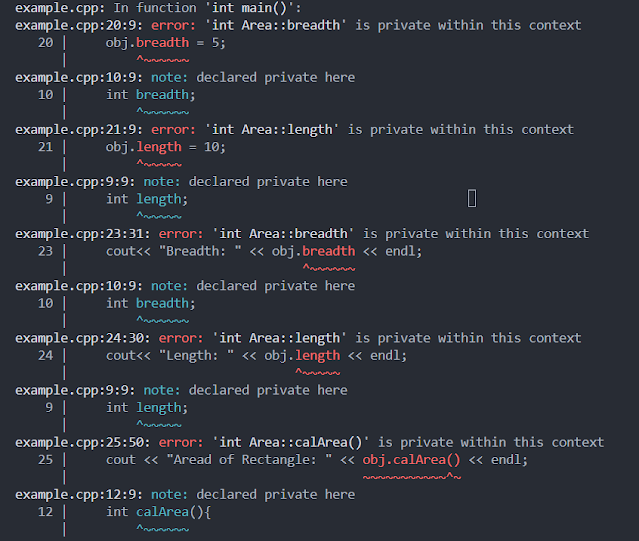
output screenshot for private access specifier

In this above example, the data members and member function are declared as private so we cannot access them outside the class and get the above error.

3. Protected: Members declared as protected are similar to private members but have one additional feature: they can be accessed in the derived classes. They are not accessible from outside the class. They allow derived classes to access certain members while still restricting access to the external world.

Example Code:
//C++ example for protected access specifier
#include <iostream>
using namespace std;

// Base class
class Vehicle {
protected:
    int speed;

public:
    Vehicle() : speed(0) {}

    void setSpeed(int s) {
        speed = s;
        cout << "Setting speed to " << speed << " km/h\n";
    }
};

// Derived class
class Car : public Vehicle {
public:
    void showSpeed() {
        // Derived class can access the protected member 'speed' of the base class
        cout << "Current speed of the car: " << speed << " km/h\n";
    }

    void accelerate() {
        // Derived class can modify the protected member 'speed' of the base class
        speed += 10;
        cout << "Accelerating! New speed: " << speed << " km/h\n";
    }
};

int main() {
    Car myCar;

    // Accessing the public function of the base class
    myCar.setSpeed(60);

    // Accessing the public function of the derived class
    myCar.showSpeed();

    // Accessing a function of the derived class that modifies the protected member of the base class
    myCar.accelerate();
    myCar.showSpeed();

    return 0;
}
Output:
Setting speed to 60 km/h
Current speed of the car: 60 km/h
Accelerating! New speed: 70 km/h
Current speed of the car: 70 km/h

In this example, the Vehicle is the base class, and it has a protected member speed. Car is a derived class from Vehicle. The derived class Car can access and modify the protected member speed of the base class Vehicle.

So I hope you understand the working and use of Access specifiers and their contribution to the principles of encapsulation and data hiding in object-oriented programming.

Classes and Objects in C++.

C++ is an object-oriented programming language, and one of its key features is the ability to create and use classes and objects. Classes and Objects in C++ are the basic building blocks for Object Oriented Programming. In this article, we are going to learn the concept of classes and objects in detail with real-life examples.


What is a Class?

At its core, a class is a blueprint for creating objects. It encapsulates data (attributes) and behaviors (methods), providing a logical structure for organizing and modeling real-world entities. 

Data Members (Attributes): Data members define the attributes of a class, representing its state. They can include fundamental types or other user-defined types.(alert-passed)
Member Functions (Methods): Member functions define the behaviors of a class. They encapsulate operations that can be performed on the class's data.(alert-passed)

SyntaxIn C++, declaring a class involves using the class keyword, followed by the class name and a set of curly braces containing class members.

class ClassName {
    Access Specifier:

    Data Member;

    Member Function();
};


Example: Let's understand with an example, a Car can be represented as a class. A Car class can have attributes (data members) that define its state and behaviors (member functions) that represent its actions. 

class Car {
public: //Access Specifier
    // Attributes
    string brand;
    string model;
    int year;
    bool engineRunning;

    // Member Function to Start the Engine
    void startEngine() {
        if (!engineRunning) {
            cout << "Starting the engine...\n";
            engineRunning = true;
        } else {
            cout << "The engine is already running.\n";
        }
    }
};

What is an Object?

Objects are instances of classes, representing tangible entities in a program. They encapsulate data and behaviors defined by the class, forming the building blocks of C++ applications.

Syntax: Creating an object involves specifying the class name followed by the object name.
ClassName objectName;  // Creating an object

The data member and member function of the class can be accessed using the dot operator with the object name. For example, if your object name is myCar and you want to access the member function startEngine() then you have to write myCar.startEngine() to access that particular function.

Access Specifiers in C++.

Access specifiers control the visibility of class members (data member and member function) from different parts of the program. They are keywords used to define the accessibility or visibility of class members (data members and member functions). 

There are three access specifiers in C++:
  • Public: Members declared as public are accessible from any part of the program. They have no restrictions on access.
  • Private: Members declared as private are only accessible within the same class. They are not accessible from outside the class.
  • Protected: Members declared as protected are similar to private members but have one additional feature: they can be accessed in the derived classes. They are not accessible from outside the class.
Example:
//Access Specifier Example
class AccessExample {
public:
    int publicVar;

private:
    int privateVar;

protected:
    int protectedVar;

public:
    void displayValues() {
        cout << "Public: " << publicVar << "\n";
        cout << "Private: " << privateVar << "\n"; //Err: private is not accessible
        cout << "Protected: " << protectedVar << "\n";
    }
};

Access specifiers provide control over the visibility and accessibility of the class members, contributing to the principles of encapsulation and data hiding in object-oriented programming.

Constructors.

In C++, a constructor is a special member function that is automatically called when an object is created. It has the same name as the class and does not have any return type. The purpose of a constructor is to initialize the object's data members or perform other setup operations when an object is created.

There are two main types of constructors:

Default Constructor:
  • A default constructor is a constructor that takes no parameters.
  • If a class does not have any constructor defined, the compiler automatically generates a default constructor.
  • It initializes the data members with default values (zero or null, depending on the data type).

Parameterized Constructor:
  • A parameterized constructor is a constructor that takes parameters.
  • It allows you to initialize the object with specific values when it is created.
Example:
#include <iostream>

class Car {
private:
    std::string brand;
    int year;

public:
    // Default Constructor
    Car() {
        brand = "Unknown";
        year = 0;
    }

    // Parameterized Constructor
    Car(std::string carBrand, int carYear) {
        brand = carBrand;
        year = carYear;
    }

    void displayInfo() {
        std::cout << "Brand: " << brand << "\n";
        std::cout << "Year: " << year << "\n";
    }
};

int main() {
    // Using Default Constructor
    Car defaultCar;
    defaultCar.displayInfo();

    // Using Parameterized Constructor
    Car customCar("Toyota", 2022);
    customCar.displayInfo();

    return 0;
}
Output:
Brand: Unknown
Year: 0
Brand: Toyota
Year: 2022

In this example, the Car class has a default constructor that initializes the brand and year with default values. It also has a parameterized constructor that allows you to specify the brand and year when creating an object.

Destructor.

In C++, a destructor is a special member function of a class that is automatically called when an object goes out of scope or is explicitly deleted using the delete keyword. The purpose of a destructor is to release resources or perform cleanup operations before the object is destroyed.

The destructor has the same name as the class, preceded by a tilde (~). Unlike constructors, destructors do not take any parameters, and a class can have only one destructor.

Example:
#include <iostream>

class MyClass {
public:
    // Constructor
    MyClass() {
        std::cout << "Constructor called\n";
    }

    // Destructor
    ~MyClass() {
        std::cout << "Destructor called\n";
    }
};

int main() {
    // Object creation
    MyClass obj; // Constructor called

    // Object goes out of scope
    // Destructor is automatically called here

    return 0;
}
Output:
Constructor called
Destructor called

I hope you understand the basic workings of classes and objects in Object Oriented Programming. There are several key points that you can keep in mind when you are working with classes. 
  • Use access specifiers (public, private, protected) to control the visibility of class members.
  • Always define a constructor and, if needed, a destructor to manage the object's lifecycle.
  • Ensure that all class members are properly initialized, either through default values, member initialization lists, or in the constructor body.
  • Consider making functions const-correct when they do not modify the object's state.
  • Access static members using the class name, not an instance.
  • Prefer composition over inheritance to achieve polymorphic behavior.

30 OOPs Interview Questions and Answer in C++ (2023)

C++ is a powerful programming language known for its extensive use of Object-Oriented Programming (OOP) principles. In the world of software development, mastering OOP concepts is crucial for building scalable, modular, and maintainable code. Whether you're a beginner looking to grasp the fundamentals or an experienced developer aiming to refine your knowledge, this article provides detailed answers to the top 30 OOP interview questions in C++.

30 OOPs Interview Questions and Answer in C++.

1. What is Object-Oriented Programming (OOP)?

Answer: Object-oriented programming is a programming paradigm that uses objects to model real-world entities and organizes code into classes and objects. It promotes the use of concepts like encapsulation, inheritance, and polymorphism to enhance code modularity and reusability.


2. What are the four fundamental principles of OOP?

Answer: The four fundamental principles of OOP are:

  • Encapsulation: This principle bundles data (attributes) and the methods (functions) that operate on that data into a single unit, the class.
  • Abstraction: Abstraction involves hiding complex implementation details and exposing only the necessary features of an object.
  • Inheritance: Inheritance allows a class to inherit properties and behaviors from another class. It promotes code reuse and the creation of a hierarchy of classes.
  • Polymorphism: Polymorphism enables objects of different classes to be treated as objects of a common base class. It includes function overloading and function overriding.

Pillars of Object Oriented Programming

3. What is a class in C++?

Answer: A class in C++ is a blueprint for creating objects. It defines the structure (attributes or properties) and behavior (methods or functions) that objects of that class will have.


4. What is an object in C++?

Answer: An object in C++ is an instance of a class. It represents a specific real-world entity with its own data (attributes) and behavior (methods).

Example:

#include <iostream>

// Define a class named 'Person'
class Person {
public:
    // Public members of the class
    std::string name;
    int age;

    // Member function to introduce the person
    void introduce() {
        std::cout << "I am " << name << " and I am " << age << " years old.";
    }
};

int main() {
    // Create an object of the 'Person' class
    Person person1;

    // Assign values to the object's members
    person1.name = "Alice";
    person1.age = 30;

    // Call the member function to introduce the person
    person1.introduce();

    return 0;
}
Output:
I am Alice and I am 30 years old.

In the above code, we define a class named Person that has two public data members: name and age, and a public member function introduced to introduce the person. In the main function, we create an object of the Person class named persons.


5. What is the difference between a class and an object?

Answer: A class is a template or blueprint for creating objects. It defines the structure and behavior of objects but doesn't occupy memory. An object, on the other hand, is an instance of a class, representing real data and taking up memory.


6. What is Encapsulation in OOP?

Answer: Encapsulation is the principle of bundling data and the methods that operate on that data into a single unit (a class). It provides data hiding, protecting the integrity of an object's data from external access.


7. What is a constructor in C++?

Answer: A constructor in C++ is a special member function of a class that is automatically called when an object of the class is created. It is used for initializing object properties.


8. What is the destructor in C++?

Answer: A destructor in C++ is a special member function that is called when an object goes out of scope or is explicitly destroyed. It's used for cleaning up resources and deallocating memory.


9. What is the "this" pointer in C++?

Answer: The "this" pointer in C++ is a pointer that points to the current instance of an object. It is used within class methods to access the object's members and avoid naming conflicts with local variables.


10. What is inheritance in C++?

Answer: Inheritance is a mechanism in C++ that allows a class to inherit the properties and behaviors of another class. It promotes code reuse and the creation of a hierarchy of classes.


11. Explain the types of inheritance in C++.

Answer: There are several types of inheritance in C++:

  • Single Inheritance: A class inherits from a single base class.
  • Multiple Inheritance: A class can inherit from multiple base classes.
  • Multilevel Inheritance: A class derives from a class that, in turn, derives from another class.
  • Hierarchical Inheritance: Multiple derived classes inherit from a single base class.


12. What is a base class and a derived class in C++?

Answer: A base class is the class being inherited from, and a derived class is the class that inherits from a base class. The derived class inherits the properties and behaviors of the base class.

  • Base Class: A base class, often referred to as a parent class or superclass, is a class from which other classes (derived classes) inherit properties and behaviors. It serves as a template or blueprint for creating derived classes.
  • Derived Class: A derived class, often referred to as a child class or subclass, is a class that inherits attributes and behaviors from a base class. The derived class extends or specializes the functionality of the base class by adding new attributes and methods or by modifying the inherited ones.


13. What is polymorphism in C++?

Answer: Polymorphism is a key concept in OOP. It allows objects of different classes to be treated as objects of a common base class. There are two main types of polymorphism in object-oriented programming:

1. Compile Time Polymorphism.

Compile Time Polymorphism also known as static binding or early binding occurs at compile time when the program is being compiled. It is achieved through function overloading and operator overloading.

Function Overloading: Function overloading is the ability of a class to have multiple functions with the same name, provided that they have different parameter lists. The appropriate function to call is determined at compile time based on the number and types of arguments passed. (alert-passed)

Example:
// Example of Function overloading in C++
class MathOperations {
public:
    int add(int a, int b) {
        return a + b;
    }

    double add(double a, double b) {
        return a + b;
    }
};

2. Run Time Polymorphism.

Run Time Polymorphism also known as late binding or dynamic binding occurs at runtime when the program is executed, it is achieved through method overriding, virtual functions, and interfaces/abstract classes.

Method Overriding: Method overriding is the ability of a derived class to provide a specific implementation for a method that is already defined in its base class. The appropriate function to call is determined at runtime, based on the actual type of the object.(alert-passed)

Example:

// Example of Method overriding
class Shape {
public:
    virtual double area() {
        return 0.0; // Base class provides a default implementation
    }
};

class Circle : public Shape {
public:
    double area() override {
        return 3.14 * radius * radius;
    }
};


14. Explain function overloading in C++.

Answer: Function overloading is the ability to define multiple functions with the same name but different parameter lists in the same class. The appropriate function is selected at compile time based on the number and types of arguments.


15. What is function overriding in C++?

Answer: Function overriding is the process of providing a specific implementation for a method defined in a base class. It allows a derived class to provide its own implementation of a method with the same name and parameters as the base class.


16. What is an abstract class in C++?

Answer: An abstract class in C++ is a class that cannot be instantiated. It is typically used as a base class and may contain pure virtual functions, which must be implemented by derived classes.


17. What is a virtual function in C++?

Answer: A virtual function is a member function declared in a base class with the `virtual` keyword. It allows derived classes to provide their own implementations, enabling dynamic binding and polymorphism.


18. What is a pure virtual function in C++?

Answer: A pure virtual function is a virtual function that is declared in a base class but has no implementation.

It is defined with the `= 0` syntax, and derived classes must provide an implementation.


19. What is an interface class in C++?

Answer: C++ doesn't have a built-in "interface" keyword like some other languages. Instead, an interface is often implemented using an abstract base class with pure virtual functions.


20. What is operator overloading in C++?

Answer: Operator overloading allows you to define how C++ operators should work with user-defined types. For example, you can define custom behavior for operators like `+`, `-`, or `==` for your classes.


21. What are the new and delete operators in C++?

Answer: `new` is used to dynamically allocate memory for objects, and `delete` is used to deallocate memory. They are used to manage dynamic memory allocation.


22. What are templates in C++?

Answer: Templates allow you to define generic types and functions that can work with different data types without code duplication. They facilitate code reuse and type safety, especially when working with collections and algorithms.


23. Explain the role of the "friend" keyword in C++.

Answer: The "friend" keyword allows a function or class to access the private and protected members of another class. It promotes encapsulation while providing exceptions.


24. What is a smart pointer in C++?

Answer: A smart pointer is a C++ object that manages the memory allocated for another object. Types include shared_ptr, unique_ptr, and weak_ptr. They help prevent memory leaks and provide automatic memory management.


25. What is the RAII (Resource Acquisition Is Initialization) principle in C++?

Answer: RAII is a programming paradigm where resource management is tied to the lifetime of objects. Resources are acquired in constructors and released in destructors. This principle helps ensure that resources are properly managed and released, even in the presence of exceptions.


26. What is dynamic binding (late binding) in C++?

Answer: Dynamic binding allows the selection of the appropriate function to be delayed until runtime. It enables polymorphism, where the actual function to be called is determined based on the runtime type of an object.


27. What is a vtable in C++?

Answer: A vtable, short for virtual function table, is a data structure used for dynamic dispatch in C++. It maps virtual functions to their implementations. Each class with virtual functions has its own vtable.


28. What is the C++ Standard Template Library (STL)?

Answer: The C++ Standard Template Library (STL) is a set of C++ template classes to provide general-purpose classes and functions with templates to implement many popular and commonly used algorithms and data structures. It includes containers like vectors, maps, and algorithms like sorting and searching.


29. How does C++ handle multiple inheritance, and what is the diamond problem?

Answer: C++ supports multiple inheritance, allowing a class to inherit from multiple base classes. The "diamond problem" occurs when a class inherits from two or more classes that share a common base class. It can lead to ambiguity. To resolve the diamond problem, C++ uses the "virtual" keyword to specify virtual inheritance, ensuring that there's only one shared base class instance.


30. How do you implement an interface in C++?

Answer: In C++, interfaces are implemented using abstract classes with pure virtual functions. A class can derive from the abstract class and must provide implementations for all the pure virtual functions to satisfy the interface requirements.


These detailed answers should help you prepare for C++ OOP interviews by better understanding the concepts and principles involved.

DON'T MISS

Tech News
© all rights reserved
made with by AlgoLesson