Arrays Data Structure in Java.

An Array is a reference data type that can hold a fixed number of the same type of data. Array elements are store contiguously and the length of the array is decided when the array is created. We cannot change the array length after creation. 

Array in Java is very different than the array present in other programming languages like C/C++. Some key points to note about Array in Java. 

  • In Java, arrays are dynamically allocated. What does it mean? It means that we can allocate memory to an array at run time using the heap. 
  • Arrays are objects in Java and we can use several array properties on them like we can use object property length to know the size of the array. 
  • We can specify the size of the array using int and short data type only. 
An array in Java can hold primitive data like int, char, long, etc, and non-primitive data types like object references. 
Array Indexing

int mark[] = {10, 20, 30, 40 ,50}; //primitive datatype

Employee empList[] = new Employee[3]; //non-primitive datatype

empList[0] = new Employee();
empList[1] = new Employee();
empList[2] = new Employee();

The values that we store in an array are called elements and each element can be accessed by using their index. 

Declaring an Array in Java. 

The two common ways of declaring an array in Java is:

datatype[] arrayName;
        or
datatype arrayName[];

//You can declare array of several different datatype:
int[] arrayInt;
long[] arrayLong;
short[] arrayShort;
float[] arrayFloat;
double[] arrayDouble;
boolean[] arrayBoolean;
char[] arrayChar;
String[] arrayString;

Creating an Array in Java.

An array is created when we allocate memory to an array. 

arrayInt = new int[10]; //creating an array

Initializing an Array in Java.

It is a process of assigning values to each element of the array. 

arrayInt[0] = 10;   //initializing first element
arrayInt[1] = 15;   //initializing second element
arrayInt[2] = 20;   //initializing third element
arrayInt[3] = 25;   //so on..
arrayInt[4] = 30;

Accessing Array Elements in Java. 

We can access any array elements using their index value.

System.out.println(arrayInt[0]); //15
System.out.println(arrayInt[1]); //20
System.out.println(arrayInt[4]); //30

System.out.println(arrayInt[8]); //0
because our array length is 10 but the index 8 is not initialize with any value so by default it assign with 0. 
System.out.println(arrayInt[11]); //Error
We will get "ArrayIndexOutOfBoundsException" because our array length is 10 and we are trying to access index value 11 which is out of its range.


Java program to create integer array and access each element using their index value.  


public class ArrayExample
{
	public static void main(String[] args) {
		//declare an integer 
		int[] array;
		
		//allocating memory to the array 
		array = new int[8];
		
		array[0] = 10;  //initializing first element
		array[1] = 20;  //initializing second element
		array[2] = 30;
		array[3] = 40;
		System.out.println("Element at index 0: "+array[0]); //accessing first element
		System.out.println("Element at index 1: "+array[1]); //accessing second element
		System.out.println("Element at index 2: "+array[2]);
		System.out.println("Element at index 3: "+array[3]);
		System.out.println("Element at index 6: "+array[6]);
	}
}
Output:
Element at index 0: 10
Element at index 1: 20
Element at index 2: 30
Element at index 3: 40
Element at index 6: 0

You can also access array elements using a loop.

public class Main
{
	public static void main(String[] args) {
		//declare an integer 
		int[] array;
		
		//allocating memory to the array 
		array = new int[5];
		
		array[0] = 10;  //initializing first element
		array[1] = 20;  //initializing second element
		array[2] = 30;
		array[3] = 40;
		array[4] = 50;
		
        System.out.println("Length of Array: "+array.length);  
        
		for(int i = 0; i < array.length; i++) {
		    System.out.println("Element at index "+i+":"+array[i]);
		}
	}
}
Output:
Length of Array: 5
Element at index 0:10
Element at index 1:20
Element at index 2:30
Element at index 3:40
Element at index 4:50

An array of Objects. 

An array can also store objects similarly like it stores primitive data types. 

Example:
Student studentList[] = new Student[3];

The array variable studentList[] does not hold an array of Student objects, instead, it holds an array of Student reference variables. To make these variables hold the object, we have to create the object as:

studentList[0] = new Student();
studentList[1] = new Student();
studentList[2] = new Student();


Example of Array of Object in Java.

import java.util.*;

class Student {
    public int stud_roll_no;
    public String studen_Name;
    Student(int rollno, String name) {
        this.stud_roll_no = rollno;
        this.studen_Name = name;
    }
}

public class Main
{
	public static void main(String[] args) {
	    Scanner sc = new Scanner(System.in);
	    
	    //allocating memory to object of type student
		Student studentList[] = new Student[3];
		
		//initializing elements of the array
		for(int i = 0; i < studentList.length; i++) {
		    System.out.println("Enter the rollNo: ");
		    int rollno = sc.nextInt();
		    
		    System.out.println("Enter the name: ");
		    String name = sc.next();
		    
		    studentList[i] = new Student(rollno, name);
		}
		
		//accessing elements of the array 
		for(int i = 0; i < studentList.length; i++) {
		    System.out.println(studentList[i].studen_Name+" Roll no is: "+studentList[i].stud_roll_no);
		}
	}
}
Output:
Enter the rollNo: 
101
Enter the name: 
Rahul
Enter the rollNo: 
102
Enter the name: 
Mohit
Enter the rollNo: 
103
Enter the name: 
Kajal
Rahul Roll no is: 101
Mohit Roll no is: 102
Kajal Roll no is: 103

Multidimensional Arrays in Java.

A multidimensional array is also called an Array of Arrays in which an array holds another array. Each row of the array can contain different lengths. The dimension of the array is decided by the number of square brackets ([ ]) you are adding. These are also known as Jagged Array

  • int[] arr; // 1D array
  • int[][] arr; // 2D array
  • int[][][] arr; //3D array  
Example to 2D Array in Java.
public class Main
{
	public static void main(String[] args) {
		
		int[][] arr = {{1, 2, 3}, {4, 5, 6}, {7, 8, 9}};
		
		for(int i = 0; i < 3; i++) {
		    for(int j = 0; j < 3; j++) {
		        System.out.print(arr[i][j]+" ");
		    }
		    System.out.println();
		}
	}
}
Output:
1 2 3
4 5 6
7 8 8

Array as a Function Argument.

Java passes "objects by reference" and not by values. The array is passed as a reference and not as a copy of individual elements so any change done using array reference will be reflected in the original array. 

Example of an array as a function argument in Java(Sort an Array). 

class SortArray {
    public void sort(int[] newArr) {
        
        int n = newArr.length;
        
        for(int i = 0; i < n; i++) {
            for(int j = 0; j < n-1; j++) {
                if(newArr[j] > newArr[j+1]) {
                    int temp = newArr[j];
                    newArr[j] = newArr[j+1];
                    newArr[j+1] = temp;
                }
            }
        }
    }
}
public class Main
{
	public static void main(String[] args) {
		
		SortArray obj = new SortArray();
		
		int arr[] = {20, 12, 50, 65, 15, 10};
		obj.sort(arr);
		
		for(int i : arr) {
		    System.out.print(i+" ");
		}
	}
}
Output:
10 12 15 20 50 65

The above example program is to sort all the array elements in ascending order. Similarly, we can perform several different operations on an array, like searching an element in an array using different searching methods or sorting the array elements in ascending or descending order. 

Units of Computer Memory Measurement

computer memory measurement

The computer only understands the language of 0 and 1 which is known as binary digits. A bit is a binary digit that can hold only one value either 0 or 1.  A bit is a very small unit to work on so we group 8 bits together which is known as bytes. Similarly, 1 Kilobyte of memory is equal to 1024 Bytes. 


Computer Memory Measurement

1 Bit Binary Digit
8 Bits 1 byte
1024 Bytes 1 Kilobyte
1024 Kilobytes 1 Megabyte
1024 Megabytes 1 Gigabyte
1024 Gigabytes 1 Terabyte
1024 Terabytes 1 Petabyte
1024 Petabytes 1 Exabyte
1024 Exabytes 1 Zettabyte
1024 Zettabytes 1 Yottabyte
1024 Yottabytes 1 Brontobyte
1024 Brontobytes 1 Geopbyte
1024 Geopbytes 1 Saganbyte
1024 Saganbytes 1 Pijabyte
Alphabyte 1024 Pijabytes
Kryatbyte 1024 Alphabytes
Amosbyte 1024 Kryatbytes
Pectrolbyte 1024 Amosbytes
Bolgerbyte 1024 Pectrolbytes
Sambobyte 1024 Bolgerbytes
Quesabyte 1024 Sambobytes
Kinsabyte 1024 Quesabytes
Rutherbyte 1024 Kinsabytes
Dubnibyte 1024 Rutherbytes
Seaborgbyte 1024 Dubnibytes
Bohrbyte 1024 Seaborgbytes
Hassiubyte 1024 Bohrbytes
Meitnerbyte 1024 Hassiubytes
Darmstadbyte 1024 Meitnerbytes
Roentbyte 1024 Darmstadbytes
Coperbyte 1024 Roentbytes

Do While Loop in Java.

Java do-while loop is a control flow statement and is very similar to a while loop. It is also used to iterate a block of code repeatedly until the boolean condition is true. 

The only difference between the java do-while loop and the java while loop is that the do-while loop executes the block of code at least once even if the boolean condition is false but the while loop executes the block of code only when the boolean condition is true. 

do while loop syntax

Example: 1 Write a Java Program to print "Hello" four times using a do-while loop. 

public class Main
{
	public static void main(String[] args) {
		
		int i = 1;
		
		do {
		    System.out.println("Hello");
		    i++;
		} while(i < 5);
	}
}
Output:
Hello
Hello
Hello
Hello

Example: 2

public class Main
{
	public static void main(String[] args) {
		
		int i = 1;
		
		do {
		    System.out.println("Hello");
		    i++;
		} while(i > 5);
	}
}
Output:
Hello

Note: In the above second example, "Hello" is printed only one time because the boolean condition is false and when the boolean condition is false in the do-while loop, the block of code executes at least once

While loop in Java.

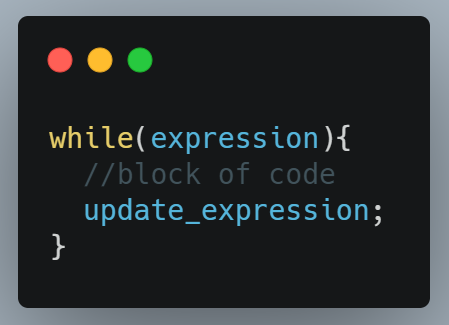
Java while loop is a control flow statement used to iterate a block of code repeatedly until the boolean condition present in the while loop is true. It is mainly used when we don't know the number of iteration in advance. The loop gets automatically stops when the boolean condition returns false. 
while loop in Java

Example: Write a Java Program to sum all numbers from 1 to 10 using a while loop.

public class Main
{
	public static void main(String[] args) {
		
		int i = 1, sum = 0;
		
		while(i <= 10) {
		    sum = sum + i;
		    //increment value of i for next iteration
		    i++;
		}
		System.out.println("Sum: "+sum);
	}
}
Output:
Sum: 55


Example: Write a Java Program to print all-natural numbers from 1 to 10 using a while loop. 

public class Main
{
	public static void main(String[] args) {
		
		int i = 1;
		
		while(i <= 10) {
		    System.out.print(i+" ");
		    i++;
		}
	}
}
Output:
1 2 3 4 5 6 7 8 9 10

For loop in Java.

For loop in Java is used to iterate a part of the program n number of times. There are other types of loops like while loop or do-while loop but they are used when the number of iteration is not known in advance and for loop is used when the number of iteration is fixed or known in advance. 

A simple for loop consists of three parts:

  • Initialization: It is the initial condition of a loop that executes only once before the execution of the code block. 
  • Condition: The loop will keep executing until the condition become false. This condition is tested each time before each iteration. 
  • Increment/Decrement: It executes every time after the block of code gets executed.

Example: Write a Java Program to Print all natural numbers from 1 to 10. (Simple loop)

public class Main
{
	public static void main(String[] args) {
		
		for(int i = 1; i <= 10; i++){
		    System.out.println(i);
		}
	}
}
Output:
1
2
3
4
5
6
7
8
9
10


Example: Write a Java Program to Print 3X3 matrix (nested loop).

public class Main
{
	public static void main(String[] args) {
		
		for(int i = 0; i < 3; i++){
		    System.out.print(i);
		    for(int j = 0; j < 3; j++){
		        System.out.print(" "+j);
		    }
		    System.out.println("\n");
		}
	}
}
Output:
0 0 1 2
1 0 1 2
2 0 1 2


Example: Write a Java Program to Print all the elements of an Array. (for each loop)

Here, we are using a for-each loop to traverse all the elements of an array.  For-each loop syntax is different from simple for loop. 

//syntax of for-each loop
for(type var : arr)
{
//statement;
}

public class Main
{
	public static void main(String[] args) {
		
		int[] arr = {10, 15, 20, 25, 30, 35, 40};
		
		for(int i : arr) {
		    System.out.print(i+" ");
		}
	}
}
Output:
10 15 20 25 30 35 40

Switch case Statement in Java.

Java Switch statement

Java switch case is like if..else statement, it also executes only one block of code from multiple blocks of code present. The data type that can be used to control the switch statement are int, byte, short, char, long and from Java 7 a String literal constant can also be used to control a switch statement. 

Some important points about switch cases in Java.  

  • We can have N number of switch-case statements in Java. 
  • Duplicate values are not allowed or we will get a compilation error. 
  • Data of the value which we provide to the switch case must be the same as the data type of the expression of the switch case. 
  • The datatype which is allowed for switch case expression is int, char, short, byte, and long.
  • Break statement in switch case is to control execution if we remove break then it will execute all the code until it reaches its end or meets new break statement. 
  • The default statement is optional, it gets execute when no expression matches the case. If we remove the default statement then noting will execute in that case. 

Example: Write a Java program to print the month name base on the given number. 


public class Main
{
	public static void main(String[] args) {
		
		int monthNumber = 12;
		
		switch(monthNumber) {
		    case 1:
		        System.out.println("January");
		        break;
		    case 2:
		        System.out.println("February");
		        break;
		    case 3:
		        System.out.println("March");
		        break;
		    case 4:
		        System.out.println("April");
		        break;
		    case 5:
		        System.out.println("May");
		        break;
		    case 6: 
		        System.out.println("June");
		        break;
		    case 7:
		        System.out.println("July");
		        break;
		    case 8:
		        System.out.println("August");
		        break;
		    case 9:
		        System.out.println("September");
		        break;
		    case 10:
		        System.out.println("October");
		        break;
		    case 11:
		        System.out.println("November");
		        break;
		    case 12:
		        System.out.println("December");
		        break;
		    default:
		        System.out.println("Not a valid month number!!");
		}
	}
}
Output:
December

Example: Write a Java program to print the season name based on the given month number.

  • Spring - March, April, May
  • Summer - June, July, August
  • Autumn - September, October, November
  • Winter - December, January, February

public class Main
{
	public static void main(String[] args) {
		
		int monthNumber = 12;
		
		switch(monthNumber) {
		    case 3:
		    case 4:
		    case 5:
		        System.out.println("Spring Season!!!");
		        break;
		    case 6:
		    case 7:
		    case 8:
		        System.out.println("Summer Season!!!");
		        break;
		    case 9:
		    case 10:
		    case 11:
		        System.out.println("Autumn Season!!!");
		        break; 
		    case 12:
		    case 1:
		    case 2:
		        System.out.println("Winter Season!!!");
		        break;      
		    default:
		        System.out.println("Not a valid month number!!");
		}
	}
}
Output:
Winter Season!!!

if...else Statement in Java.

Java  If else statement

In Java, if...else statement is used to check the boolean condition is true or false and based on the outcome, it runs a particular block of code and skips the other block of code present. There are various different ways and conditions in which the if-else statement is used for solving easy and complex problems.  

Example 1: if statement.

The block of code will execute if the boolean condition is true else nothing will execute. 


public class Main
{
	public static void main(String[] args) {
		int age = 18;
		
		if(age >= 18)
		   System.out.println("You are eligible to vote.");
	}
}
Output:
You are eligible to vote.

Example 2: if...else statement.

If the, if condition is true then the block of code present in the if block will get executed otherwise else block code will get executed. 


public class Main
{
	public static void main(String[] args) {
		int age = 17;
		
		if(age >= 18)
		   System.out.println("You are eligible to vote");
		else
		   System.out.println("You are not eligible to vote");
	}
}
Output:
You are not eligible to vote

Example 3: if-else if statement.

If we have more than one condition to check and the particular block of code gets executed whose condition is true. 


public class Main
{
	public static void main(String[] args) {
		
		int mark = 65;
		
		if(mark > 90)
		   System.out.println("Grade A");
		else if(mark > 70 && mark <= 90)
		   System.out.println("Grade B");
		else if(mark > 50 && mark <= 70)
		   System.out.println("Grade C");
		else
		   System.out.println("Fail");
	}
}
Output:
Grade C

Example 4: nested if-else statement.

In the nested if-else block, we get an if-else statement inside another if or else block of code. Inner condition is checked only if the other condition is true and nesting can be done up to any level. 

public class Main
{
	public static void main(String[] args) {
		
		int year = 2024;
		
		if(year % 4 == 0) {
		    if(year % 100 == 0) {  //check if the year is century
		        if(year % 400 == 0)  
		            System.out.println(year+" is a Leap Year");
		        else 
		            System.out.println(year+" is NOT a Leap Year");
		    }
		    else
		       System.out.println(year+" is a Leap Year");
		}
		else
		   System.out.println(year+" is NOT a Leap Year");
	}
}
Output:
2024 is a Leap Year

Operators in Java.

Operators in Java

To perform mathematical and logical manipulation of data we have to use Operators in Java Programming. 

Different types of Operators available in Java:


Operator Types Precedence
Unary Operator x++ x-- ++x --x ~ !
Arithmetic Operator * / % + -
Shift Operator << >> >>>
Relational Operator < > <= >= instanceof == !=
Bitwise Operator & ^ |
Logical Operator && ||
Ternary Operator ? :
Assignment Operator = += -= *= /= %= &= ^= |= <<= >>= >>>=


  • Unary Operator: Unary operators require only one operand to perform operations. 

Example


public class Main
{
	public static void main(String[] args) {
		int x = 10;
		int y = 20;
		boolean b = false;
		System.out.println(x++); //post increment
		System.out.println(x--); //post decrement
		System.out.println(++x); //pre increment
		System.out.println(--x); //pre decrement
		System.out.println(~y);  //minus of total positive value which starts from 0
		System.out.println(!b); //true
	}
}
Output:
10
11
11
10
-21
true

  • Arithmetic Operator: Arithmetic operators are used to performing addition, subtraction, multiplication, division, and modulo(remainder) operations. 

Example: 


public class Main
{
	public static void main(String[] args) {
		int x = 10;
		int y = 20;
		
		System.out.println(x+y); 
		System.out.println(y-x); 
		System.out.println(x*y); 
		System.out.println(y/x); 
		System.out.println(y%x); 
	}
}
Output:
30
10
200
2
0

  • Shift Operator: Shift operators are used to shifting all the bits in a value to the left or right side of a specified number of times based on the type of shift operation like left shift or right shift. 

Example:


public class Main
{
	public static void main(String[] args) {
		int x = 10; 
		int y = 2; 
		System.out.println(x<>y); //Right Shift Operator 10/2^2 = 10/4 = 2
	}
}
Output:
40
2

  • Relational Operator: Relational operators are used to define some kind of relation between two entities. There are two types of relational operators in Java, comparison operator and equality operator. 

Example: 


public class Main
{
	public static void main(String[] args) {
		int x = 10; 
		int y = 5;
		int a = 10;
		int b = 5;
		Main m = new Main();
		System.out.println(x < y);
		System.out.println(y < x);
		System.out.println(y > x);
		System.out.println(x > y);
		System.out.println(x >= a);
		System.out.println(y <= b);
		System.out.println(x == a);
		System.out.println(x != y);
		System.out.println(m instanceof Main);
	}
}
Output:
false
true
false
true
true
true
true
true
true

  • Bitwise Operator: There are three types of bitwise operators, bitwise AND (&) operator, bitwise inclusive (|) OR, and bitwise exclusive OR(XOR) (^). 

Example:


public class Main
{
	public static void main(String[] args) {        
        int a = 14;

    System.out.println("Bitwise AND:"+(a&a));
    System.out.println("Bitwise inclusive OR:"+(a|a));
    System.out.println("Bitwise exclusive OR(XOR):"+(a^a));

    }
}
Output:
Bitwise AND:14
Bitwise inclusive OR:14
Bitwise exclusive OR(XOR):0

  • Logical Operator: There are two types of logical operators, logical AND(&&) which return true when both the condition is true, and logical OR(||) which return true even if any one condition is true (it doesn't check the second condition if the first is true) operators.

Example: 

public class Main
{
	public static void main(String[] args) {
		int x = 10;
		int y = 20;
		int z = 30;
		System.out.println(x < y && x < z); 
		System.out.println(x < y && x > z);
		System.out.println(x < y || x > z);
		System.out.println(x > y || x < z);
		System.out.println(x > y || x > z);
	}
}
Output:
true
false
true
true
false

  • Ternary Operator: Ternary operator in Java can work as a replacement to an if-else statement and is very useful in Java programming. It is called ternary because it takes only three operands. 

Example: 


public class Main
{
	public static void main(String[] args) {
		int x = 10;
		int y = 20;
		int max = x < y ? y:x;
		System.out.println("Maximum: "+max);
	}
}
Output:
Maximum: 20

  • Assignment Operator: Assignment operators are used to assigning the value present on the right side to the operand present on the left side. 

Example: 


public class Main
{
	public static void main(String[] args) {
		int x = 10;
		System.out.println(x);
		x += 5;   //x = x+5
		System.out.println(x);
		x -= 5;  //x = x-5
		System.out.println(x);
		x *= 5;  //x = x*5
		System.out.println(x);
		x /= 5;  //x = x/5
		System.out.println(x);
		x %= 5;  //x = x%5
		System.out.println(x);
		x &= 5;  //x = x&5
		System.out.println(x);
		x |= 5;  //x = x | 5
		System.out.println(x);
		x ^= 5;  //x = x^5
		System.out.println(x);
		x>>=4;   //x = x>>4
		System.out.println(x);
	}
}
Output:
10
15
10
50
10
0
0
5
0
0


Precedence and Associativity in Java.

Precedence and associativity are used when we have to deal with more than one operator in a single equation. Precedence is used to determine the priority of the operators in an equation. If two operators have equal priority in the expression is evaluated through associativity. 

Category Operator Associativity
Postfix () [] .(dot operator) Left to Right
Unary ++ -- ! ~ Right to Left
Multiplicative * / % Left to Right
Additive + - Left to Right
Shift >> >>> << Left to Right
Relational >>= < <= Left to Right
Equality == != Left to Right
Bitwise AND & Left to Right
Bitwise XOR ^ Left to Right
Bitwise OR | Left to Right
Logical AND && Left to Right
Logical OR || Left to Right
Conditional ?: Right to Left
Assignment = += -= /= %= >= <= &= ^= |= Right to Left
Comma , Left to Right

DON'T MISS

Nature, Health, Fitness
© all rights reserved
made with by AlgoLesson