Insertion in Singly Linked List in C++

In the previous post, we discussed the Singly Linked List and the operations that we can perform it. Here we are going to discuss the insertion of new nodes in a singly linked list in detail. 
There are three ways of inserting a new node into a Linked List and these are, 
  • Adding a node at the beginning of the list.
  • Adding a node after a given position in the list.
  • Adding a node at the end of the list.
Structure of our node using C++ class:
class Node{
    public:
    int data;
    Node *next;
    //constructor
    Node(int data){
        this->data = data;
        this->next = NULL;
    }
};


1. Adding a node at the beginning of the Linked List.

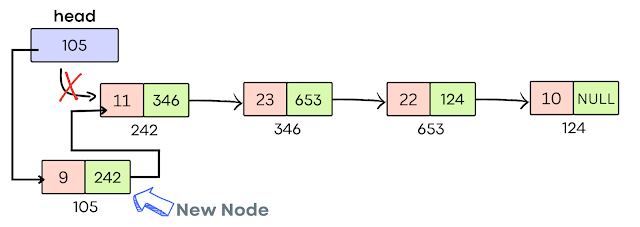
A head pointer is used in the linked list that always points to the first node of the list and when we add a new node in front the new node becomes the first node and now the head pointer should point to this new node. You can follow the below three steps to add a new node at the front of the list. 
Adding a node at the front of the list.
  • Create a new node and store the data value in the first part of the node and the second part is initially pointing to NULL
//create a new node and initialize data value using constructor
Node *new_node = new Node(data);
  • Point the next pointer of the newly created node to the existing first node whose address is present inside the head pointer. 
new_node->next = head;
  • Update the value of the head pointer with the address of our new node as the head always points to the first node of the list. 
head = new_node;


2. Adding a node at a position in the Linked List.

You can follow the below steps to insert a new node at a specified position in the Singly Linked List. 
Adding a node at the position in the list
  • Traverse the given list and reach the position-1 node and mark that node as current.
  • Create a new node with the given data value and the next pointer initially pointing to NULL.
  • Point the next pointer of the new node to the next of the current node.
  • Point the next pointer of the current node to the newly created node. 


3. Adding a node at the end of the Linked List.

This is the most common way of adding a new node to the list because whenever we create a new node we prefer to add it at the end of the list. You can follow the below steps to add a new node at the end of a singly linked list.
Adding a node at the end of the list
  • Traverse a given list using a temp pointer till you reach the end of the list. 
  • Create a new node with the given data value and the next pointer of the new node pointing to NULL.
  • Point the next pointer of the temp node to the new node and the next pointer of the new node is already pointing to NULL

Complete C++ program of Inserting a new node in a Singly Linked List.
//C++ Example of Insertion in Singly Linked List
#include<iostream>
using namespace std;

class Node{
    public:
    int data;
    Node *next;
    //constructor
    Node(int data){
        this->data = data;
        this->next = NULL;
    }
};

//Add a node to the front of list
Node *insertFront(Node *head, int data){

    Node *new_node = new Node(data);
    //add a new node when list is empty
    if(head == NULL)
      head = new_node;
    //adding new node at the front of the list  
    else{
        new_node->next = head;
        head = new_node;
    }
    return head;  
}
//Add a node after the position
Node *insertPos(Node *head, int pos, int data){
    int count = 0;
    Node *current = head;

    //Adding a node in empty list
    if(current == NULL){
        Node *new_node = new Node(data);
        head = new_node;
    }
    //Adding a node after given position
    else{
        while (count != pos-1)
        {
            current = current->next;
            count++;
        }
        Node *new_node = new Node(data);
        new_node->next = current->next;
        current->next = new_node;
    }
    return head;
}
//Adding node at the end of the list
Node *insertEnd(Node *head, int data){
    //create a new node
    Node *new_node = new Node(data);
    Node *temp = head;
    //when list is empty
    if(temp == NULL){
        head = new_node;
    }
    else{
        while (temp->next != NULL)
        {
            temp = temp->next;
        }
        temp->next = new_node;
    }
    return head;
}

//Traversing Linked List
void display(Node *head){
    Node *temp = head;

    while(temp != NULL){
        cout<<temp->data<<" ";
        temp = temp->next;
    }
}

int main(){
    Node *head = NULL;
    head = insertFront(head, 10);
    head = insertFront(head, 13);
    head = insertEnd(head, 22);
    head = insertEnd(head, 23);
    head = insertFront(head, 33);
    head = insertPos(head, 3, 32);

    cout<<"Singly Linked List: ";
    display(head);
    return 0;    
}
Output:
Singly Linked List: 33 13 10 32 22 23
  • Time Complexity: Adding a node at the front of the list takes O(1) time whereas adding a node at the end or in between the list takes O(n) time in worst cases. 
  • Space Complexity: No extra space is required to perform any insertion operation so space complexity will be O(1).

Operators in C++

In programming, operators are the symbols that perform mathematical or logical operations on one or more values. To fulfill any operation, we require two important things one is an operator and the second is an operand. 


Example: int a = b + c;

Here, + is the operator, and b and c are the operands on which the addition operation is going to perform. 


Below is the list of operators available in the C++ programming language.

list of operators

1. Arithmetic Operators.

All Arithmetic Operators are binary operators which means they required two operands to perform operations. They are used to perform arithmetic or mathematical operations on operands. Below is the list of Arithmetic Operators in C++:
Operator Operation
+ Addition Operator
- Subtraction Operator
* Multiplication Operator
/ Division Operator
% Modulo Operator (Remainder)

C++ Example code:
//C++ Example of Arithmetic Operation
#include<iostream>
using namespace std;

int main(){
    
    int x = 10, y = 2;

    //Addition operator
    cout<<"x + y = "<<(x + y)<<endl;

    //Subtraction operator
    cout<<"x - y = "<<(x - y)<<endl;

    //Multiplication operator
    cout<<"x * y = "<<(x * y)<<endl;

    //Division operator
    cout<<"x / y = "<<(x / y)<<endl;

    //Modulo operator
    cout<<"x % y = "<<(x % y)<<endl;

    return 0;
}
Output:
x + y = 12
x - y = 8
x * y = 20
x / y = 5
x % y = 0

It might be possible that in some mathematical expression, more than one operators are present and in that case, we need to follow Operator Precedence and Associativity rules to evaluate the given expression. 
Precedence Operators Associativity
Highest *, /, % Left to Right
Lowest +, - Left to Right

To solve a mathematical expression, operators with higher precedence need to be solved first then the lower precedence. Associativity is used only when two or more operators are of same precedence. Let's understand this with C++ example code.
//C++ Example of Operation Precedence and Associativity
#include<iostream>
using namespace std;

int main(){
    
    int a = 2, b = 4, c = 6, d = 8;

    /*
    all operators are of same precedence so
    follow associativity rules 
    (solve the expression from Left to Right)
    */ 
    cout<<"a * b / c = "<<(a * b / c)<<endl;

    /*
    operators with high precedence like * and % 
    will be solve first then operators with low 
    precedence will be solve
    */
   cout<<"a + b * d - c % a = "<<(a + b * d - c % a)<<endl;

    return 0;
}
Output:
a * b / c = 1
a + b * d - c % a = 34
Note: All Operators are not use with all data types like modulo operator (%) cannot be used with floating data type. (alert-warning)

2. Increment / Decrement Operators. 

  • The Increment operator (++) is used to increment the value of a variable by one. 
  • The Decrement operator (--) is used to decrement the value of a variable by one.
Both increment and decrement operators are unary operators which means they required only operand to perform operation. 

Increment/Decrement operators are divided into different categories. 
Operator Operation Description
++a Pre-increment Operator The value of the variable is incremented first and then it is used
a++ Post-increment Operator The value of the variable is assigned first and then it is incremented
--a Pre-decrement Operator The value of the variable is decremented first and then it is used
a-- Post-decrement Operator The value of the variable is assigned first and then it is decremented

C++ Example code:
//C++ Example of Increment/Decrement Operators
#include<iostream>
using namespace std;

int main(){
    
    int a = 6, b = 10, c = 8, d = 2;

    //pre-increment
    cout<<"++a = "<<++a<<endl;

    //post-increment
    cout<<"b++ = "<<b++<<endl;
    cout<<"b = "<<b<<endl;
//pre-decrement cout<<"--c = "<<--c<<endl; //post-decrement cout<<"d-- = "<<d--<<endl;
    cout<<"d = "<<d<<endl;
return 0; }
Output:
++a = 7
b++ = 10
b = 11
--c = 7
d-- = 2
d = 1

In the above example, you can observe that ++a has increased the value by one, and then it is printed but b++ has assigned the same value to be at first, and then when we try to print it again then it got updated with an incremented value. A similar case is happening with decrement operators. 

3. Relational Operators.

Relational operators are used to compare two operands and return a boolean value either True or False based on the condition. 
Operator Operation
== equal to
!= not equal to
<= less than or equal to
>= greater than or equal to
< less than
> greater than
 
Example:
int a = 5, b = 4;
bool check = a > b;
In this example, > greater than relational operator is used to check if a is greater than b or not. If the given condition is true then it will return 1 and if the condition fails then it will return 0. 

C++ Example code:
//C++ Example of Relational Operators
#include<iostream>
using namespace std;

int main(){

    int a = 5, b = 10;
    bool check;

    //equal to
    check = (a == b);
    cout<<"a == b is "<<check<<endl;

    //not equal to
    check = (a != b);
    cout<<"a != b is "<<check<<endl;

    //less than or equal to
    check = (a <= b);
    cout<<"a <= b is "<<check<<endl;

    //greater than or equal to
    check = (a >= b);
    cout<<"a >= b is "<<check<<endl;

    //less than
    check = (a < b);
    cout<<"a < b is "<<check<<endl;

    //greater than
    check = (a > b);
    cout<<"a > b is "<<check<<endl;

    return 0;
}
Output:
a == b is 0
a != b is 1
a <= b is 1
a >= b is 0
a < b is 1
a > b is 0

4. Logical Operators.

Logical operators are used to combining two more conditions together and return true or false if conditions pass or fail. There are three logical operators in C++ programming mostly use for decision-making. 
Operator Operation Description
&& Logical AND Return True when all the conditions under consideration are true and Return False when any one or more conditions are false.
|| Logical OR Return True when one or more than one condition under consideration is true and Return False when all conditions are false.
! Logical NOT Return True when a condition is false and Return False when a condition is True.
//C++ Example of Logical Operators
#include<iostream>
using namespace std;

int main(){

    int a = 5, b = 10, c = 4;
    bool check;

    //AND 
    check = (a > b) && (a > c);
    cout<<"Expression1 && Expression1 is "<<check<<endl;

    //OR
    check = (a > b) || (a > c);
    cout<<"Expression1 || Expression1 is "<<check<<endl;

    //NOT
    check = (!(b > c));
    cout<<"!(Expression) is "<<check<<endl;

    return 0;
}
Output:
Expression1 && Expression1 is 0
Expression1 || Expression1 is 1
!(Expression) is 0
  • (5 > 10) is false and (5 > 4) is true, as we used logical AND (&&) which means if any one condition is false it will return False (0).
  • (5 > 10) is false and (5 > 4) is true, as we used logical OR (||) it means even if any one condition is true it will return True (1). 
  • (10 > 4) is true and we used logical NOT so it will always return the opposite that is false.

5. Bitwise Operators.

Bitwise operators are used to performing calculations on a bit level. You can use bitwise operators only with integer or character data types. There are six bitwise operators in C++ programming.

Operator Operation Description
& Bitwise AND It is a binary operator that performs bitwise AND operation. The result of AND is 1 when both bits are 1.
| Bitwise OR It is a binary operator that performs a bitwise OR operation. The result of OR is 0 when both bits are 0.
~ Bitwise NOT It is a unary operator that performs a complement of each bit one by one. The result of NOT is 0 when a bit is 1 and 1 when a bit is 0.
<< Left Shift It shifts the value to the left by the number of bits specified by the right operand.
>> Right Shift It shifts the value to the right by the number of bits specified by the right operand.
^ Bitwise XOR It results in 1 if both the inputs are not the same otherwise result is 0.

6. Assignment Operators.

Assignment operators are used to assigning value to a variable. Below is the list of assignment operators in C++. 
Operator Description
+= First addition and then assignment.
-= First subtraction and then assignment.
*= First multiplication and then assignment.
%= First modulus and then assignment.
<<= First bitwise left shift then assignment.
>>= First bitwise right shift then assignment.
&= First bitwise AND then assignment.
|= First bitwise OR then assignment.
^= First bitwise XOR then assignment.

Example:
int a = 10;
a += 5; //equivalent to a = a + 5 = 10 + 5 = 15

C++ Example code:
//C++ Example of Assignment Operators
#include<iostream>
using namespace std;

int main(){

    int a = 5, b = 10, c = 4;
    bool check;

    a += b; // equivalent to a = a + b
    cout<<"a = "<<a<<endl;

    c *= b; //equivalent to c = c * b
    cout<<"c = "<<c<<endl; 

    return 0;
}
Output:
a = 15
c = 40

7. Ternary Operator.

Ternary operator (?) which is also known as a Conditional operator accepts three arguments and returns a value based on the condition. Let's understand with some examples.
Syntax: Expression1 ? Expression2 : Expression3;
Here if expression1 return true then expression2 will get evaluated to get our answer and if the expression1 return false then expression3 will get evaluated to get our answer. (alert-passed)

 C++ Example code:

//C++ Example of Conditional Operators
#include<iostream>
using namespace std;

int main(){

    int a = 5, b = 10;
    //ternary operator
    int result = (a < b) ? a : b;
    cout<<"The smallest number: "<<result<<endl;

    return 0;
}
Output:
The smallest number: 5


There are a few more useful operators in C++ and here we are going to list a few of them that are more commonly used. 
Operator Description
sizeof() It is a unary operator used to calculate the size of a variable. Example: int size = sizeof(int); // output 4
& It is used to represent the memory address of a variable or operand.
-> It is used to access the variable of class or structure.
. (Dot Operator) It is used to access members of structure variables or class objects.

Singly Linked List in C++

A singly Linked List is the simplest linked list in which you can traverse the list only in one direction from head to the last node.


A Linked List is a linear data structure in which each element is stored in the form of a node and each node contains two parts, one part is to store the data and another part contains a pointer pointing to the next node (the pointer holds the address of the next node). 

Unlike an array, in linked list nodes are not stored at a contiguous memory location. All nodes are linked using pointers and form a linear structure. We use a head pointer that always points to the first node of the list and it is used to traverse the linked list. The last node of the list points to null that indicates the end of the list. 


List of Operations on Singly Linked List.

1. Creating a new List.

Create a class Node with two attributes one is data and the other one is a node. The data is used to store elements and the node is a pointer pointing to the next node.

class Node{
    public:
    int data;
    Node *next;
    //constructor
    Node(int data){
        this->data = data;
        this->next = NULL;
    }
};


As we are creating a completely new list it means there should be no address to store inside the head pointer so in that case, the head pointer points to null. Create a new node and the head node will store the address of the newly created node.


2. Adding a new node to the List.

We have three cases for adding a new node in a singly linked list. We can add a node at the front of the list, at the end of the list, or anywhere in the list. 
  • Adding a node at the front takes O(1) time complexity.
  • Adding a node at the end takes O(n) time complexity.
  • Adding a node anywhere in between takes O(n) time complexity. 
Read our post, Insertion in a Singly Linked List to understand the process of adding a new node in detail.

3. Search for a node in the list.

To search for a value in a linked list, we need to traverse the list to compare the value and in the worst case, it will take O(n) time. The below function will return true if the value is present in the list.
bool search(Node *head, int value){
    Node *current = head;
    //traverse list
    while(current != NULL){
        if(current->data == value)
           return true;
        current = current->next;   
    }
    return false;
}

4. Remove a node from the list.

We can remove a node from the front, end, or middle of the linked list and worst case it can take O(n) time complexity. Always remember to free the memory of the deleted node.


C++ Code Implementation of Singly Linked List.

//C++ Example of Singly Linked List
#include<iostream>
using namespace std;

class Node{
    public:
    int data;
    Node *next;
    //constructor
    Node(int data){
        this->data = data;
        this->next = NULL;
    }
};

//Add a node to the list
Node *addNode(Node *head, int data){

    Node *new_node = new Node(data);
    //add a new node when list is empty
    if(head == NULL)
      head = new_node;
    //adding new node at the front of the list  
    else{
        new_node->next = head;
        head = new_node;
    }
    return head;  
}

//Search a node in the list
bool search(Node *head, int value){
    Node *current = head;
    //traverse list
    while(current != NULL){
        if(current->data == value)
           return true;
        current = current->next;   
    }
    return false;
}
//Remove a node from the list
void deleteNode(Node* head, int position)
{
    Node* temp;
    Node* prev;
    temp = head;
    prev = head;
    for (int i = 0; i < position; i++) {
        if (i == 0 && position == 1) {
            head = head->next;
            free(temp);
        }
        else {
            if (i == position - 1 && temp) {
                prev->next = temp->next;
                free(temp);
            }
            else {
                prev = temp;
 
                // Position was greater than
                // number of nodes in the list
                if (prev == NULL)
                    break;
                temp = temp->next;
            }
        }
    }
}
//Traversing Linked List
void display(Node *head){
    Node *temp = head;

    while(temp != NULL){
        cout<<temp->data<<" ";
        temp = temp->next;
    }
}

int main(){
    Node *head = new Node(32);
    head = addNode(head, 20);
    head = addNode(head, 40);
    head = addNode(head, 12);

    cout<<"Singly Linked List: ";
    display(head);
    
    if(search(head, 20))
      cout<<"\nValue is present in the List";
    else
      cout<<"\nValue is not present in the List";

    deleteNode(head, 2);

    cout<<"\nSingly Linked List after deletion: ";
    display(head);

    return 0;    
}
Output:
Singly Linked List: 12 40 20 32
Value is present in the List
Singly Linked List after deletion: 12 20 32

Signed and Unsigned Types in C++

Signed and Unsigned are datatype modifiers which mostly use with integral type values to tell us about the sign of that value whether the value is a positive value or negative value. 

  • Signed type is used to represent negative or positive numbers including zero. The datatype like int, short, long, and long long are all signed values by default. Example: singed int x = -1; 
  • The Unsigned type is used to represent only values greater than or equal to zero. You can obtain the corresponding unsigned datatype by adding an unsigned keyword with the datatype. Example: unsigned int x = 4;

Note: Signed values have dedicated extra bits for storing the sign of the value. 


Let's understand with one C++ example code of signed and unsigned values.

//C++ Example for signed and unsigned values
#include<iostream>
using namespace std;

int main(){

  unsigned int num = -1;
  int x = -1;

  cout<<num<<","<<x;
  return 0;
}
Output:
4294967295,-1

In the above code, you can observe that when we try to store a negative value in an unsigned variable then in the output it is printing some random value, and the integer variable which is by default a signed variable can easily store a negative number.
When you try to store any negative value in an unsigned variable then that variable actually stores the 2's complement of the binary equivalent of that value. The 2's complement of -1 in 32-bit format will be equal to 4294967296 and that same value is printed in the output. (alert-success)

Basic Character Types

Unlike the other integer types, there are three distinct basic character types:

  • char
  • signed char
  • unsigned char 
Although there are three character types, there are only two representations and these are signed and unsigned. The char type uses one of these representations and it depends upon the compiler. 

DON'T MISS

Nature, Health, Fitness
© all rights reserved
made with by AlgoLesson