


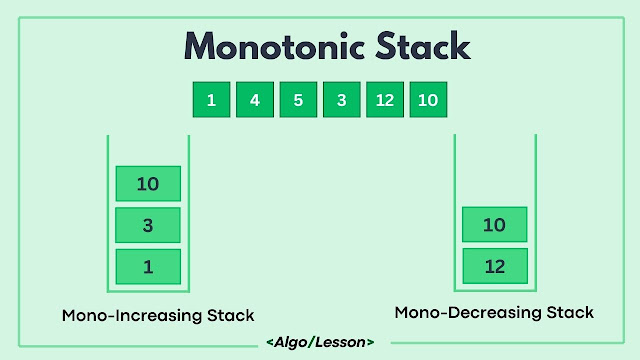
A monotonic stack is a stack-based data structure used in solving problems related to finding the next greater or smaller element, computing the nearest or farthest smaller or larger elements, or solving various range-based problems efficiently. It maintains a certain monotonic property, either non-increasing or non-decreasing while traversing through elements in the stack.
Output:
Output:
Note: In mathematics, "monotonic refers to the behavior or trend of a function or sequence that consistently moves in one direction without reversing or fluctuating.
What is a Monotonic Stack?
The primary purpose of a monotonic stack is to facilitate efficient queries for elements that satisfy certain conditions within a sequence or an array. It allows constant-time access to specific elements by leveraging its monotonic property, making it ideal for scenarios where the order of elements is crucial.
A monotonic stack can either be non-increasing or non-decreasing. A non-increasing monotonic stack maintains elements in decreasing order from the stack's base to its top. Conversely, a non-decreasing monotonic stack arranges elements in increasing order within the stack.
Key features of Monotonic stack:
- A normal stack but its elements are in monotonically decreasing/increasing order.
- The next element can only be pushed if it maintains the order.
- If pushing the next element violates the order, pop elements until it can be safely pushed.

Types of Monotonic Stack.
Monotonic stacks can be categorized into two types based on the order they maintain.
- Non-Increasing monotonic stack.
- Non-decreasing monotonic stack.
Non-increasing Monotonic stack.
This stack type maintains elements in decreasing order from the base to the top of the stack. To push an element onto the stack, elements greater than the incoming element are removed (popped) to sustain the decreasing order.
Example:
Consider the input array [5, 3, 9, 6, 2, 8]
Step-by-step process:
- Initially, the stack is empty.
- Push 5 onto the stack: Stack contains [5].
- Push 3 onto the stack: Stack contains [5, 3].
- Push 9 onto the stack: Since 9 is greater than 5 and 3, we remove 5 and 3 and the stack becomes [9].
- Push 6 onto the stack: Stack contains [9, 6].
- Push 2 onto the stack: Stack contains [9, 6, 2].
- Push 8 onto the stack: Since 8 is greater than 6 and 2, we remove 6 and 2 and the stack becomes [9, 8].
- After processing all the elements, the resultant stack is [9, 8].
Code Implementation:
Below is the code implementation of the Non-Increasing Monotonic Stack:
#include <iostream>
#include <stack>
#include <vector>

using namespace std;

// Function to find a monotonic decreasing stack
vector<int> decreasingStack(const vector<int>& arr) {
    stack<int> stk;
    vector<int> result;

    for (int num : arr) {
        while (!stk.empty() && stk.top() < num) {
            stk.pop();
        }
        stk.push(num);
    }

    int n = stk.size();
    result.resize(n);
    int i = n - 1;

    // Empty stack
    while (!stk.empty()) {
        result[i--] = stk.top();
        stk.pop();
    }

    return result;
}

// Driver code
int main() {
    vector<int> arr = {12, 17, 11, 13, 14, 10};

    // Function Call
    vector<int> result = decreasingStack(arr);

    // Displaying the original array
    cout << "The Original Array: ";
    for (int num : arr) {
        cout << num << " ";
    }
    cout << endl;

    // Displaying Monotonic Decreasing Stack
    cout << "The Monotonic Stack: ";
    for (int num : result) {
        cout << num << " ";
    }
    cout << endl;

    return 0;
}
import java.util.Stack;

public class MonotonicDecreasingStack {

  // Function to find a monotonic decreasing stack
  static int[] decreasingStack(int[] arr) {
      Stack<Integer> stack = new Stack<>();

      for (int num : arr) {
          while (!stack.isEmpty() && stack.peek() < num) {
              stack.pop();
          }
          stack.push(num);
      }

      int n = stack.size();
      int[] result = new int[n];
      int i = n - 1;

      // Empty stack
      while (!stack.isEmpty()) {
          result[i--] = stack.pop();
      }

      return result;
  }

  // Driver code
  public static void main(String[] args) {
      int[] arr = {12, 17, 11, 13, 14, 10};

      // Function Call
      int[] result = decreasingStack(arr);

      // Displaying the original array
      System.out.print("The Original Array: ");
      for (int num : arr) {
          System.out.print(num + " ");
      }
      System.out.println();

      // Displaying Monotonic Decreasing Stack
      System.out.print("The Monotonic Stack: ");
      for (int num : result) {
          System.out.print(num + " ");
      }
      System.out.println();
  }
}
def decreasing_stack(arr):
    stack = []
    result = []

    for num in arr:
        while stack and stack[-1] < num:
            stack.pop()
        stack.append(num)

    # Empty stack
    while stack:
        result.insert(0, stack.pop())

    return result

# Driver code
arr = [12, 17, 11, 13, 14, 10]

# Function Call
result = decreasing_stack(arr)

# Displaying the original array
print("The Original Array:", *arr)

# Displaying Monotonic Decreasing Stack
print("The Monotonic Stack:", *result)
using System;
using System.Collections.Generic;

class Program
{
    // Function to find a monotonic decreasing stack
    static int[] DecreasingStack(int[] arr)
    {
        Stack<int> stack = new Stack<int>();

        foreach (int num in arr)
        {
            while (stack.Count > 0 && stack.Peek() < num)
            {
                stack.Pop();
            }
            stack.Push(num);
        }

        int n = stack.Count;
        int[] result = new int[n];
        int i = n - 1;

        // Empty stack
        while (stack.Count > 0)
        {
            result[i--] = stack.Pop();
        }

        return result;
    }

    // Driver code
    static void Main()
    {
        int[] arr = { 12, 17, 11, 13, 14, 10 };

        // Function Call
        int[] result = DecreasingStack(arr);

        // Displaying the original array
        Console.Write("The Original Array: ");
        foreach (int num in arr)
        {
            Console.Write(num + " ");
        }
        Console.WriteLine();

        // Displaying Monotonic Decreasing Stack
        Console.Write("The Monotonic Stack: ");
        foreach (int num in result)
        {
            Console.Write(num + " ");
        }
        Console.WriteLine();
    }
}
The Original Array: 12 17 11 13 14 10
The Monotonic Stack: 17 14 10
Time Complexity: The time complexity of the code is O(N), where N is the number of elements in the input array. This is because the code iterates through each element of the array exactly once.
Space Complexity: The space complexity is also O(N), where N is the number of elements in the input array. The space is used for the stack and the result array.
Non-Decreasing Monotonic Stack.
This stack type maintains elements in increasing order from the base to the top of the stack. When we want to push an element onto the stack, elements smaller than the incoming element are removed (popped) to maintain the increasing order.
Example:
Consider the input array [4, 7, 2, 9, 5, 1]
- Initially, the stack is empty.
- Push 4 onto the stack: Stack contains[4].
- Push 7 onto the stack: Stack contains[4, 7].
- Push 2 onto the stack: Since 2 is smaller than 7 and 4, we remove 7 and 4 and push 2. [2].
- Push 9 onto the stack: Stack contains[2, 9].
- Push 5 onto the stack: Since 5 is smaller than 9, we remove 9 and push 5. [2, 5].
- Push 1 onto the stack: Since 1 is smaller than 2 and 5, we remove 2 and 5 and push 1 [1].
- After processing all elements, the resultant stack is [1].
Code Implementation:
Below is the code implementation of the Non-Decreasing Monotonic Stack:
#include <iostream>
#include <stack>
#include <vector>

using namespace std;

// Function to build a monotonic increasing stack
vector<int> increasingStack(const vector<int>& arr) {
    stack<int> stk;
    vector<int> result;

    for (int num : arr) {
        while (!stk.empty() && stk.top() > num) {
            stk.pop();
        }
        stk.push(num);
    }

    while (!stk.empty()) {
        result.insert(result.begin(), stk.top());
        stk.pop();
    }

    return result;
}

// Driver code
int main() {
    vector<int> arr = {1, 4, 5, 3, 14, 17};

    // Function Call
    vector<int> result = increasingStack(arr);

    // Displaying the original array
    cout << "The Original Array: ";
    for (int num : arr) {
        cout << num << " ";
    }
    cout << endl;

    // Displaying Monotonic increasing stack
    cout << "The Monotonic Stack: ";
    for (int num : result) {
        cout << num << " ";
    }
    cout << endl;

    return 0;
}
import java.util.Stack;

public class MonotonicIncreasingStack {

  // Function to build a monotonic increasing stack
  static int[] increasingStack(int[] arr) {
      Stack<Integer> stack = new Stack<>();

      for (int num : arr) {
          while (!stack.isEmpty() && stack.peek() > num) {
              stack.pop();
          }
          stack.push(num);
      }

      int n = stack.size();
      int[] result = new int[n];
      int i = n - 1;

      // Empty Stack
      while (!stack.isEmpty()) {
          result[i--] = stack.pop();
      }

      return result;
  }

  // Driver code
  public static void main(String[] args) {
      int[] arr = {1, 4, 5, 3, 14, 17};

      // Function Call
      int[] result = increasingStack(arr);

      // Displaying the original array
      System.out.print("The Original Array: ");
      for (int num : arr) {
          System.out.print(num + " ");
      }
      System.out.println();

      // Displaying Monotonic increasing stack
      System.out.print("The Monotonic Stack: ");
      for (int num : result) {
          System.out.print(num + " ");
      }
      System.out.println();
  }
}
def increasing_stack(arr):
    stack = []
    result = []

    for num in arr:
        while stack and stack[-1] > num:
            stack.pop()
        stack.append(num)

    while stack:
        result.insert(0, stack.pop())

    return result

# Driver code
arr = [1, 4, 5, 3, 14, 17]

# Function Call
result = increasing_stack(arr)

# Displaying the original array
print("The Original Array:", *arr)

# Displaying Monotonic increasing stack
print("The Monotonic Stack:", *result)
using System;
using System.Collections.Generic;

class Program
{
    // Function to build a monotonic increasing stack
    static int[] IncreasingStack(int[] arr)
    {
        Stack<int> stack = new Stack<int>();

        foreach (int num in arr)
        {
            while (stack.Count > 0 && stack.Peek() > num)
            {
                stack.Pop();
            }
            stack.Push(num);
        }

        int n = stack.Count;
        int[] result = new int[n];
        int i = n - 1;

        // Empty Stack
        while (stack.Count > 0)
        {
            result[i--] = stack.Pop();
        }

        return result;
    }

    // Driver code
    static void Main()
    {
        int[] arr = { 1, 4, 5, 3, 14, 17 };

        // Function Call
        int[] result = IncreasingStack(arr);

        // Displaying the original array
        Console.Write("The Original Array: ");
        foreach (int num in arr)
        {
            Console.Write(num + " ");
        }
        Console.WriteLine();

        // Displaying Monotonic increasing stack
        Console.Write("The Monotonic Stack: ");
        foreach (int num in result)
        {
            Console.Write(num + " ");
        }
        Console.WriteLine();
    }
}
The Original Array: 1 4 5 3 14 17
The Monotonic Stack: 1 3 14 17
Time Complexity: O(n)
Space Complexity: O(n)
Advantages of Monotonic Stack.
- It allows quick determination of immediate next or previous elements in a sequence, aiding in optimizing various algorithms.
- It provides a straightforward approach to solving problems involving the next greater/smaller elements or histogram-related calculations.
- It offers improved complexity in scenarios requiring element comparisons, reducing the overall computation time.
Disadvantages of Monotonic Stack.
- It's specialized for problems requiring specific immediate next or previous element computations and might not be suitable for border algorithmic solutions.
- It involves maintaining a stack, which can lead to additional memory overhead in scenarios with large input sizes.

