String Class in C++

Many people get confused with the definition of string in C++ whether it is a class or a data type. Let's make it clear that string is not a built-in data type but its behavior is very much similar to the fundamental data types.

String Class in C++

A String is a class from the standard template library that defines objects and is used to store a sequence of variable-length characters surrounded by double quotes(" ") that end with a null character '\0'. 

We use String data type to store words or a sentence kind of data.

  • Example 1: "Algolesson"
  • Example 2: "We are learning C++ Programming"

Note: All the functionality that we need to work with String class is available in the <string> header file so it is good practice to include this header file while working with String.


Some important properties of String:

  • In string, memory allocation takes place dynamically at runtime so no memory is wasted.
  • String implementations are slower than character arrays.
  • String provides several inbuilt functionalities that we can use to perform operations on strings.


How do you Declare and Initialize a string in C++?

String declaration is very much like any other data type, we use the string keyword followed by string name (variable name) which is going to store our value. In the below example, str is the string name and the default initialization of this string is empty. 

ex: string str; //str is an empty string


There are multiple ways to initialize a string in C++ and below are a few examples:

String Initialization Examples Definition
string str; In this example, the string is empty which is a default Initialization whenever we create a string.
string str2(str1); In this example, we are copying the value of one string (str1) into another string (str2).
string str("algolesson"); In this example, the str string is copying the value of the string literal present in double quotes "algolesson".
string str = "algolesson"; In this example also, the str string is copying the value of the string literal present in double quotes "algolesson".
string str(n, 'e'); In this example also, we initialize the string with n copies of the character 'e'.

C++ Code for string declaration and Initialization.

//C++ Code example for initialization
#include<iostream>
#include<string>
using namespace std;

int main(){

    string str1; //empty string
    string str2 ("What is your name?");
    string answer = "My name is John";
    str1 = "I am a Software Engineer.";
    string copyChar (3, 'w');
    string companyName (".algolesson.com");

    //Printing the string values
    cout<<str2<<endl;
    cout<<answer<<" "<<str1<<endl;
    cout<<copyChar<<companyName<<endl;

    return 0;
}
Output:
What is your name?
My name is John I am a Software Engineer.
www.algolesson.com

There are several operations that you can perform on String in C++ programming language. Let's understand each of them one by one. 

Read and Write Operations on String in C++ (getline()).

There are multiple ways to perform read/write operations on a string one is by using cin (character input) and cout (character output) objects but there is one limitation the cin can read only one word and everything after the white space is discarded. Let's understand with one example:
//C++ code to read and write string
#include<iostream>
#include<string>
using namespace std;

int main(){
    //empty string
    string str;
    //input from the user
    cout<<"Enter a string: ";
    cin>>str;
    cout<<str<<endl;

    return 0;
}
Output:
Enter a string: Hello World
Hello

If you observe in the above example, we entered a two-word string "Hello World" separated by white space but our string variable str is able to only the first word. To overcome this problem and to read an entire line of string we use the getline() standard library function which read the input one line at a time until the EOF(End of File) is encountered. 

Let's understand getline()in C++ with one example:
//C++ code to read and write string using getline()
#include<iostream>
#include<string>
using namespace std;

int main(){
    //empty string
    string name, subject;

    cout<<"What is your name? ";
    //use of getline() function
    getline(cin,name); 
    cout<<name<<endl;

    cout<<"Enter your subject name: ";
    //use of getline() function with delimiting character
    getline(cin,subject,'-'); 
    cout<<subject;
    
    return 0;
}
Output:
What is your name? I am John Wick
I am John Wick
Enter your subject name: Operating-System
Operating
In the above example code, we have taken user input using the getline() function, and when we use it for the first time (getline(cin, name)) we can observe that the entire line is displayed which means that getline() function capture characters even after white spaces. 

When we use the getline() function for the second time (getline(cin, subject, '-')) we have added a delimiting character (-) that is added as the third parameter of the function and it means that any character that appears after this delimiting character is discarded.

How to Access String Elements in C++?

String class is used to store a sequence of characters and each character takes one byte of memory. There are several ways to access individual characters of a string. 
String Function Definition
operator [pos] This function is used to return a reference of the character at position pos in the string. We can also modify the character of that position (pos).
at() This function is used to return a reference of the character at position pos in the string. We can also modify the character of that position.
back() This function is used to return a reference of the last character of the string. We can also add one character at the end using this function.
front() This function is used to return a reference of the first character of the string. We can also add one character at the front using this function.

Let's understand the ways of accessing characters in a string in C++ code:
/*C++ program to access string elements*/
#include<iostream>
#include<string>
using namespace std;

int main(){

  string str = "Welcome to Algolesson";
  //working of [] operator
  for(int i = 0; i < str.size(); i++){
    cout<<str[i];
  }
  //working of at()
  cout<<endl;
  for(int i = 0; i < str.size(); i++){
    cout<<str.at(i);
  }
  cout<<endl;
  //working of back()
  str.back() = '!';
  cout<<"The last character of the string is: "<<str.back()<<endl;
  //working of front()
  str.front() = '@';
  cout<<"The first  character of the string is: "<<str.front()<<endl;

  cout<<"String after operation: "<<str<<endl;
  return 0;
}
Output:
Welcome to Algolesson
The last character of the string is: !
The first  character of the string is: @
String after operation: @elcome to Algolesso!


I hope you found this post useful, please write a comment if you found anything incorrect or share your valuable feedback. 

C++ Program to Check if a Year is a Leap Year.

In this post, you will learn to check whether a year is a leap year or not using the C++ programming language. But before moving to the coding part it is important to get some basic understanding of Leap Year. Let's start this topic with our first question and that is:


What is Leap Year?

A Year that contains 366 days is known as Leap Year. We get one leap year every four years and this year February month contains 29 days which is one extra day than any usual year. Examples of Leap Years: 1968, 2000, 2004, 2012, etc. 


How to Check if a Year is Leap Year or not?

There are certain conditions that you can check to find out whether a year is a leap year or not. 

  • If the given year is divisible by 400 then it is a leap year.
  • If the given year is divisible by 100 but not divisible by 400 then it is not a leap year.

  • If the given year is divisible by 4 but is not divisible by 100 then it is a leap year.
  • If both the above conditions fail to satisfy then the given year is not a leap year.

C++ Program to check Leap Year using if else statement.

//C++ Code to check Leap year using if else.
#include<iostream>
using namespace std;

int main(){

    int year;

    cout<<"Enter a Year: ";
    cin>>year;

    //Year divisible by 400
    if(year % 400 == 0)
       cout<<year<<" is a Leap Year.";
    //Year divisible by 100 but not divisible by 400   
    else if(year % 100 == 0)
       cout<<year<<" is not a Leap Year.";
    //Year divisible by 4 but not divisible by 100   
    else if(year % 4 == 0)
       cout<<year<<" is a Leap Year.";
    else
       cout<<year<<" is not a Leap Year.";

    return 0;            
}
Output:
Enter a Year: 1968
1968  is a Leap Year.


C++ Program to check Leap Year using nested if else statement.

//C++ Code to check Leap year using nested if else.
#include<iostream>
using namespace std;

int main(){

    int year;

    cout<<"Enter a Year: ";
    cin>>year;

    if(year % 4 == 0){
        if(year % 100 == 0){
            if(year % 400 == 0){
                cout<<year<<" is a Leap Year.";
            }
            else{
                cout<<year<<" is not a Leap Year.";
            }
        }
        else{
            cout<<year<<" is a Leap Year.";
        }
    }
    else{
        cout<<year<<" is not a Leap Year.";
    }

    return 0;            
}
Output:
Enter a Year: 2006
2006  is not a Leap Year.

Here in the above program, first, check if the year is divisible by 4 or not if not divisible then the given year is not a leap year. If the year is divisible by 4 then check if it is divisible by 100 or not, if not divisible by 100 then it is a leap year else, not a leap year. If the year is divisible by 100 then it must be divisible by 400 to be a leap year.

C++ Program to Check an Armstrong Number.

In this post, we will learn to check if a given number is Armstrong's number or not. Before checking any number we first need to understand what an Armstrong number is? Any positive n digits integer is called an Armstrong number of order n when the number can be expressed in the below format:

[abcd... = pow(a, n) + pow(b, n) + pow(c, n) + pow(d, n) + ...]

Here n = number of digit present.


Example of Armstrong Numbers.

Input: num = 153
Output: 153 is an Armstrong number.

Explanation: 
1*1*1 + 5*5*5 + 3*3*3 = 1 + 125 + 27 = 153

Input: num = 135
OutL 135 is not an Armstrong number.

Explanation: 1*1*1 + 3*3*3 + 5*5*5 = 1 + 27 + 125 = 153  135

Input: num = 1634
Output: 1634 is an Armstrong number.

Explanation: 
1*1*1*1 + 6*6*6*6 + 3*3*3*3 + 4*4*4*4 = 1 + 1296 + 81 + 256 = 1634

C++ Program to check three Digit Armstrong numbers.

//C++ code to check the three-digit Armstrong number.
#include<iostream>
using namespace std;

int main(){
    
    int num, numCopy, remainder, ans = 0;
    cout<<"Enter a three digit integer: ";
    cin>>num;
    numCopy = num;

    while(numCopy != 0){
        //this remainder always contain last digit
        remainder = numCopy % 10;

        ans += remainder * remainder * remainder;

        //remove the last digit of a number.
        numCopy /= 10;
    }
    
    if(ans == num)
       cout<<num<<" is an Armstrong Number.";
    else
       cout<<num<<" is not an Armstrong Number.";   
    return 0;                    
}
Output:
Enter a three digit integer: 153
153 is an Armstrong Number.
The above program can only check three-digit Armstrong numbers but if we get any integer with more digits then the above program will fail. (alert-warning) 

C++ Program to check n Digits Armstrong number.

//C++ code to check n digit Armstrong number.
#include<iostream>
#include<math.h>
using namespace std;

int main(){
    
    int num, numCopy, remainder, ans = 0;
    cout<<"Enter an integer: ";
    cin>>num;
    numCopy = num;
    
    //variable to store a number of digits
    int n = 0;
    //counting number of digits present given num 
    while(numCopy != 0){
        numCopy /= 10;
        n++;
    }
    numCopy = num;

    while(numCopy != 0){
        //this remainder always contain the last digit
        remainder = numCopy % 10;

        ans += round(pow(remainder, n));

        //remove the last digit of number.
        numCopy /= 10;
    }
    
    if(ans == num)
       cout<<num<<" is an Armstrong Number.";
    else
       cout<<num<<" is not an Armstrong Number.";   
    return 0;                    
}
Output:
Enter a three digit integer: 1634
1634 is an Armstrong Number.

The above program can check an Armstrong number with n number of digits and to do so we first need to count the number of digits present in the user input and store it in a variable n. This calculation is done by the first while loop in the program.
 
Next, while loop will check if the number is an Armstrong number or not, and for that, we will use the math pow(a, n) function which is present inside <math.h> header file.

C++ Code to Convert Celsius to Fahrenheit (vice versa).

In this post, we will learn to write C++ code to convert Celsius to Fahrenheit. We can use below conversion formula for our temperature calculation. Let's understand with one example.


Formula to calculate Fahrenheit when Celsius is given:

F = (C * 1.8) + 32

In the above mathematical formula, C stands for temperature given in Degree Celsius and F stands for the Degree Fahrenheit temperature we will get after the calculation. In most countries, Celsius is used to measuring the temperature but in US Fahrenheit is used to measure temperature.

Example: Find the degree Fahrenheit when the celsius temperature is 50°C.

F = (C * 1.8) + 32

  = (50 * 1.8) + 32

  = (90) + 32

  = 122°F(alert-passed)


C++ Code Implementation for Celsius to Fahrenheit conversion.

//C++ code to convert celsius to Fahrenheit
#include<iostream>
using namespace std;

int main(){
    float celsius, fahrenheit; 
   
    cout<<"Enter the temperature in Celsius: ";
    cin>>celsius;
    fahrenheit = (celsius * 1.8) + 32;
    cout<<"The temperature in Fahrenheit is: "<<fahrenheit;

    return 0;                    
}
Output:
Enter the temperature in Celsius: 50
The temperature in Fahrenheit is: 122

Converting Fahrenheit to Celsius.
We can also convert Fahrenheit to Celsius by deriving a new formula using the same above formula. We just did some basic math to create Fahrenheit to Celsius formula as shown below.

F = (C * 1.8) + 32

F - 32 = (C * 1.8)

(F - 32)/1.8 = C

C = (F - 32)/1.8

Example: Find the degree Celsius when the Fahrenheit temperature is 122°F.

C = (F - 32)/1.8

  = (122 - 32)/1.8

  = (90)/1.8

  = 50°F(alert-passed)

C++ Code Implementation for Fahrenheit to Celsius Conversion.

//C++ code to convert Fahrenheit to celsius
#include<iostream>
using namespace std;

int main(){
    float celsius, fahrenheit; 
   
    cout<<"Enter the temperature in Fahrenheit: ";
    cin>>fahrenheit;
    celsius = (fahrenheit - 32) / 1.8;
    cout<<"The temperature in Celsius is: "<<celsius;

    return 0;                    
}

Output:

Enter the temperature in Fahrenheit: 122
The temperature in Celsius is: 50

C++ Program to Find Biggest of Three Numbers.

Here we will understand how to find the largest number among the three numbers using C++ code. 

Examples:
Input: int a = 5, b = 8, c = 2
Output: The Biggest number among the three is 8

Input: int a = 54, b = 21, c = 9
Output: The Biggest number among the three is 54

There are multiple ways to solve this problem:
  1. Using if statement.
  2. Using if-else statement.
  3. Using Ternary Operator.
1. Algorithm using if statement.
  • Take three input variables from the user and store them in three different variables a, b, and c.
  • Check condition if a >= b and a >= c, if both conditions are true then print "The Biggest number among three is a. 
  • Check condition if b >= a and b >= c, if both conditions are true then print "The Biggest number among three is b. 
  • Check condition if c >= a and c >= b, if both conditions are true then print "The Biggest number among three is c.  
  • Stop the Program.
//C++ Code to find Biggest among three numbers
#include<iostream>
using namespace std;

int main(){
    int a, b, c;

    cout << "Enter three numbers: ";
    cin >> a >> b >> c;

    if(a >= b && a >= c)
       cout<<"The Biggest number among the three is "<<a;

    if(b >= a && b >= c)
       cout<<"The Biggest number among the three is "<<b;

    if(c >= a && c >= b)
       cout<<"The Biggest number among the three is "<<c;
             
    return 0;                    
}
Output:
Enter three numbers: 10 34 54
The Biggest number among the three is 54

2. Algorithm using if-else statement
This algorithm is a little better than the previous one because here we are not going to check the remaining conditions once we find our first true condition.  
  • Take three input variables from the user and store them in three different variables a, b, and c.
  • Check first if-condition, a >= b and a >= c, if conditions are true then print "The Biggest number among three is a" and end the program.
  • Check the next else-if condition b >= a and b >= c, if conditions are true then print "The Biggest number among three is b" and end the program.
  • If both the above conditions fail then without checking any further conditions you can declare the third variable as the largest variable.
  • End the Program.
//C++ Code to find Biggest among three numbers
//using if-else 
#include<iostream>
using namespace std;

int main(){
    int a, b, c;

    cout << "Enter three numbers: ";
    cin >> a >> b >> c;

    if(a >= b && a >= c)
       cout<<"The Biggest number among the three is "<<a;
    else if(b >= a && b >= c)
       cout<<"The Biggest number among the three is "<<b;
    else
       cout<<"The Biggest number among the three is "<<c;
             
    return 0;                    
}
Output:
Enter three numbers: -5 4 5
The Biggest number among the three is 5

3. Algorithm using Ternary Operator.
The ternary operator is a shorter way of writing if-else conditions and based on the results of the condition a particular block of code executes.
  • (condition) ? expression 1 : expression 2
Here, if the condition is true then expression 1 will get executed and if the condition is false then expression 2 will get executed.
//C++ Code to find Biggest among three numbers 
//using ternary operator
#include<iostream>
using namespace std;

int main(){
    int a, b, c;
    int ans;
    cout << "Enter three numbers: ";
    cin >> a >> b >> c;

    //Ternary Operator
    ans = (a >= b ? (a >= c ? a : c) : (b >= c ? b : c));
    
    cout<<"The Biggest number among the three is "<<ans;
             
    return 0;                    
}
Output:
Enter three numbers: 5 3 12
The Biggest number among the three is 12

C++ Program to check a Prime Number.

To write code for Prime number checking first we need to understand what is Prime Number? Any number which is divisible only itself and 1 is known as Prime Number. Example: 2, 3, 5, 7, etc. You cannot divide these numbers with any other number except 1 and itself but one thing to make sure of here is that 0 and 1 are not Prime Numbers.


We can follow the below instructions to check if a number is Prime or not:

  • Create a boolean flag is_prime and mark and initially initialize it with true.
  • Check if the given number n is 0 or 1, if yes then set the is_prime flag value equal to false and print a message that the given number is not prime. 
  • If the n is greater than 1 then run a for loop from i = 2 up to i <= n/2 where n is the number that we need to check. Keep on incrementing the value of i by 1 with each iteration.

Note: We are running the loop up to n/2 because it is not possible to find any factor of n beyond n/2.(alert-passed)

  • In any iteration, the value of i perfectly divides the given value n then set the is_prime flag value equal to false and prints a message that the given number is not prime, else prints a message that the given number is a prime number.

Example: C++ Code to check Prime Number.

//C++ Code to check prime number
#include<iostream>
using namespace std;

int main(){

    int n;
    bool is_prime = true;

    cout<<"Enter a positive number: ";
    cin>>n;

    if(n == 0 || n == 1)
       is_prime = false;

    for(int i = 2; i <= n/2; i++){
        if(n % i == 0){
            is_prime = false;
            break;
        }
    }   

    if(is_prime)
       cout<<n<<" is a prime number.";
    else
       cout<<n<<" is not a prime number.";

    return 0;                    
}
Output:
Enter a positive number: 7
7 is a prime number.

How To Calculate Time Complexity of an Algorithm.

We calculate the Time and Space complexity of any algorithm by finding the growth rate of the function for different values of N where N is the size of our input. In most cases, we check an algorithm for a bigger value of N to get the worst-case time complexity of an Algorithm. 


It might be possible that one algorithm is giving the best results for smaller values of N and for the same problem another algorithm is giving the best results for larger values of N so we can't predict after which value of N one algorithm is better than other algorithm and this is the reason why we need to check for different values of N. 


But isn't it a tedious task to plug in different values of N to find the growth rate of any program? Here we use our Asymptotic Notations (more specifically Big O notation) to describe the growth rate or time complexity of our programs. 

Before going further into this topic to learn time complexity calculation, we will highly recommend you go through our Algorithms Introduction and Analysis post once. It will help you understand the terminologies used in this post. (alert-passed)  


What is Big O Notation?

When we want to find the running time of an algorithm we are not interested in calculating the exact running time because it is not possible to calculate the exact running time of each algorithm. We always calculate the approximate running time and Big O Notation helps us to achieve this. 


Big O Notation helps us find the time complexity in terms of the size of the input and the best part is that it gives us the upper bound of the function that tells us about the worse case time complexity of an algorithm because the function can never grow faster than this upper bound.


Condition for Big O Notation:

If f(n) and g(n) are the two functions, then

f(n) = O(g(n)) if there exists constants c and no such that f(n)  c.g(n), for all n  no.

Example: 
Given f(n) = n
Is f(n) = O(g(n))?

Let g(n) = 2n

f(n)  c.g(n)
   n  c.2n for all c = 1 and n. = 1

Yes, f(n) = O(g(n))
     f(n) = O(2n)  O(n) Linear Growth


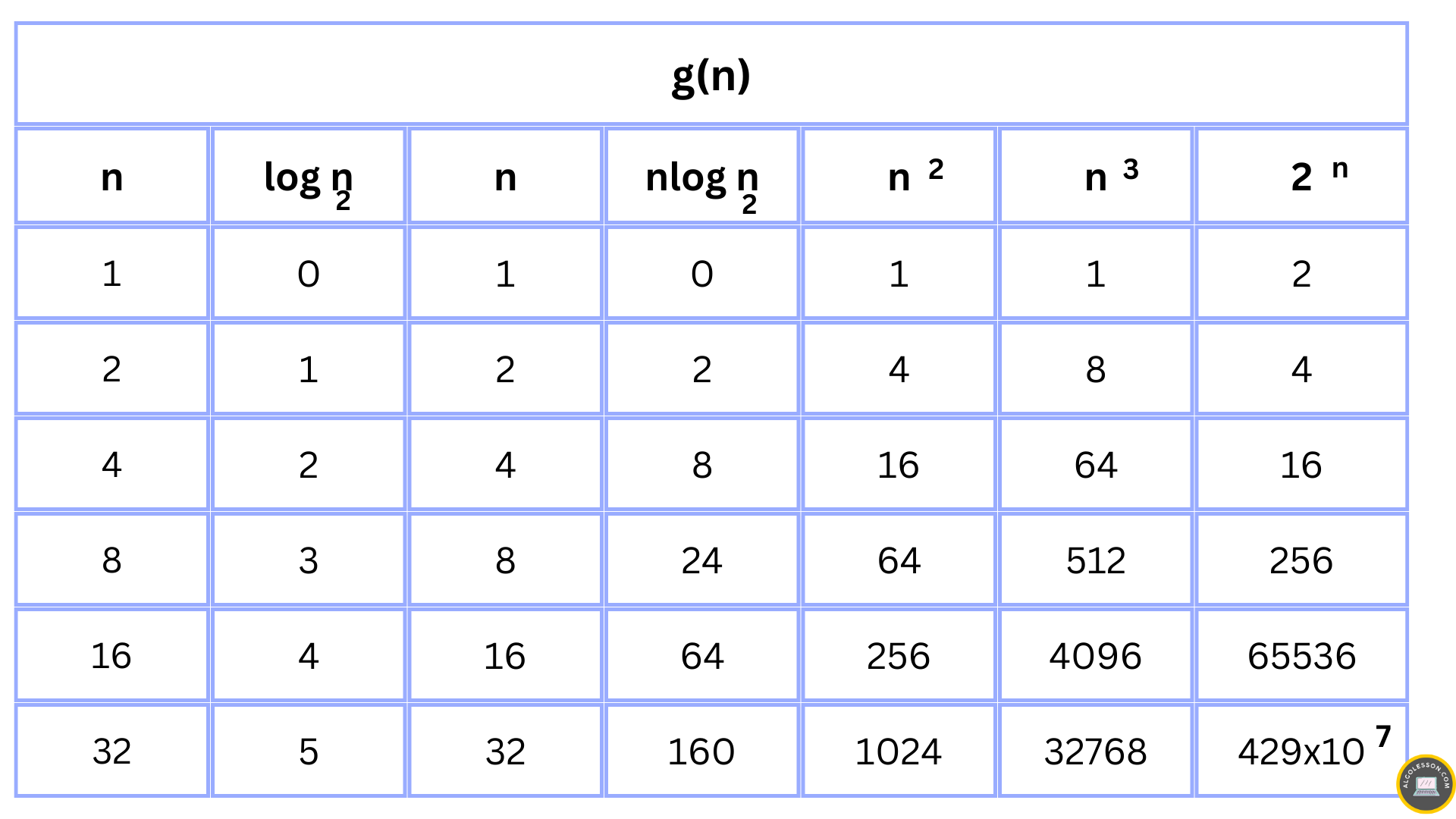
Below is the growth rate of some Standard Functions.

Time complexity growth rate table


Let's understand the time complexity calculation with some example programs.

Example: Program to calculate the sum of first N natural numbers (using a loop).

//C++ Code to sum n natural numbers
#include<iostream>
using namespace std;

int main(){

    int sum = 0, n;              // ---> 1 time
    cin>>n;                      // ---> 1 time 

    for(int i = 1; i <= n; i++){ 
        sum = sum + i;           // ---> n times 
    }

    cout<<sum;                  // ---> 1 time 

    return 0;                   // ---> 1 time 
}
Output:
5
15

Calculation of Time complexity:

Total number of instruction = f(n) = n + 4

f(n) = n + 4
Let g(n) = n

f(n)  c.g(n)
n+4  c.n
n  4

Is f(n) = O(g(n)) ?
Yes, f(n)  c.g(n) for all n  no
where c = 2 and no = 4
f(n) = O(n) Linear Time Complexity

Example: Program to calculate the sum of first N natural numbers (using a formula).

//C++ Code to sum n natural numbers
#include<iostream>
using namespace std;

int main(){

    int sum = 0, n;              // ---> 1 time
    cin>>n;                      // ---> 1 time 

    sum = n*(n+1)/2;            // ---> 1 time
    cout<<sum;                  // ---> 1 time 

    return 0;                   // ---> 1 time 
}
Output:
5
15

Calculation of Time complexity:

Total number of instruction = f(n) = 5

f(n) = 5
Let g(n) = 1

f(n)  c.g(n)
5  c.1
Take c = 6
5  6

Is f(n) = O(g(n)) ?
Yes, f(n)  c.g(n) for all n  no
where c = 6 and no = 1
f(n) = O(1) Constant Time Complexity

In the above two examples, we have solved the same problem using two different methods to make you understand that multiple algorithms are present to solve one particular problem. Here the first approach is giving us time complexity O(n) and the second approach is giving us time complexity O(1) so we will use the second solution as constant time complexity is much faster than linear time complexity. 

What is the time complexity of the below function?
void fun(int n){
  int i, j;
  for(i = 1; i <= n/3; i++){    //Loop 1
     for(j = 1; j <= n; j+=4){  //Loop 2
         cout<<"Hello";
     }
  }
}
Answer:
Calculation of Time complexity:

For Loop 1:Loop is running from i = 1 to i = n/3 and incremented by one
unit each time.

Iteration 1: i = 1
Iteration 2: i = 2
Iteration 3: i = 3
          .
          .
          .
Iteration k: i = n/3 = k O(n)
Time Complexity = O(n)

For Loop 2: Loop is running from j = 1 to j = n and incremented by four
unit each time.

Iteration 1: j = 1
Iteration 2: j = 1 + 4
Iteration 3: j = 1 + 4 + 4 = 1 + 2*4
          .
          .
          .
Iteration k: j = n = 1 + (k - 1)*4
      n = 1 + (k - 1)*4
    n-1 = (k - 1)*4
(n-1)/4 = (k -1)
(n-1)/4 + 1 = k O(n)
Time Complexity = O(n)      

Total Time Complexity = O(n) x O(n) = O(n^2)

Time Complexities of Common Programming Conditions:

Loops: Normal loops usually execute for n number of times where n is the size of input present.
for(int i = 0; i < n; i++){
    //statements
}
  • The above loop executes n times.
  • Time Complexity: O(n)


Nested Loops: One loop run inside another loop and we can multiply the running time of both loops to get the total time.

for(int i = 0; i < n; i++){
    for(int j = 0; j < n; j++)
        //statements
}
  • The outer loop executes n times and the inner loop also executes n times.
  • Time Complexity: O(nxn) = O(n^2)

Consecutive statements: Series of statements and conditions are present inside a function and to get the total running time of the function we sum the time taken by each individual condition.
int n = 10;                // 1 time
int sum = 0;               //1 time

for(int i = 1; i <= n; i++){
   //statements           //n times
}

for(int i = 0; i < n; i++){
    for(int j = 0; j < n; j++)
        //statements       //n^2 times
}
  • The first two lines of code will take constant time to execute, the single for loop statement will execute n times and the nested for loops will execute n^2 times. 
  • Time Complexity: O(n^2 + n + 2) = O(n^2)

If-then-else statement: Usually taken constant time but if nested loops are present then we have to include their running time as well.
if(n == 0){               // ---> 1 time    
  //statement            // ---> 1 time
}
else{
   for(int i = 1; i <= n; i++){
       //statement       // ---> n times
   }
}
  • For if part it will take constant time (1 + 1 = O(1)) and for else part it will take constant time for condition checking and statement will execute n times (1 + n = O(n)).
  • Time Complexity: O(1) + O(n) = O(n)

Logarithmic Complexity: Logarithmic time complexity is achieved when the problem size is cut down by a fraction. log2(n) - Logarithmic equation tells us how many times 2 has been multiplied by itself in order to obtain value n.
//Example of Logarithmic growth
while(i <= n){
   //statement
   i = i*2;
}
Logarithmic Complexity

  • Time Complexity: O(log2n) 
I hope you found this post useful, please share your valuable feedback in the comment section below and share the post with other so we can keep on providing more such valuable content.(alert-success)

DON'T MISS

Tech News
© all rights reserved
made with by AlgoLesson