Stack Implementation Using Array.

Implementing a stack using an array involves using a fixed-size array to store elements and managing the stack operations by manipulating the array's indices. In this article, we will discuss stack implementation using an array and the advantages and disadvantages of using an array for this implementation.
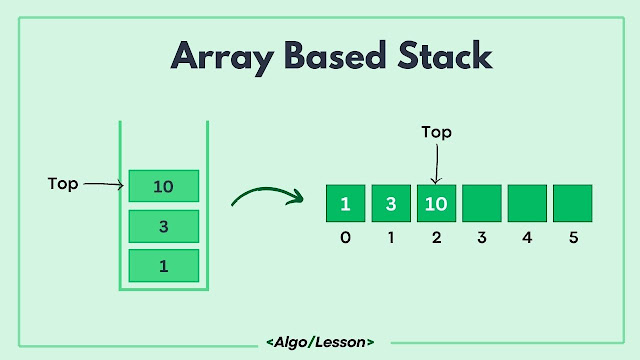
Array Based Stack Diagram

Stack Implementation using Array.

An array provides a contiguous memory block to store stack elements, allowing direct access to elements via their indices. A top pointer or index is used to keep track of the top element of the stack within the array. 

Implementation of stack operations like push, pop, and peek is easy in array as we have direct access to elements using indices, providing constant-time access O(1). However, arrays have a fixed size, limiting the maximum capacity of the stack. 
Let's understand how to implement each stack operation using an array:

First of all, we have to define an array to store stack elements and initialize an index variable (top) to keep track of the top element.

Implement Push Operation:

  • Create a push function that takes a value as input.
  • Check if the stack is full (array size is reached), and handle overflow if needed.
  • Increment the top pointer and insert the value at the incremented index.

Implement Pop Operation:

  • Create a pop function.
  • Check if the stack is empty (top is -1), and handle underflow if needed.
  • Retrieve the value at the top index, decrement the top pointer, and return the value.

Implement Peek Operation:

  • Create a peek function.
  • Check if the stack is empty.
  • Return the value at the top index without modifying the stack.

Implement isEmpty Operation:

  • Create an isEmpty function.
  • Check if the top pointer is -1 (indicating an empty stack).
  • Return True if the stack is empty; otherwise, return False.

Stack Implementation Code.

Below is the code implementation of the stack using an array in C++, Java, Python, and C# language.

// C++ program to implement stack using array
#include <iostream>
using namespace std;

class Stack {
private:
    static const int MAX_SIZE = 1000; // Maximum size of the stack
    int arr[MAX_SIZE];
    int top;

public:
    Stack() : top(-1) {}

    // Push operation
    void push(int value) {
        if (top >= MAX_SIZE - 1) {
            cout << "Stack Overflow. Cannot push." << endl;
            return;
        }
        arr[++top] = value;
    }

    // Pop operation
    void pop() {
        if (isEmpty()) {
            cout << "Stack is empty. Cannot pop." << endl;
            return;
        }
        top--;
    }

    // Check if the stack is empty
    bool isEmpty() {
        return top == -1;
    }

    // Display the top element of the stack
    void peek() {
        if (isEmpty()) {
            cout << "Stack is empty." << endl;
            return;
        }
        cout << "Top element: " << arr[top] << endl;
    }
};

int main() {
    // Example usage of the stack
    Stack stack;

    // Push elements onto the stack
    stack.push(1);
    stack.push(2);
    stack.push(3);

    // Display the top element
    stack.peek();

    // Pop an element
    stack.pop();

    // Display the top element after pop
    stack.peek();

    return 0;
}
// Java program to implement stack using Array
public class Main {
  private static final int MAX_SIZE = 1000; // Maximum size of the stack

  static class Stack {
      private int[] arr;
      private int top;

      Stack() {
          arr = new int[MAX_SIZE];
          top = -1;
      }

      // Push operation
      void push(int value) {
          if (top >= MAX_SIZE - 1) {
              System.out.println("Stack Overflow. Cannot push.");
              return;
          }
          arr[++top] = value;
      }

      // Pop operation
      void pop() {
          if (isEmpty()) {
              System.out.println("Stack is empty. Cannot pop.");
              return;
          }
          top--;
      }

      // Check if the stack is empty
      boolean isEmpty() {
          return top == -1;
      }

      // Display the top element of the stack
      void peek() {
          if (isEmpty()) {
              System.out.println("Stack is empty.");
              return;
          }
          System.out.println("Top element: " + arr[top]);
      }
  }

  public static void main(String[] args) {
      // Example usage of the stack
      Stack stack = new Stack();

      // Push elements onto the stack
      stack.push(1);
      stack.push(2);
      stack.push(3);

      // Display the top element
      stack.peek();

      // Pop an element
      stack.pop();

      // Display the top element after pop
      stack.peek();
  }
}
# Python code to implement stack using array 
class Stack:
MAX_SIZE = 1000  # Maximum size of the stack

def __init__(self):
    self.arr = [0] * self.MAX_SIZE
    self.top = -1

# Push operation
def push(self, value):
    if self.top >= self.MAX_SIZE - 1:
        print("Stack Overflow. Cannot push.")
        return
    self.top += 1
    self.arr[self.top] = value

# Pop operation
def pop(self):
    if self.is_empty():
        print("Stack is empty. Cannot pop.")
        return
    self.top -= 1

# Check if the stack is empty
def is_empty(self):
    return self.top == -1

# Display the top element of the stack
def peek(self):
    if self.is_empty():
        print("Stack is empty.")
        return
    print("Top element:", self.arr[self.top])

# Example usage of the stack
stack = Stack()

# Push elements onto the stack
stack.push(1)
stack.push(2)
stack.push(3)

# Display the top element
stack.peek()

# Pop an element
stack.pop()

# Display the top element after pop
stack.peek()
// C-Sharp Code to implement stack using array
using System;

public class StackArray {
    private const int MAX_SIZE = 1000; // Maximum size of the stack

    class Stack {
        private int[] arr;
        private int top;

        public Stack() {
            arr = new int[MAX_SIZE];
            top = -1;
        }

        // Push operation
        public void Push(int value) {
            if (top >= MAX_SIZE - 1) {
                Console.WriteLine("Stack Overflow. Cannot push.");
                return;
            }
            arr[++top] = value;
        }

        // Pop operation
        public void Pop() {
            if (IsEmpty()) {
                Console.WriteLine("Stack is empty. Cannot pop.");
                return;
            }
            top--;
        }

        // Check if the stack is empty
        public bool IsEmpty() {
            return top == -1;
        }

        // Display the top element of the stack
        public void Peek() {
            if (IsEmpty()) {
                Console.WriteLine("Stack is empty.");
                return;
            }
            Console.WriteLine("Top element: " + arr[top]);
        }
    }

    static void Main() {
        // Example usage of the stack
        Stack stack = new Stack();

        // Push elements onto the stack
        stack.Push(1);
        stack.Push(2);
        stack.Push(3);

        // Display the top element
        stack.Peek();

        // Pop an element
        stack.Pop();

        // Display the top element after pop
        stack.Peek();
    }
}
Output:
Top element: 3
Top element: 2

Advantages of Array-based Stack.

  • Implementing a stack using an array is straightforward and requires minimum code compared to linked list implementations.
  • Array-based stacks offer efficient access to elements using indices, providing constant-time access O(1).
  • Array uses contiguous memory, consuming less memory overhead compared to linked lists which require additional pointers for each node.

Disadvantages of Array-based Stack.

  • Arrays have a fixed size, limiting the maximum capacity of the stack. This constraint requires predefined sizing or dynamic resizing logic to handle overflow conditions.
  • Dynamic resizing to accommodate more elements involves creating a new array with increased capacity and copying existing elements, resulting in time complexity O(n) for resizing operations.
  • If the array's size is significantly larger than the current number of stack elements, it can lead to memory wastage.

Related Post:

How To Delete Temporary Files in Windows.

Delete Temp Files on Windows
Temporary files, accumulated during regular computer usage, can consume valuable disk space over time. Cleaning these files not only frees up storage but also contributes to smoother system performance. Here's a detailed step-by-step guide on how to efficiently delete temporary files in Windows, along with additional tips for optimizing your system.


How To Delete Temporary Files on Windows.

Deleting unnecessary temp files of your Windows system is an important task that you should perform at regular intervals. Let's learn how to delete temp files using Disk Cleanup on Windows.

Step 1: Press 'Windows key + S' to open the search box, type 'Disk Cleanup' and select the app from the search result.

Disk Cleanup App in Windows

Step 2: The Disk Cleanup utility will prompt you to select a drive. Choose the drive you want to clean (usually C:), and click 'OK.'

Disk Cleanup Drive Selection

Step 3: The utility will calculate the space you can free up. In the Disk Cleanup dialog box, check the categories of files you want to delete, such as 'Temporary files' or 'Temporary Internet files.'

Confirmation Page to Delete Temp Files

Quick Note: 'Temporary Files' refer to a broader category of temporary data created by applications and the operating system, while 'Temporary Internet Files' specifically pertain to temporary files generated by web browsers during internet browsing.

Step 4: Click 'OK' to confirm your selection, then click 'Delete Files' to initiate the cleanup process.

Delete Files' to initiate the cleanup process.

To access more cleanup options, click on 'Clean up system files' in the Disk Cleanup dialog. This allows you to remove system files, including the previous Windows installation if applicable.

How To Delete Temporary Files Using Command Prompt.

You can also delete your Windows temp files from the Command prompt using some basic simple commands. Let's learn how to do this:

Step 1: Press 'Windows + X' to open the Power User menu.

Step 2: Select 'Command Prompt (Admin)' or 'Windows PowerShell (Admin)' to open CMD with administrative privileges.

Opening Windows Powershell as Admin in Windows

Step 3: In the Command Prompt window, type the following command and press Enter:
cd %temp%
Optionally, you can view the contents of the Temp folder by typing: dir

Step 4: To delete all files and subdirectories in the Temp folder, type:
del /s /q *
  • /s includes files in all subdirectories.
  • /q enables quiet mode, which doesn't prompt for confirmation.
Step 5: To navigate to the Prefetch folder, which contains additional temporary files, type:
cd C:\Windows\Prefetch

Step 6: To delete the contents of the Prefetch folder, type:
del /q *

Step 7: Type exit and press Enter to close the Command Prompt.

Don't forget to empty the Recycle Bin after deleting files to reclaim additional space.

Automate the Cleanup Process in Windows.

Deleting temp files using Disk Cleanup or Command Prompt is a manual process but you can also automate this process using Window's Settings. 

To schedule the cleanup process in Windows 11, Go to Settings > System > Storage > Configure Storage Sense or run it now. Enable Storage Sense to automatically free up space by deleting temporary files and you also change the default schedule time based on your need.

Enable Storage Sense in WIndows

Another quick and easy method to automate this cleanup process is by creating a Batch File. 

Create a batch file containing the cleanup commands (shown below) and run it whenever needed. For example, create a text file with the extension .bat and include the commands:
cd %temp%
del /s /q *
cd C:\Windows\Prefetch
del /q *

For changes to take effect, consider restarting your computer after the cleanup.

Note: Be cautious when using the del command, especially with wildcard characters (*). Ensure you are in the intended directory before executing these commands to avoid unintentional data loss.

By following these steps and incorporating these tips, you can efficiently manage and delete temporary files on your Windows system, ensuring optimal performance and ample disk space. Regular cleanup is a proactive measure for maintaining a streamlined and responsive computing environment.

Stack Implementation Using Linked List.

Implementing a stack using a linked list involves utilizing the dynamic nature of linked lists to create a Last-in, First Out (LIFO) data structure. A linked list, comprising nodes where each node contains data and a reference to the next node, is ideal for stack implementation due to its efficient insertion and deletion at the beginning or to the top of a stack.

In this article, we will discuss how to perform push, pop, peek, isEmpty, and size operations of a stack using a linked list.

Stack Using LinkedList

To implement a stack using a linked list we need to create nodes that will contain a value and a reference to the next node and we also need a top pointer to point to the topmost node that will help us in further push and pop operation. Initially, our top pointer pointed to null as the stack is empty.

Stack Operations using Linked List.

Push operation: The push operation involves adding an element to the top of the stack. This process begins by creating a new node and linking it to the current top node. The newly created node becomes the new top of the stack, updating the top pointer to this newly added node. This operation has a constant time complexity of O(1), irrespective of the stack's size.

Pop operation: The pop operation removes the top element from the stack. It starts by checking if the stack is empty. If not, it removes the top node, reassigning the top pointer to the subsequent node in the linked list. This constant-time operation O(1) effectively removes the element from the stack, ensuring adherence to the LIFO principle.

Peek operation: The peek (or top) operation retrieves the top element without removing it. It simply returns the value of the top node, allowing users to view the element at the stack's top without altering the stack's structure.

IsEmpty operation: The isEmpty operation inspects whether the stack is empty by checking if the top pointer is null, promptly determining the stack's status without traversing the entire linked list.

Size operation: The size operation determines the number of elements in the stack. It traverses the entire linked list while incrementing a counter for each node encountered. This operation exhibits a linear time complexity O(n), directly proportional to the number of elements in the stack.

Below is the code implementation of the above stack operations using Linked List.
// C++ code implementation for stack using linked list
#include <iostream>
using namespace std;

// Node class for the linked list
class Node {
public:
    int data;
    Node* next;
    Node(int value) : data(value), next(nullptr) {}
};

// Stack class using linked list
class Stack {
private:
    Node* top;

public:
    Stack() : top(nullptr) {}

    // Push operation
    void push(int value) {
        Node* newNode = new Node(value);
        newNode->next = top;
        top = newNode;
    }

    // Pop operation
    void pop() {
        if (isEmpty()) {
            cout << "Stack is empty. Cannot pop." << endl;
            return;
        }
        Node* temp = top;
        top = top->next;
        delete temp;
    }

    // Check if the stack is empty
    bool isEmpty() {
        return top == nullptr;
    }

    // Display the top element of the stack
    void peek() {
        if (isEmpty()) {
            cout << "Stack is empty." << endl;
            return;
        }
        cout << "Top element: " << top->data << endl;
    }
};

int main() {
    // Example usage of the stack
    Stack stack;

    // Push elements onto the stack
    stack.push(1);
    stack.push(2);
    stack.push(3);

    // Display the top element
    stack.peek();

    // Pop an element
    stack.pop();

    // Display the top element after pop
    stack.peek();

    return 0;
}
// Java code implementation for stack using Linked list
public class Main {
  // Node class for the linked list
  static class Node {
      int data;
      Node next;
      Node(int value) {
          data = value;
          next = null;
      }
  }

  // Stack class using linked list
  static class Stack {
      private Node top;

      // Push operation
      void push(int value) {
          Node newNode = new Node(value);
          newNode.next = top;
          top = newNode;
      }

      // Pop operation
      void pop() {
          if (isEmpty()) {
              System.out.println("Stack is empty. Cannot pop.");
              return;
          }
          top = top.next;
      }

      // Check if the stack is empty
      boolean isEmpty() {
          return top == null;
      }

      // Display the top element of the stack
      void peek() {
          if (isEmpty()) {
              System.out.println("Stack is empty.");
              return;
          }
          System.out.println("Top element: " + top.data);
      }
  }

  public static void main(String[] args) {
      // Example usage of the stack
      Stack stack = new Stack();

      // Push elements onto the stack
      stack.push(1);
      stack.push(2);
      stack.push(3);

      // Display the top element
      stack.peek();

      // Pop an element
      stack.pop();

      // Display the top element after pop
      stack.peek();
  }
}
# Python code implementation of stack using linked list
class Node:
def __init__(self, value):
    self.data = value
    self.next = None

class Stack:
def __init__(self):
    self.top = None

# Push operation
def push(self, value):
    new_node = Node(value)
    new_node.next = self.top
    self.top = new_node

# Pop operation
def pop(self):
    if self.is_empty():
        print("Stack is empty. Cannot pop.")
        return
    self.top = self.top.next

# Check if the stack is empty
def is_empty(self):
    return self.top is None

# Display the top element of the stack
def peek(self):
    if self.is_empty():
        print("Stack is empty.")
        return
    print("Top element:", self.top.data)

# Example usage of the stack
stack = Stack()

# Push elements onto the stack
stack.push(1)
stack.push(2)
stack.push(3)

# Display the top element
stack.peek()

# Pop an element
stack.pop()

# Display the top element after pop
stack.peek()
// C-Sharp  code implementation for stack using linked list
using System;

// Node class for the linked list
public class Node {
    public int Data;
    public Node Next;

    public Node(int value) {
        Data = value;
        Next = null;
    }
}

// Stack class using linked list
public class Stack {
    private Node top;

    // Push operation
    public void Push(int value) {
        Node newNode = new Node(value);
        newNode.Next = top;
        top = newNode;
    }

    // Pop operation
    public void Pop() {
        if (IsEmpty()) {
            Console.WriteLine("Stack is empty. Cannot pop.");
            return;
        }
        top = top.Next;
    }

    // Check if the stack is empty
    public bool IsEmpty() {
        return top == null;
    }

    // Display the top element of the stack
    public void Peek() {
        if (IsEmpty()) {
            Console.WriteLine("Stack is empty.");
            return;
        }
        Console.WriteLine("Top element: " + top.Data);
    }
}

class Program {
    static void Main() {
        // Example usage of the stack
        Stack stack = new Stack();

        // Push elements onto the stack
        stack.Push(1);
        stack.Push(2);
        stack.Push(3);

        // Display the top element
        stack.Peek();

        // Pop an element
        stack.Pop();

        // Display the top element after pop
        stack.Peek();
    }
}
Output:
Top element: 3
Top element: 2

Time Complexity: All stack operations like, push, pop, peek, and isEmpty take O(1) constant time as it doesn't rely on traversal. But for counting the number of nodes in the stack take O(n) time as we need to traverse the complete list.

Space Complexity: O(n) where n represents the number of elements in the stack. Each node in the linked list consumes space for value and a reference to the next node.

Benefits of Stack Implementation using LinkedList.

  • Dynamic Memory Allocation: Linked lists allow dynamic memory allocation, accommodating a varying number of elements without predefining a fixed size, providing flexibility.
  • Efficient Insertions and Deletions: Push and pop operations in linked lists execute in constant time, making them efficient for stack implementations.
  • Simplicity and Ease of Use: Implementing a stack using a linked list is relatively straightforward and easy to understand, aiding in code readability and maintenance.
  • No Memory Wastage: Linked lists utilize memory efficiently by allocating space only as needed for elements, preventing memory wastage.

Difference Between Procedural and Object Oriented Programming.

Software development encompasses various methodologies, among which Procedural Programming and Object-Oriented Programming (OOP) stand as fundamental paradigms. Each approach offers unique ways to structure code and solve problems.

In this article, we will discuss the difference between Procedural and Object Oriented Programming. 

Procedural Programming.

Procedural Programming is a programming paradigm that revolves around a step-by-step approach to solving problems by executing procedures or routines. In this paradigm, the emphasis is on procedures or functions that manipulate data, sequentially performing specific tasks. Languages that use procedural programming are C, Pascal, FORTRAN, BASIC, COBOL, and ALGOL.

Key Characteristics of Procedural Programming.

  • It focuses on breaking a program into smaller, reusable functions or procedures.
  • Procedural programming often utilizes global variables that can be accessed from anywhere in the program.
  • Problem-solving follows a top-down methodology, where the main task is broken into smaller sub-tasks.
  • Procedural programming code tends to be less reusable compared to Object-Oriented Programming.

Object-Oriented Programming.

Object-oriented programming (OOP) is programming that revolves around the concept of objects, which contain both data (attributes) and behaviors (methods). It organizes software design around real-world entities, allowing for these objects' creation, manipulation, and interaction to solve complex problems. Languages that use Object-oriented programming are C++, Java, C#, Python, Ruby, PHP, Swift, etc.

Key Characteristics of Object Oriented Programming.

  • Objects are instances of classes, which serve as blueprints defining the structure and behavior of objects.
  • In OOPs, encapsulation hides the internal state of an object and exposes only necessary functionalities through well-defined interfaces.
  • In OOPs, we have an inheritance property that enables new classes to inherit attributes and behaviors from existing classes, promoting code reuse and hierarchy.

Procedural Programming Vs Object Oriented Programming.

Below are the key differences between Procedural and Object-oriented programming.
Procedural Programming Object-Oriented Programming
Procedural Programming focuses on sequential execution via functions or procedures. Object-Oriented Programming (OOP) focuses on objects and their interactions.
Procedural Programming follows a top-down approach to code execution. Object-oriented follow bottom-up approach for code execution.
The program often relies on global data access. The program uses encapsulation to restrict data access.
Less emphasis on code reusability. Promotes code reusability through inheritance and abstraction.
Procedural Programming has no inherent concept of hierarchy. Object-Oriented uses inheritance to create hierarchies and relationships.
Code may become more complex as program size grows. OOP handles complexity better, suitable for larger and complex implementation details.
Example: C, COBOL, FORTRAN, BASIC Example: C++, Java, Python, C#, Ruby

Procedural programming revolves around functions sequentially manipulating data, while Object-Oriented Programming centers on objects containing both data and functions, promoting code reusability, modularity, and easier management of complexity. 

OOP's emphasis on encapsulation, inheritance, and abstraction makes it more suitable for larger and complex systems, whereas procedural programming is often used for simpler, smaller-scale tasks.

DON'T MISS

Tech News
© all rights reserved
made with by AlgoLesson