


Stack is a linear data structure that can be implemented using many other data structures like array and linked list. In this article, we will use a Queue data structure to implement the stack operations that follow the LIFO (Last In, First Out) principle.
 Output:
Output:
Implementation of Stack Using Queue.
If you are a little bit familiar with stack and queue data structure you might know that in stack insertion and deletion of elements happen only from one top end and in queue insertion of an element happens from the rear end and deletion happens from the front.
There are two common approaches to implementing a stack using queues:
- Using Two Queues.
- Using Single Queue.
Let's explore both the approaches,
Stack Implementation Using Two Queues.
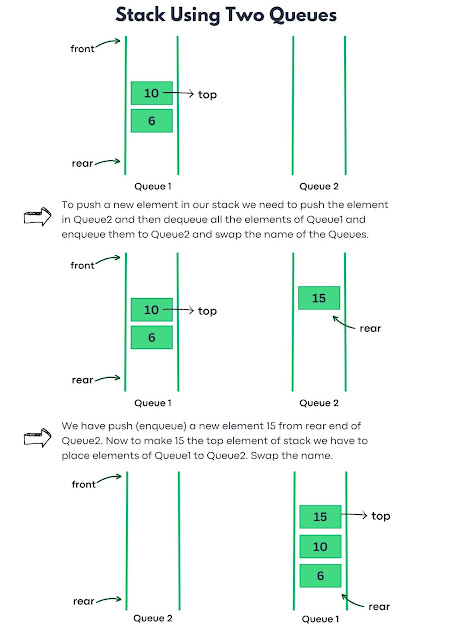
Implementing a stack using two queues involves using one queue (Queue1) for storage and the other (Queue2) for assisting in simulating the Last In, First Out (LIFO) behavior of a stack.
Push Operation: When pushing an element onto the stack, the new element is enqueued into Queue1, the primary storage queue. To maintain the LIFO order, elements from Queue2, if any, are dequeued and enqueued into Queue1. This step effectively reorganizes the elements to ensure the new addition becomes the topmost element in the simulated stack structure.
Pop Operation: Popping an element from the stack involves dequeuing elements from Queue1 until only one element remains. The objective is to remove the top element, mimicking the behavior of a typical stack operation. By continually dequeuing elements and enqueuing them back into Queue1, except for the last remaining element, the desired element to be removed is identified and dequeued.
Illustration:

Code for Stack Implementation Using Queues.
Below is the code implementation of the above approach:
// C++ program to implement stack using two Queue
#include <iostream>
#include <queue>
using namespace std;

class Stack {
private:
    queue<int> q1, q2;

public:
    // Push operation
    void push(int value) {
        q1.push(value);
    }

    // Pop operation
    void pop() {
        if (isEmpty()) {
            cout << "Stack is empty. Cannot pop." << endl;
            return;
        }

        // Move elements from q1 to q2, except the last element
        while (q1.size() > 1) {
            q2.push(q1.front());
            q1.pop();
        }

        // Pop the last element from q1
        q1.pop();

        // Swap the names of q1 and q2
        swap(q1, q2);
    }

    // Check if the stack is empty
    bool isEmpty() {
        return q1.empty();
    }

    // Display the top element of the stack
    void peek() {
        if (isEmpty()) {
            cout << "Stack is empty." << endl;
            return;
        }

        // Move elements from q1 to q2, except the last element
        while (q1.size() > 1) {
            q2.push(q1.front());
            q1.pop();
        }

        // Peek at the last element in q1
        cout << "Top element: " << q1.front() << endl;

        // Move the last element back to q1
        q2.push(q1.front());
        q1.pop();

        // Swap the names of q1 and q2
        swap(q1, q2);
    }
};

int main() {
    // Example usage of the stack
    Stack stack;

    // Push elements onto the stack
    stack.push(1);
    stack.push(2);
    stack.push(3);

    // Display the top element
    stack.peek();

    // Pop an element
    stack.pop();

    // Display the top element after pop
    stack.peek();

    return 0;
}
// Java code implementation for stack using Two Queue
import java.util.LinkedList;
import java.util.Queue;

public class Main {
    static class Stack {
        private Queue<Integer> q1 = new LinkedList<>();
        private Queue<Integer> q2 = new LinkedList<>();

        // Push operation
        void push(int value) {
            q1.add(value);
        }

        // Pop operation
        void pop() {
            if (isEmpty()) {
                System.out.println("Stack is empty. Cannot pop.");
                return;
            }

            // Move elements from q1 to q2, except the last element
            while (q1.size() > 1) {
                q2.add(q1.poll());
            }

            // Pop the last element from q1
            q1.poll();

            // Swap the names of q1 and q2
            Queue<Integer> temp = q1;
            q1 = q2;
            q2 = temp;
        }

        // Check if the stack is empty
        boolean isEmpty() {
            return q1.isEmpty();
        }

        // Display the top element of the stack
        void peek() {
            if (isEmpty()) {
                System.out.println("Stack is empty.");
                return;
            }

            // Move elements from q1 to q2, except the last element
            while (q1.size() > 1) {
                q2.add(q1.poll());
            }

            // Peek at the last element in q1
            System.out.println("Top element: " + q1.peek());

            // Move the last element back to q1
            q2.add(q1.poll());

            // Swap the names of q1 and q2
            Queue<Integer> temp = q1;
            q1 = q2;
            q2 = temp;
        }
    }

    public static void main(String[] args) {
        // Example usage of the stack
        Stack stack = new Stack();

        // Push elements onto the stack
        stack.push(1);
        stack.push(2);
        stack.push(3);

        // Display the top element
        stack.peek();

        // Pop an element
        stack.pop();

        // Display the top element after pop
        stack.peek();
    }
}
# Python program to implement stack using Two Queue
from queue import Queue

class Stack:
    def __init__(self):
        self.q1 = Queue()
        self.q2 = Queue()

    # Push operation
    def push(self, value):
        self.q1.put(value)

    # Pop operation
    def pop(self):
        if self.is_empty():
            print("Stack is empty. Cannot pop.")
            return

        # Move elements from q1 to q2, except the last element
        while self.q1.qsize() > 1:
            self.q2.put(self.q1.get())

        # Pop the last element from q1
        self.q1.get()

        # Swap the names of q1 and q2
        self.q1, self.q2 = self.q2, self.q1

    # Check if the stack is empty
    def is_empty(self):
        return self.q1.qsize() == 0

    # Display the top element of the stack
    def peek(self):
        if self.is_empty():
            print("Stack is empty.")
            return

        # Move elements from q1 to q2, except the last element
        while self.q1.qsize() > 1:
            self.q2.put(self.q1.get())

        # Peek at the last element in q1
        print("Top element:", self.q1.queue[0])

        # Move the last element back to q1
        self.q2.put(self.q1.get())

        # Swap the names of q1 and q2
        self.q1, self.q2 = self.q2, self.q1

# Example usage of the stack
stack = Stack()

# Push elements onto the stack
stack.push(1)
stack.push(2)
stack.push(3)

# Display the top element
stack.peek()

# Pop an element
stack.pop()

# Display the top element after pop
stack.peek()
// C-Sharp program to implement stack using Queues
using System;
using System.Collections.Generic;

public class StackUsingQueue {
    class Stack {
        private Queue<int> q1 = new Queue<int>();
        private Queue<int> q2 = new Queue<int>();

        // Push operation
        public void Push(int value) {
            q1.Enqueue(value);
        }

        // Pop operation
        public void Pop() {
            if (IsEmpty()) {
                Console.WriteLine("Stack is empty. Cannot pop.");
                return;
            }

            // Move elements from q1 to q2, except the last element
            while (q1.Count > 1) {
                q2.Enqueue(q1.Dequeue());
            }

            // Pop the last element from q1
            q1.Dequeue();

            // Swap the names of q1 and q2
            Queue<int> temp = q1;
            q1 = q2;
            q2 = temp;
        }

        // Check if the stack is empty
        public bool IsEmpty() {
            return q1.Count == 0;
        }

        // Display the top element of the stack
        public void Peek() {
            if (IsEmpty()) {
                Console.WriteLine("Stack is empty.");
                return;
            }

            // Move elements from q1 to q2, except the last element
            while (q1.Count > 1) {
                q2.Enqueue(q1.Dequeue());
            }

            // Peek at the last element in q1
            Console.WriteLine("Top element: " + q1.Peek());

            // Move the last element back to q1
            q2.Enqueue(q1.Dequeue());

            // Swap the names of q1 and q2
            Queue<int> temp = q1;
            q1 = q2;
            q2 = temp;
        }
    }

    static void Main() {
        // Example usage of the stack
        Stack stack = new Stack();

        // Push elements onto the stack
        stack.Push(1);
        stack.Push(2);
        stack.Push(3);

        // Display the top element
        stack.Peek();

        // Pop an element
        stack.Pop();

        // Display the top element after pop
        stack.Peek();
    }
}
Top element: 3
Top element: 2
Time and Space Complexity.
In the above code, our pop operation is costly as we have to move all the remaining elements from Queue1 to Queue2. Similarly, we can implement the same approach by making push operation costly instead of pop operation.
| Stack Operation | Time Complexity | Space Complexity |
|---|---|---|
| Push Operation | O(1) | O(1) |
| Pop Operation | O(N) | O(1) |
| IsEmpty | O(1) | O(1) |
This approach cleverly utilizes two queues to represent stack behavior by employing element movements between the queues. While it successfully emulates a stack, it incurs some space overhead and may involve extra operations, such as queue swapping which could impact performance.
Stack Implementation using Single Queue.
In the above approach, we have used two queues to implement the stack operation. In this approach, we are going to use a single queue to implement the stack by manipulating the enqueue and dequeue operations to achieve the Last In, First Out (LIFO) behavior of the stack.
Stack Operations:
Let's understand how we will implement two important stack operations push and pop using a single Queue:
Push Operation: To push an element onto the stack, enqueue the new element into the queue. To move the new element to the top, we have to rearrange elements in the queue by dequeuing elements before the newly added element and enqueuing them back to the queue.
Pop Operation: Popping is quite simple in this approach, we just have to dequeue and return the front element, which represents the topmost element of the stack.
Code for Stack Implementation Using Single Queue.
Below is the code implementation of the above approach:
// C++ program to implement stack using single Queue
#include<iostream>
#include<queue>
using namespace std;

class StackWithQueue {
private:
    queue<int> myQueue;
public:
    // function to push an element onto the stack
    void push(int value) {
        //get current size of queue
        int queueSize = myQueue.size();

        //enqueue a new element into queue
        myQueue.push(value);

        // rearrange the elements in the queue to
        // make the new element the front (top)
        for(int i = 0; i < queueSize; i++) {
            myQueue.push(myQueue.front());
            myQueue.pop();
        }
    }
    // function to pop an element from the stack
    void pop() {
        if(myQueue.empty()) {
            cout << "Stack is Empty!"<<endl;
        }
        else {
            myQueue.pop();
        }
    }
    // function to peek top element
    int peek() {
        if(myQueue.empty()){
            cout<< "Stack is Empty!"<<endl;
            return -1;
        }
        else {
            return myQueue.front();
        }
    }
    // function to check if stack is empty
    bool isEmpty(){
        return myQueue.empty();
    }
    // function to get the size of stack
    int size() {
        return myQueue.size();
    }
};

//main function
int main() {
    StackWithQueue stack;

    stack.push(1);
    stack.push(2);
    stack.push(5);
    stack.push(8);

    cout<< stack.peek() <<endl;
    stack.pop();
    cout<< stack.peek() <<endl;

    return 0;
}
// Java Program to implement stack using Single Queue
import java.util.LinkedList;
import java.util.Queue;

public class StackWithQueue {
    private Queue<Integer> myQueue = new LinkedList<>();

    // Function to push an element onto the stack
    public void push(int value) {
        int queueSize = myQueue.size();
        myQueue.add(value);

        for (int i = 0; i < queueSize; i++) {
            myQueue.add(myQueue.poll());
        }
    }

    // Function to pop an element from the stack
    public void pop() {
        if (myQueue.isEmpty()) {
            System.out.println("Stack is Empty!");
        } else {
            myQueue.poll();
        }
    }

    // Function to peek top element
    public int peek() {
        if (myQueue.isEmpty()) {
            System.out.println("Stack is Empty!");
            return -1;
        } else {
            return myQueue.peek();
        }
    }

    // Function to check if the stack is empty
    public boolean isEmpty() {
        return myQueue.isEmpty();
    }

    // Function to get the size of the stack
    public int size() {
        return myQueue.size();
    }

    // Main function
    public static void main(String[] args) {
        StackWithQueue stack = new StackWithQueue();

        stack.push(1);
        stack.push(2);
        stack.push(5);
        stack.push(8);

        System.out.println(stack.peek());
        stack.pop();
        System.out.println(stack.peek());
    }
}
# Python code Implementation of stack using Single Queue
from queue import Queue

class StackWithQueue:
    def __init__(self):
        self.my_queue = Queue()

    # Function to push an element onto the stack
    def push(self, value):
        queue_size = self.my_queue.qsize()
        self.my_queue.put(value)

        for _ in range(queue_size):
            self.my_queue.put(self.my_queue.get())

    # Function to pop an element from the stack
    def pop(self):
        if self.my_queue.empty():
            print("Stack is Empty!")
        else:
            self.my_queue.get()

    # Function to peek top element
    def peek(self):
        if self.my_queue.empty():
            print("Stack is Empty!")
            return -1
        else:
            return self.my_queue.queue[0]

    # Function to check if the stack is empty
    def is_empty(self):
        return self.my_queue.empty()

    # Function to get the size of the stack
    def size(self):
        return self.my_queue.qsize()

# Main function
if __name__ == "__main__":
    stack = StackWithQueue()

    stack.push(1)
    stack.push(2)
    stack.push(5)
    stack.push(8)

    print(stack.peek())
    stack.pop()
    print(stack.peek())
// C# Program to implement stack using single Queue
using System;
using System.Collections.Generic;

public class StackWithQueue
{
    private Queue<int> myQueue = new Queue<int>();

    // Function to push an element onto the stack
    public void Push(int value)
    {
        int queueSize = myQueue.Count;
        myQueue.Enqueue(value);

        for (int i = 0; i < queueSize; i++)
        {
            myQueue.Enqueue(myQueue.Dequeue());
        }
    }

    // Function to pop an element from the stack
    public void Pop()
    {
        if (myQueue.Count == 0)
        {
            Console.WriteLine("Stack is Empty!");
        }
        else
        {
            myQueue.Dequeue();
        }
    }

    // Function to peek top element
    public int Peek()
    {
        if (myQueue.Count == 0)
        {
            Console.WriteLine("Stack is Empty!");
            return -1;
        }
        else
        {
            return myQueue.Peek();
        }
    }

    // Function to check if the stack is empty
    public bool IsEmpty()
    {
        return myQueue.Count == 0;
    }

    // Function to get the size of the stack
    public int Size()
    {
        return myQueue.Count;
    }

    // Main function
    public static void Main()
    {
        StackWithQueue stack = new StackWithQueue();

        stack.Push(1);
        stack.Push(2);
        stack.Push(5);
        stack.Push(8);

        Console.WriteLine(stack.Peek());
        stack.Pop();
        Console.WriteLine(stack.Peek());
    }
}
8
5
Time and Space Complexity.
| Stack Operation | Time Complexity | Space Complexity |
|---|---|---|
| Push Operation | O(N) | O(1) |
| Pop Operation | O(1) | O(1) |
| IsEmpty | O(1) | O(1) |


