Google Unveils Gemini Ultra: Rebranding Existing Chatbot Bard.
I'm a full-time Software Developer with over 4 years of experience working at one of the world’s largest MNCs. Alongside my professional role, I run a news blog, WorkWithG.com, which focuses on Google tools, tutorials, and news. I'm passionate about breaking down complex topics and making learning accessible for everyone.
How To Delete Your Google Account Permanently?
- Open your Google Account in your browser.
- Click on Data & Privacy option from the left panel and scroll down on that page to move to the More Options section.
- You see the option to Delete your Google Account, click on it and it will redirect you to the next page.
- Google will give you the option to Download all your data related to that Google Account. Click on Download your data to choose that option.
- Scroll completely down to acknowledge and check both the check-box and finally click on Delete Account.
- You will see one last message from Google saying "Your Google Account and all its data have been deleted". You will also get one last chance to recover your account if you change your mind at the last moment.
I'm a full-time Software Developer with over 4 years of experience working at one of the world’s largest MNCs. Alongside my professional role, I run a news blog, WorkWithG.com, which focuses on Google tools, tutorials, and news. I'm passionate about breaking down complex topics and making learning accessible for everyone.
How To Add Signature in Gmail.
Gmail is now the most popular emails providers for many small and large businesses and for personal usage. It provides us many useful features that most Gmail users hardly use such as Gmail's Signature feature. Yes, you heard it right our favorite Gmail provides us an option to add our signature to every email we send.
In this blog post, we are going to learn how we can automatically add our signature to every email we send or reply from Gmail.
Why do we need a Gmail Signature?
Adding a signature to any email adds recognization and authentication because it contains information about you or your company. The signature can contain details like your name your profession or the company name in which you are working or it can contain details of your social media links.
Steps to Add a Signature in Gmail.
Open your Gmail Account and click on the Settings icon in the top right corner and then click on "See all settings".
Under General settings scroll the page a little down and search for the "Signature" option and click on "Create new".
You will get one popup inbox to give a name to your signature. Fill in any name of your own choice and click on "Create".
Add your Gmail signature inside the given box and you can also use other given features to customize your signature by adding images and social media links.
You can check your signature default option just below create a new button and from the drop-down, you can select the name of your signature. There you will notice one checkbox "Insert signature before quoted text in replies and remove the "--" line that precedes it" check this box to add your signature to all your replies.
Now, whenever you will try to send any email your default signature will get added and if you want to remove the signature for any particular email then you can choose the quick option "Manage signature" and choose the "No signature" option from the drop-down.
I hope you have learned the complete process of adding your signature to your Gmail but if you still face any difficulties please them in the comment section below and please do share this post if you really found this useful.
(getButton) #text=(How To Send a Confidential Email in Gmail) #icon=(link) #color=(#2339bd)
I'm a full-time Software Developer with over 4 years of experience working at one of the world’s largest MNCs. Alongside my professional role, I run a news blog, WorkWithG.com, which focuses on Google tools, tutorials, and news. I'm passionate about breaking down complex topics and making learning accessible for everyone.
Different Types of Machine Learning System.
Data Mining is a process
of applying ML techniques to dig into large amounts of data can help to discover patterns that were not immediately apparent.
Types of Machine Learning System:
Machine Learning system can be classified according to the amount and
type of supervision they get during training.
Supervised learning: In supervised learning, the training data you feed to the algorithm includes the desired solutions, called labels.
Spam Filter of your Gmail Inbox is a good example of this, as it is trained with many emails (spam & ham) and it must have to learn how to classify new emails.
A typical supervised learning task is classification.
Some important supervised learning algorithm:
- K-Nearest Neighbors.
- Linear Regression.
- Logistic Regression.
- Support Vector Machines(SVMs).
- Decision Trees.
- Random Forest.
- Neural network.
Unsupervised Learning: In unsupervised learning, the training data
unlabeled and the system try to learn without the teacher.
Some important unsupervised learning algorithm:
- Clustering.
- K-Means.
- Hierarchical Cluster Analysis(HCA).
- Expectation-Maximization.
- Visualization and dimensionality reduction.
- Principal component analysis(PCA).
- Kernel PCA.
- Logical Linear Embedding(LLE)
- t-distributed Stochastic Neighbor Embedding(t-SNE).
- Association rule learning.
- Apriori.
- Eclat.
For example Grouping the visitor of your blog into a different group like
40% of visitors are male who likes cricket and 20% of men like football. You
don’t even have to tell which group visitors belongs to, the clustering algorithm
finds those connections by themselves.
Semisupervised
Learning: In this, the algorithm has to deal with lots of unlabeled data and a little bit of labeled data.
Google Photos are good examples of semisupervised learning. After
uploading the photos, it automatically recognize if a person is present in many
different photos now you just have to tell who these people are. One label per
person and later it will help you search for photos.
Most of the semisupervised learning algorithms are a combination of
supervised and unsupervised algorithms.
Reinforcement Learning: The best example of a reinforcement learning algorithm is a robot learning how to walk. The robot observes the environment, select and perform an action and get rewards or penalties, and base on this the robot decide what to do and what not to do.
Another criterion used to classify Machine Learning systems is
whether or not the system can learn incrementally from a stream of incoming
data.
Batch
Learning: In batch learning, the system is not capable of learning incrementally
with time. As it takes a lot of time and computing resources so the entire
process is done offline. First, the system is trained, and then it is launched
into production and runs without learning anymore. It is also known as offline
learning.
Online Learning: In this
algorithm, you train the system incrementally by feeding data continuously,
either individually or by small groups called mini-batches. The best use of
this learning is for stock prices where data change rapidly.
Machine Learning system is also categorized base on generalization:
Instance-based
learning: In this learning, the system learns the old examples by heart then
generalizes to new cases using a similarity measure.
Model-based learning: In model-based learning, we build a model of these examples then use that model to make predictions.
I'm a full-time Software Developer with over 4 years of experience working at one of the world’s largest MNCs. Alongside my professional role, I run a news blog, WorkWithG.com, which focuses on Google tools, tutorials, and news. I'm passionate about breaking down complex topics and making learning accessible for everyone.
Google rolls out new Gmail Search Filters making it easier to search your emails.
I'm a full-time Software Developer with over 4 years of experience working at one of the world’s largest MNCs. Alongside my professional role, I run a news blog, WorkWithG.com, which focuses on Google tools, tutorials, and news. I'm passionate about breaking down complex topics and making learning accessible for everyone.
How To Use Google Services Without A Gmail Address.
![]() |
| Use Google Without Gmail |
How To Stick With Your Current Email Address.
![]() |
| Create a Google Account Without Gmail |
![]() |
| Delete Google Account |
Using Android Without a Gmail Account.
I'm a full-time Software Developer with over 4 years of experience working at one of the world’s largest MNCs. Alongside my professional role, I run a news blog, WorkWithG.com, which focuses on Google tools, tutorials, and news. I'm passionate about breaking down complex topics and making learning accessible for everyone.
How To Log people out of your Google account.
I'm a full-time Software Developer with over 4 years of experience working at one of the world’s largest MNCs. Alongside my professional role, I run a news blog, WorkWithG.com, which focuses on Google tools, tutorials, and news. I'm passionate about breaking down complex topics and making learning accessible for everyone.
How To Send a Confidential Email in Gmail.
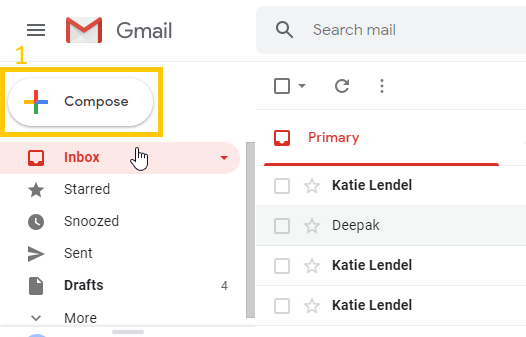
Every day we send and receive many emails and most of us use Gmail (Google Email) for sending our emails. Many times you send some important and confidential details through email and thinking to have a passcode on it but how many of you know that Gmail actually has this feature of sending a confidential email.
What Is The Benefit of a Confidential Email?
How Confidential Email Work.
In No SMS Passcode, the receiver does not need any passcode to read the email but in SMS Passcode, the receiver has to feed the OTP which the receiver gets on his/her mobile number set by the email sender.
How To Send Confidential Email in Gmail.
- No SMS Passcode- Recipient well able to open it directly.
- SMS Passcode- Enter recipient proper phone number (not your phone number) because recipient have to feed an OTP from the given number to read the email.
Step 6: Enter the recipient phone number and click on Send.
You can also remove the access of the confidential email at any time you want even before the expiry date. To do so-
Conclusion
The recipient of the confidential email cannot download, copy, forward or print the confidential email but one can take a screenshot or photo of that email.
I'm a full-time Software Developer with over 4 years of experience working at one of the world’s largest MNCs. Alongside my professional role, I run a news blog, WorkWithG.com, which focuses on Google tools, tutorials, and news. I'm passionate about breaking down complex topics and making learning accessible for everyone.
How To Change The Login Email Address of a Blogger (Blogspot) Account.
Some Possible reasons are that-
- Most of blogger start there blog with a random email address and later they think that the email address should match the blog niche. You want to change the email address because you want to match your email Address with the blog niche.
- You create a blog and after running it for a few months, you got a buyer and to change the ownership of that blogger account, you want to change the email address with your buyer email address.
- You are running multiple blogs and finding it difficult to manage all with the same email id. To manage your different blogs with different email id.
How To Transfer one Blogger Account to Another Email Address.
Here are the following steps to do so-
Suggestion
My small suggestion is if you want to change the email address of your (Blogspot) blog then try to change it in earlier days of your blogging because once you start with a blog, your visitors getting connected with your email, your Adsense account and many more things are there and changing the email address at that time also follow the same process but may affect you a lot.
I'm a full-time Software Developer with over 4 years of experience working at one of the world’s largest MNCs. Alongside my professional role, I run a news blog, WorkWithG.com, which focuses on Google tools, tutorials, and news. I'm passionate about breaking down complex topics and making learning accessible for everyone.