Variable Size Sliding Window Algorithm.

Sliding Window is an efficient approach to solve problems involving contiguous subarrays. It can be used to find the maximum or minimum sum of a contiguous subarray of size k. This approach involves maintaining a "window" that moves from the left to the right of the array, keeping track of the sum of the elements within the window.

Dynamic Sliding Window Algorithm

Variable Size Sliding Window.

The Variable Size Sliding Window Algorithm, also known as Dynamic Sliding Window, is a technique used for efficiently processing arrays or lists to avoid unnecessary re-computation. Unlike the Fixed Size Sliding Window, where the window size remains constant, the Variable Size Sliding Window allows the window to dynamically adjust its size based on certain conditions.


Approach of Variable Size Sliding Window:

In this approach, we use two pointers left and right to define the window size. We move our right pointer to expand the window size until a certain condition is violated. Similarly, we move our left pointer to shrink the size of the window to the desired condition. Each time we either store a result or perform some computation whenever the size of the window is changed. We repeat these steps until the right pointer reaches the end of the array. 

Let's understand the working of the Variable Size Sliding Window Algorithm with an example problem.

Example to Illustrate the Dynamic Sliding Window Technique. 

Problem: Given an array of positive integer nums and a positive integer target, find the minimum length of a contiguous subarray whose sum is greater than or equal to the target. If no such subarray exists, return 0.

Example:
Input: num[] = {2, 3, 1, 2, 4, 3} target = 7
Output: 2

Explanation: The subarray [4,3] has the minimum length 
among the contiguous subarrays whose sum is greater than or equal to 7.

There are multiple approaches to solving this problem but here we will focus on the sliding window approach.

Algorithm:

Below are the steps to follow to solve this problem:

Step 1: We initialize a variable, 'minLen', to hold the minimum length of the contiguous subarray found so far. We also initialize a variable, 'sum', to keep track of the sum of the elements in the current window.

Step 2: We iterate over the input array, using a for loop to iterate through each element. For each element, we add its value to the 'sum' variable.

Step 3: Inside the for loop, we check if the 'sum' is greater than or equal to the target. If it is, we update the 'minLen' variable to be the minimum of its current value and the current window's length (calculated using the 'right' pointer).

Step 4: After updating the 'minLen' variable, we slide the window to the right by subtracting the first element of the current window from the 'sum' variable. This involves incrementing the 'left' pointer by 1.

Step 5: We repeat steps 3-4 until the 'right' pointer reaches the end of the input array.

Step 6: Finally, we return the value of the 'minLen' variable, which represents the minimum length of the contiguous subarray whose sum is greater than or equal to the target.

Below is the code implementation of the Variable size Sliding Window problem.

C++ Code:
// C++ code implementation of finding the minimum length 
//of the subarray for given sum
#include <iostream>
#include <vector>
#include <climits> 
using namespace std;
int minSubarrayLen(int target, vector<int>& nums) {
    int n = nums.size();
    int left = 0, right = 0;
    int minLen = INT_MAX;
    int sum = 0;

    while (right < n) {
        sum += nums[right];

        while (sum >= target) {
            minLen = min(minLen, right - left + 1);
            sum -= nums[left];
            left++;
        }

        right++;
    }

    return (minLen == INT_MAX) ? 0 : minLen;
}

int main() {
    vector<int> nums = {2, 3, 1, 2, 4, 3};
    int target = 7;
    cout << minSubarrayLen(target, nums) << endl; 
    return 0;
}
Output:
2

Java Code:
// Java code to find minimum length subarray 
// for the given target 
public class VariableSizeSlidingWindow {

    public static int minSubArrayLen(int target, int[] nums) {
        int left = 0, right = 0, sum = 0;
        int minLength = Integer.MAX_VALUE;

        while (right < nums.length) {
            sum += nums[right];

            while (sum >= target) {
                minLength = Math.min(minLength, right - left + 1);
                sum -= nums[left];
                left++;
            }

            right++;
        }

        return minLength == Integer.MAX_VALUE ? 0 : minLength;
    }

    public static void main(String[] args) {
        int[] nums = {2, 3, 1, 2, 4, 3};
        int target = 7;

        int result = minSubArrayLen(target, nums);

        System.out.println("Minimum Length: " + result);
    }
}
Output:
Minimum Length: 2
  • Time Complexity: The time complexity is O(n), where n is the length of the input array. This is because each element in the array is processed exactly once. 
  • Space Complexity: The space complexity is O(1), as we only use a constant amount of space to store the necessary variables.

Python Slicing Technique | Examples.

Python slicing is a technique used to get a part of a sequence, such as a string, tuple, or list. In this technique the slice() built-in Python function is not called directly instead it is called indirectly by using the slice notation on sequences. It provides a convenient way to access elements based on their index ranges.


Slice Notation in Python.

Slicing allows Python to access and retrieve a segment of elements from a sequence, such as a string, tuple, or list. Slice notation is a concise syntax directly supported by Python for creating slices. It is used when you want to extract a part of a sequence using the colon (:) notation.


Here's a brief overview of the slice notation:

Syntax: s[start:stop:step]

  • start: The starting index of the segment. The default is 0.
  • stop: The index where the segment ends. It does not include the stop index itself. The default is the end of the string.
  • step: The difference between each index for the segment. The default is 1. This parameter is optional and allows you to skip elements.

Note: If you leave any parameter blank then it will lead to its default values.

List Slicing in Python.

List slicing in Python is a way to extract subsets from a list. It is achieved using the slicing operator [::]. Before performing a slicing operation on the list you should always remember that the positive indices start from the beginning (0) and the negative indices start from the end (-1).

Python Example Code:

# List Slicing
lst = [1, 2, 3, 4, 5]

# Slicing the entire list
print(lst[:]) 

# Slicing the first two elements
print(lst[:2]) 

# Slicing the last two elements
print(lst[-2:]) 

# Slicing every other element
print(lst[::2]) 
Output:
[1, 2, 3, 4, 5]
[1, 2]
[4, 5]
[1, 3, 5]

List slicing is a convenient and efficient way to extract sublists from a list in Python. It allows for a wide range of manipulations and transformations on lists without the need to explicitly iterate over them.

String Slicing in Python.

String slicing in Python is a technique used to extract a substring from a given string. It is achieved using the slicing operator [::], which is similar to list slicing.

Python Example Code:
# String Slicing
str = "Hello, World!"

# Slicing the entire string
print(str[:]) 

# Slicing the first five characters
print(str[:5]) 

# Slicing the last six characters
print(str[-6:]) 
Output:
Hello, World!
Hello
World!


Step Slicing in Python.

Python Step Slicing is an extension of Python Slicing that allows for a step size greater than 1. This feature can be useful in cases where you want to extract characters from a string at a regular interval, but not every character.

Step slicing is achieved by using the slicing operator [::], followed by the desired step size. This is an optional parameter in slicing.

Python Example Code:
# Step Slicing in Python Example
string = "Hello, World!"

# Slice the string from index 0 to index 5, taking a step of 2
sliced_string = string[0:5:2] 

print(sliced_string)
Output:
Hlo

In this example, the string string is sliced using the slice notation string[0:5:2]. This slicing operation extracts characters from index 0 to index 5, but it only takes every second character. The resulting string sliced_string contains the characters "Hlo".

It's important to note that if the step size is negative, the slice will start from the end of the string and proceed backward.

Python Example Code:
# Step Slicing with Negative Step in Python
string = "Hello, World!"

# Slice the string in reverse order
sliced_string = string[::-1] 

print(sliced_string) # Output: !dlroW ,olleH
Output:
!dlroW ,olleH

In this example, the slice notation string[::-1] is used to slice the string string in reverse order. The resulting string sliced_string contains the characters of the original string in reverse order.

Slice Notation [::] Vs Slice() Built-in Function in Python.

Slice function and Slice notation both serve the same purpose of creating a slice object that can be used to extract a portion of a sequence (such as a string, list, or tuple), but they have different use cases.

When to use Slice Notation?
We use slice notation when we know the indices at the time of slicing. It provides a concise and expressive way to create slices directly.

When to use Slice Function?
We use the slice() function when we need to create a slice object dynamically, perhaps based on some conditions or calculations. It's useful when you want to encapsulate slicing logic in a function or a variable.

I hope you understand the concept of Slicing in Python and how to used them in solving real-life coding problems. 

Python Program to Find Duplicate Elements in an Array.

Given an integer array arr[] of size n, the task is to write a Python program to find and print all duplicate elements present in the given array. Duplicate elements are those elements that appear more than once in the array. 

Example:

Input: num = [1, 2, 3, 4, 5, 2, 4, 6, 2, 7, 4, 2]
Output: [2, 4]
Explanation: 2 and 4 are present more than once in the array.

Input: num = [3, 2, 5, 1, 2, 3, 7, 6]
Output: [3, 2]
Explanation: 3 and 2 are present more than once in the array.

Python Program to Find List of Duplicate Elements of an Array.

In this approach, we are using a dictionary to store the number of occurrences of each element in the array. We iterate through each element of the array and check if it is already present in the dictionary. If the number is present, the code increases the count in the dictionary. If the number is not present then it is added to the dictionary with count 1. At the end, we add those elements to a new list whose count is greater than 1.

Python Code:
# Python code to find duplicate elements from array
def find_duplicates(nums):
    duplicates = []
    counts = {}

    for num in nums:
        if num in counts:
            counts[num] += 1
        else:
            counts[num] = 1

    for num, count in counts.items():
        if count > 1:
            duplicates.append(num)

    return duplicates


nums = [1, 2, 3, 4, 5, 2, 4, 6, 2, 7, 4, 2]
duplicates = find_duplicates(nums)
print(duplicates)
Output:
[2, 4]

Explanation:

The find_duplicates function uses a dictionary called counts to keep track of the frequency of each number in the array. It iterates through the array and updates the frequency count of each number in the dictionary. Then, it iterates through the dictionary and adds any number that occurs more than once to the duplicates list. Finally, it returns the duplicates list.

Time Complexity: The time complexity of the function is O(n), where n is the length of the input array. This is because it needs to iterate through the array twice: once to count the frequency of each number, and once to find the duplicates.

Space Complexity: The space complexity of the function is also O(n), where n is the length of the input array. This is because it needs to store the frequency count of each number in the dictionary, which in the worst case could be equal to the size of the input array.

Difference Between '/' and '//' in Python.

There are many programmers especially beginners who have started learning Python programming get confused between the '/' and '//' division operators of Python. In this article, we will understand the difference between them and the situation in which they are used.

Different Division Operator of Python

Division Operator in Python.

In Python, there are two types of division operators available that are used for division, but they have different behaviors. These are:

  • True Division (/)
  • Floor Division (//)


True Division Operator (/).

True Division (/) in Python is also known as Floating Point Division. It is used to divide one number by another. The result is always a float, which is a number that can have decimal points.


For example, let's consider the following Python code:

# Python Code Example for True Division
x = 5
y = 2
z = x / y

print(z)
Output:
2.5

In this code, we have divided 5 by 2. Since we used the True Division operator (/), the result is a float. Therefore, z will be 2.5.
Note: It is important to note that True Division was introduced in Python 3. In Python 2, the division operator (/) performs floor division, while the true division operator is not available. This can sometimes lead to confusion and bugs. (alert-warning)

Floor Division Operator (//).

Floor Division is a division operation that rounds the result down to the nearest integer. It discards the fractional part and only returns the integer part of the quotient.

For example, let's consider the following Python code:
# Python code Example for Floor Division
x = 5
y = 2
z = x // y

print(z)
Output:
2

In this code, we have divided 5 by 2. Since we used the Floor Division operator (//), the result is rounded down to the nearest integer. Therefore, z will be 2.


In conclusion, the difference between '/' and '//' in Python is that '/' performs true division, which can handle decimal values and fractions correctly, while '//' performs floor division, which only returns the integer part of the quotient and discards the fractional part. 

Binary Search Algorithm in Python.

There are two popular searching algorithms to find a target value in an Array 'Linear Search' and 'Binary Search'. In this article, we will learn about the Binary Search Algorithm in detail using Python Programming.

Binary Search Algorithm.

Binary search is an efficient algorithm for finding an item from a sorted list of items. It works by repeatedly dividing the search interval in half. The only drawback of this search algorithm is that we need a sorted array to perform our search operation to find the target element in the given list. 

Below are the algorithm steps to follow:

Step 1: Set two pointers, low and high, to the start and end of the array, respectively.
Step 2: Loop until the base case is reached:
  • Calculate the middle index as (low + high) // 2.
  • If the element at the middle index is equal to the target, return the index.
  • If the element is greater than the target, update high to mid - 1 and repeat the search in the left half.
  • If the element is smaller than the target, update low to mid + 1 and repeat the search in the right half.
Step 3: If low is greater than high, the target is not present. Return -1.

Example of Binary Search:
Let's go through an example to understand the workings of the Binary Search Algorithm.

We have a sorted array [1, 3, 5, 7, 9, 11, 13, 15, 17, 19], and we want to find the index of element 13.

Initialize Pointers: Set low to 0 and high to 9 (the indices of the array's first and last elements).

Iteration 1:
  • Calculate mid as (low + high) // 2 = (0 + 9) // 2 = 4.
  • Compare arr[mid] (element at index 4) with the target (13).
  • Since arr[4] is less than 13, update low to mid + 1, making low = 5.
Working of Binary Search Algorithm Step 1
Iteration 2:
  • Calculate mid as (low + high) // 2 = (5 + 9) // 2 = 7.
  • Compare arr[mid] (element at index 7) with the target (13).
  • Since arr[7] is greater than 13, update high to mid-1, making high = 6.
Working of Binary Search Algorithm Step 2
Iteration 3:
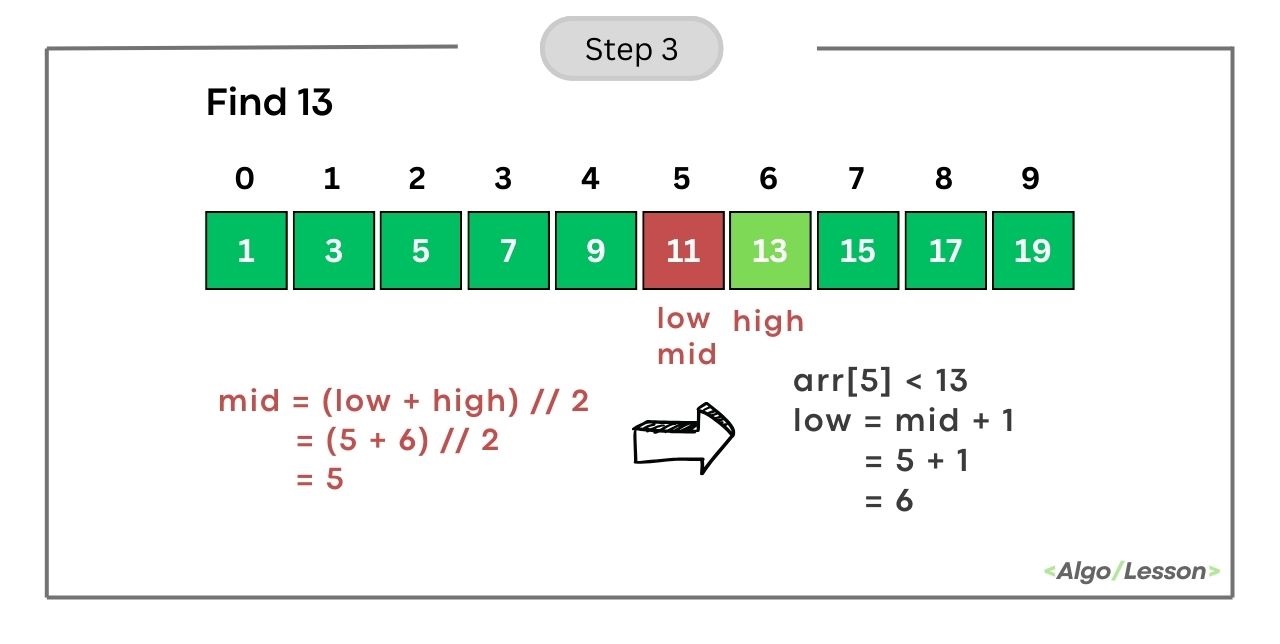
  • Calculate mid as (low + high) // 2 = (5+ 6) // 2 = 5.
  • Compare arr[mid] (element at index 5) with the target (13).
  • Since arr[5] is less than 13, update low to mid + 1, making low = 6.
Working of Binary Search Algorithm Step 3
Iteration 4:
  • Calculate mid as (low + high) // 2 = (6 + 6) // 2 = 6.
  • Compare arr[mid] (element at index 6) with the target (13).
  • Since arr[6] is equal to 13, we found the target. Return the index 6.
Working of Binary Search Algorithm Step 4
The target element 13 is present at index 9 in the array.

Python Program for Binary Search Using Iteration.

# Python code for Iterative Binary Search to find
# target element from sorted array
def binary_search(arr, target):
    low, high = 0, len(arr) - 1
    
    while low <= high:
        mid = (low + high) // 2
        mid_element = arr[mid]

        if mid_element == target:
            return mid
        elif mid_element < target:
            low = mid + 1
        else:
            high = mid - 1

    return -1

# Example
sorted_array = [1, 2, 3, 4, 5, 6, 7, 8, 9]
target_element = 6
result = binary_search(sorted_array, target_element)

if result != -1:
    print(f"Element {target_element} is present at index {result}.")
else:
    print(f"Element {target_element} is not present in the array.")
Output:
Element 6 is present at index 5.
  • Time Complexity: The time complexity of binary search is O(log n), where 'n' is the number of elements in the array.
  • Space Complexity: The space complexity is O(1), indicating that the memory used by the algorithm remains constant regardless of the input size.

Python Program for Binary Search Using Recursion.

# Python code for Recursive Binary Search Algorithm
def binary_search_recursive(arr, low, high, target):
    if low <= high:
        mid = (low + high) // 2

        # Check if the target is present at the middle
        if arr[mid] == target:
            return mid
        # If the target is smaller, search in the left half
        elif arr[mid] > target:
            return binary_search_recursive(arr, low, mid - 1, target)
        # If the target is larger, search in the right half
        else:
            return binary_search_recursive(arr, mid + 1, high, target)
    else:
        # Target is not present in the array
        return -1

# Example usage:
arr = [1, 3, 5, 7, 9, 11, 13, 15, 17, 19]
target = 13
result = binary_search_recursive(arr, 0, len(arr) - 1, target)

if result != -1:
    print(f"Element {target} is present at index {result}.")
else:
    print(f"Element {target} is not present in the array.")
Output:
Element 13 is present at index 6.

The base case of the above recursive function is when low is greater than high, indicating that the search range is empty. The function will return the index at which the element is present else it will return -1 which means the target element is not present in the given array.
  • Time Complexity: The time complexity is O(log n) because, at each step, the search range is divided by 2.
  • Space Complexity: The space complexity is O(log n) due to the recursive call stack.

Linear Search Algorithm in Python.

Given an integer array arr[] of size n and an element x, the task is to write a Python program to search for the element x in the given array.
Example:
Input: arr = [12, 10, 9, 11, 41] x = 9
Output: X is present at index 2.

Input: arr = [1, 2, 3, 4, 6, 9] x = 7
Output: Not Found

Input: arr = [-1, 2, 4] x = 2
Output: X is present at index 1

There are two popular algorithms one is Linear Search and another is Binary Search for searching an element in an array. In this article, we are going to learn how to use the Linear Search algorithm in Python programming.

Linear Search Algorithm.

Linear search, also known as sequential search, is a straightforward searching algorithm where we start from the beginning of the array and compare each element with the target value until a match is found or the entire array has been traversed.
 
Below are the algorithm steps to do the linear search:
  • Step 1: Start from the first element of the array.
  • Step 2: Compare the current element with the target value x.
  • Step 3: If the element is equal to the target x, return the index.
  • Step 4: If not, move to the next element.
  • Step 5: Repeat steps 2-4 until the target is found or the end of the array is reached.
  • Step 6: If the target is not found after traversing the entire array, return -1.
Linear Search Algorithm Visualization

Python Program for Linear Search.

Below is the Python code implementation of Linear search using an iterative method.
# Python code to search element using Linear Search
def linear_search(arr, target):
    for i in range(len(arr)):
        if arr[i] == target:
            return i  # Target found, return the index
    return -1  # Target not found

# Example usage
array = [3, 1, 4, 1, 5, 9, 2, 6, 5, 3, 5]
target_value = 6
result = linear_search(array, target_value)

if result != -1:
    print(f'Target {target_value} found at index {result}.')
else:
    print(f'Target {target_value} not found in the array.')
Output:
Target 6 found at index 7.
  • Time Complexity: The worst-case time complexity is O(n) when the target element is present at the end of the array. 
  • Space Complexity: O(1) - Linear search is an "in-place" algorithm that doesn't require additional memory proportional to the input size.

Python Program for Linear Search Using Recursion.

In this recursive algorithm, we have two base cases: first, if the current element equals the target, it returns the current index; second, if the current index surpasses the array length, indicating the target is not present, it returns -1. 

In the recursive case, the function calls itself with an incremented index to continue the search in the remaining array. This process repeats until one of the base cases is met.

Below is the Python code implementation of Linear search using recursion.

Python Code.
# Python program to search element using Recursive Method
def linear_search(arr, target, current_index=0):
    # Base case: target found
    if current_index < len(arr):
        if arr[current_index] == target:
            return current_index
    
    # Base case: target not found
    if current_index == len(arr):
        return -1
    
    # Recursive case: search in the remaining array
    return linear_search_recursive(arr, target, current_index + 1)

# Example
arr = [1, 2, 3, 4, 5]
target = 3

result = linear_search(arr, target)

if result != -1:
    print(f"Target {target} found at index {result}.")
else:
    print(f"Target {target} not found in the array.")
Output:
Target 3 found at index 2.
  • Time Complexity: Linear search has a time complexity of O(n) in the worst case.
  • Space Complexity: The recursive calls use the call stack, and in the worst case, the space complexity is O(n) due to the depth of the recursion. 

Python Program to Count Even and Odd Elements in an Array.

Given an integer array of size n, the task is to write a Python program to count the numbers of even and odd elements present in the Array.

Example:
Input: [1, 2, 3, 4, 5, 6, 7, 8, 9]
Output:
Even elements: 4
Odd elements: 5

Note: Any number that is divisible by 2 and gives us a remainder 0 is known as an even number and any number that is not divisible by 2 and gives us a remainder 1 is known as an odd number.

Algorithm to Count Even and Odd Numbers of Array.

Below are the steps of the algorithm that we need to follow to count even and odd elements of an array in Python programming.
  • Step 1: Initialize two counters, even_count and odd_count, to 0.
  • Step 2: Iterate through each element in the array.
  • Step 3: If the element is even (element % 2 == 0), increment even_count.
  • Step 4: If the element is odd (element % 2 != 0), increment odd_count.
  • Step 5: Print the counts of even and odd elements.

Python Code Implementation.
# Python program to count even and odd elements
def count_even_odd(arr):
    # Initialize counters
    even_count = 0
    odd_count = 0

    # Iterate through the array
    for num in arr:
        if num % 2 == 0:
            even_count += 1
        else:
            odd_count += 1

    # Display the result
    print("Even elements:", even_count)
    print("Odd elements:", odd_count)

# Example usage
array = [1, 2, 3, 4, 5, 6, 7, 8, 9]
count_even_odd(array)
Output:
Even elements: 4
Odd elements: 5
  • Time Complexity: O(n) where n is the size of the given array.
  • Space Complexity: O(1) as a constant amount of extra space is used.

DON'T MISS

Nature, Health, Fitness
© all rights reserved
made with by AlgoLesson