


The Hypertext Transfer Protocol (HTTP) is the backbone of communication on the World Wide Web, for the exchange of information between clients and servers. Within the realm of HTTP, parameters play a crucial role, enabling the customization and specification of requests and responses. In this article, we will cover HTTP parameters, exploring their types, significance, and practical applications in web development.
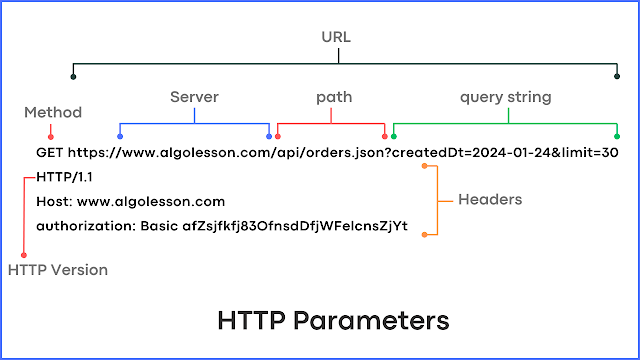
What are HTTP Parameters?
HTTP parameters are elements appended to the end of a URL or included in the body of an HTTP request. They serve as key-value pairs that convey additional information, allowing clients to customize their requests and servers to tailor their responses. Parameters play a pivotal role in transmitting data, specifying the nature of requests, and influencing the behavior of web applications.

Types of HTTP Parameters.
There are several parameters that we use in any HTTP protocol and here we are listing a few of them:
- HTTP Version.
- Uniform Resource Identifier (URI).
- Request Headers.
- Request Body.
- Date and Time Format.
- Character Set.
- Media Type.
- Language Tag.
1. HTTP Version.
The HTTP version is specified in the request and response messages to indicate the version of the HTTP protocol being used. The format typically follows the pattern "HTTP/major_version.minor_version."
- HTTP/1.0
- HTTP/1.1
- HTTP/2.0
- HTTP/3.0
Examples:
GET /example HTTP/1.12. Uniform Resource Identifier (URI).
A Uniform Resource Identifier (URI) identifies a particular resource on the web. URIs can be either Uniform Resource Locators (URLs), which specify the location of the resource, or Uniform Resource Names (URNs), which are persistent identifiers for resources but don't necessarily provide the location.
Examples:
- URL: https://www.example.com/path/to/resource
- URN: urn:isbn:0451450523
You can read our article Structure of URLs in HTTP to get a complete understanding.
3. Request Headers.
HTTP headers convey additional information about the request or response. Request headers, included in the HTTP request, may contain parameters that define characteristics such as the accepted content types, authentication credentials, or language preferences.
Examples include the "Accept," "Authorization," and "User-Agent" headers.
4. Request Body.
For certain HTTP methods, such as POST and PUT, parameters can be included in the request body. This is common when submitting form data or sending JSON payloads. The body parameters are separate from the URL and headers but contribute essential information for processing the request on the server.
5. Date and Time Format.
Date and time format is crucial for indicating when the HTTP message was generated. The format adheres to the RFC 1123 specification, such as:
Date: Wed, 09 Feb 2022 12:34:56 GMT
This parameter helps in managing caching, understanding the age of the resource, and coordinating activities across distributed systems.
6. Character Set.
The character set parameter is used to specify the character encoding of the resource. It is included in the Content-Type header in HTTP responses. This parameter ensures that the client interprets the received content correctly. This parameter ensures that the client interprets the received content correctly.
Examples:
Content-Type: text/html; charset=UTF-8
Content-Type: application/json; charset=ISO-8859-1
7. Media Types.
Media types, also known as MIME types (Multipurpose Internet Mail Extensions), define the nature and format of a resource. They are included in the Content-Type header of HTTP responses.
Examples:
Content-Type: text/html
Content-Type: image/jpeg
Content-Type: application/json
8. Language Tag.
Language tags are used to indicate the language of the resource. They are included in the Content-Language header in HTTP responses. This parameter helps in content negotiation, allowing servers to deliver content in the language preferred by the client.
Examples:
Content-Language: en-US
Content-Language: es
Significance of HTTP Parameters.
- Customization of Requests: HTTP parameters empower clients to tailor their requests based on specific criteria. For instance, in a search query, parameters can define the search term, page number, or sorting preferences, allowing users to customize their experience.
- Data Transmission: Parameters are instrumental in transmitting data between clients and servers. Whether it's user inputs, authentication tokens, or preferences, parameters enable the seamless exchange of information within the URL, headers, or request body.
- Server-Side Processing: On the server side, parameters guide the processing of incoming requests. They assist in extracting relevant data, determining the nature of the request, and formulating appropriate responses. Server applications often rely on parameters to perform specific actions or retrieve targeted resources.
Practical Application of HTTP Parameters.
- In search engine requests, parameters in the form of query parameters help define the search terms, filters, and pagination, delivering tailored search results to users.
- Authentication parameters, often included in headers, play a critical role in securing requests. These parameters authenticate the client and authorize access to specific resources.
- When submitting forms on web pages, form data is often sent as parameters in the request body. This allows servers to process and store user inputs.
Developers must grasp the concept of HTTP parameters to build robust and flexible web applications that respond adeptly to user input and requirements. As technology advances, the role of HTTP parameters continues to evolve, shaping the landscape of web development and enhancing the efficiency of data exchange on the World Wide Web.


